
Across many manufacturing and service teams, the same integration gap persists. Salesforce holds customer and case context, Oracle holds transaction and repair data, Excel holds technician notes and line-item detail, and the document packet stalls because the process still depends on manual consolidation.
A better architecture is a governed document generation workflow that connects multiple data sources directly, runs source-specific queries where needed, maps the returned data into a template, and generates production-ready documents at batch scale. Users can connect Salesforce, Oracle, Excel, JSON, XML, SQL, and other business sources in one workflow, define direct queries for each system, map the returned payloads into a template, and generate thousands of documents in one batch run. The differentiator is not just rendering. It is multi-source orchestration, direct mapping, batch execution, and governance in one platform, without a separate pre-generation transformation process.
That is the core requirement behind Salesforce, Oracle, and Excel: Document Generation from Multiple Datasources . The output might be a work order, warranty claim package, inspection report, or field service summary, but the technical requirement is the same: connect the sources, resolve the mappings, and generate the final documents inside one controlled workflow.
The three recurring document flows we see most often are work orders and field service packets , warranty claims with supporting documentation , and inspection or maintenance reports . They all depend on records from different systems under time pressure, and they all break when keys do not match cleanly.
Practical rule: If the source records disagree, do not treat rendering as the first problem. Make sure the record relationship is defined clearly so the final PDF reflects the right operational record.
Oracle is often the transactional system behind repair events, part movements, service history, replacements, and other records that complete the document. In a current workflow, the requirement is simple: query the right Oracle data at run time, map it into the template, and generate the final document alongside Salesforce and spreadsheet inputs in the same run.
For operations teams, the practical question is whether the workflow can pull the correct Oracle transaction data, line items, and service context at the right moment, then combine it with CRM and spreadsheet data without creating a separate prep layer.
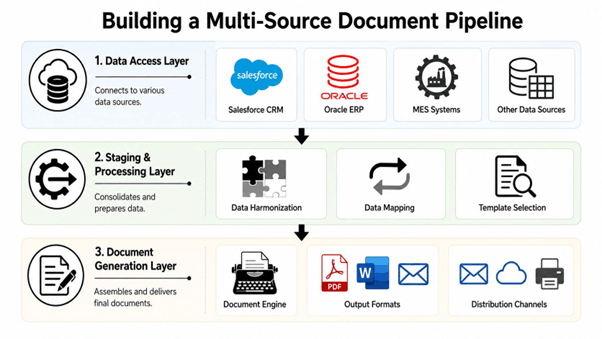
Technical architecture callout: The diagram represents a governed three-layer flow, source connectivity, query execution and retrieval, template mapping, and batch rendering. Those layers can stay inside a single document workflow so teams can connect multiple systems, define source-specific queries where needed, map the returned payloads into the template, and generate output at enterprise scale without a separate pre-generation transformation process.
Salesforce and Oracle sit in the source access layer, where the system retrieves the records needed for each document run. In most service and operations workflows, Salesforce supplies the customer, case, account, and service context, while Oracle supplies the transaction detail, repair history, asset references, replacement parts, and other line-level records that complete the packet.
The requirement at this layer is not simply access to each system. It is coordinated retrieval in the same document run. The workflow needs to execute source-specific queries, return the right records from Salesforce and Oracle, and pass those payloads directly into the mapping layer without relying on exports or staging files.
Excel remains important because it often carries technician inputs, calculated values, inspection notes, or handoff data that never made it back into CRM or ERP. The workflow therefore has to treat spreadsheet input as a first-class source, not an exception.
This matters because document generation has different requirements from reporting. Teams need to connect multiple business systems, query each one directly where needed, and use one governed process to prepare the final document payload.
The practical advantage here is direct multi-source mapping into one template run. Users do not need to flatten, reshape, or manually reconcile everything in a separate prep step before generation. The platform handles the multi-source mapping needed to populate the template correctly, including repeating sections, conditional blocks, nested structures, and cross-source field resolution.
The system makes data mapping much easier by automatically matching your source data fields with the right dynamic fields in your document template. If the field names match, the system handles the mapping for you, so there’s less manual work and fewer chances for errors. And when things aren’t quite that straightforward—such as when field names are different or you need more control—you can manually map the fields yourself. This gives teams the convenience of automation without taking away the flexibility to fine-tune the mapping when needed.
Once the sources and mappings are defined, the template layer performs the final assembly. It resolves placeholders, applies conditional sections, loops through repeating data, and emits the final file in the requested format.
For teams working with Oracle-heavy and Salesforce-led processes, the key question is not whether the data can be rendered. It is whether Salesforce context, Oracle transactions, and spreadsheet inputs can be pulled, mapped, and generated together without creating a separate prep workflow. The broader template approach described in Oracle PDF generation patterns matters because it supports that operating model at scale. The workflow should orchestrate multiple data sources in one run, populate the template directly, and generate high-volume output without requiring users to maintain a separate transformation layer.
A pipeline that works under deadline pressure separates source connectivity , template mapping , and document rendering . The user experience is simpler when those steps are handled inside one governed document generation platform instead of across custom scripts and manual staging files.
The practical question is not whether a team can generate a document from one system. It is whether the workflow can reliably pull from CRM, ERP, spreadsheets, and structured payloads without creating a separate prep project every time the source mix changes.
A custom workflow can be flexible, but every new source shape adds maintenance. Once Oracle enters the mix, the process usually needs extra query logic, more exception handling, and tighter version control around template artifacts. The real cost appears when data cleanup, field mapping, and rendering rules all start living in different places.
The stronger operating model is direct multi-source connectivity, source-specific queries, template-level mapping, support for nested and repeating data, batch generation at scale, and centralized governance over templates and runs. In practice, that means users can connect those sources, add the queries for systems like Salesforce and Oracle, map the fields into a template, and generate output in bulk. There is no need to build a separate transformation process before generation. The platform pulls from multiple data sources and populates the template directly, which is especially valuable when thousands of documents need to be created in one batch. For a practical Salesforce-only reference point, the Salesforce document generation examples page shows a narrower pattern well, but mixed-source processes still need a workflow that can orchestrate Oracle and Excel too.
|
Consideration |
What matters in practice |
|
Source diversity |
The workflow should handle CRM, ERP, spreadsheets, JSON, XML, and SQL in one run |
|
Mapping model |
Field mapping should happen inside the governed template workflow |
|
Batch readiness |
The system should generate large document volumes without a separate prep layer |
|
Governance |
Teams need one place to manage templates, runs, and delivery |
|
Differentiation |
Direct queries, multi-source merge, nested data support, and connector-based orchestration |
The choice is not just about rendering. It is about where data gets reconciled, where exceptions are handled, and how many moving parts the team can support under deadline pressure. Once the input mix changes often, the integration layer starts behaving like a second application unless orchestration is built into the workflow.
The better fit is the workflow that matches the source diversity you actually have, without forcing every edge case into the same source shape.
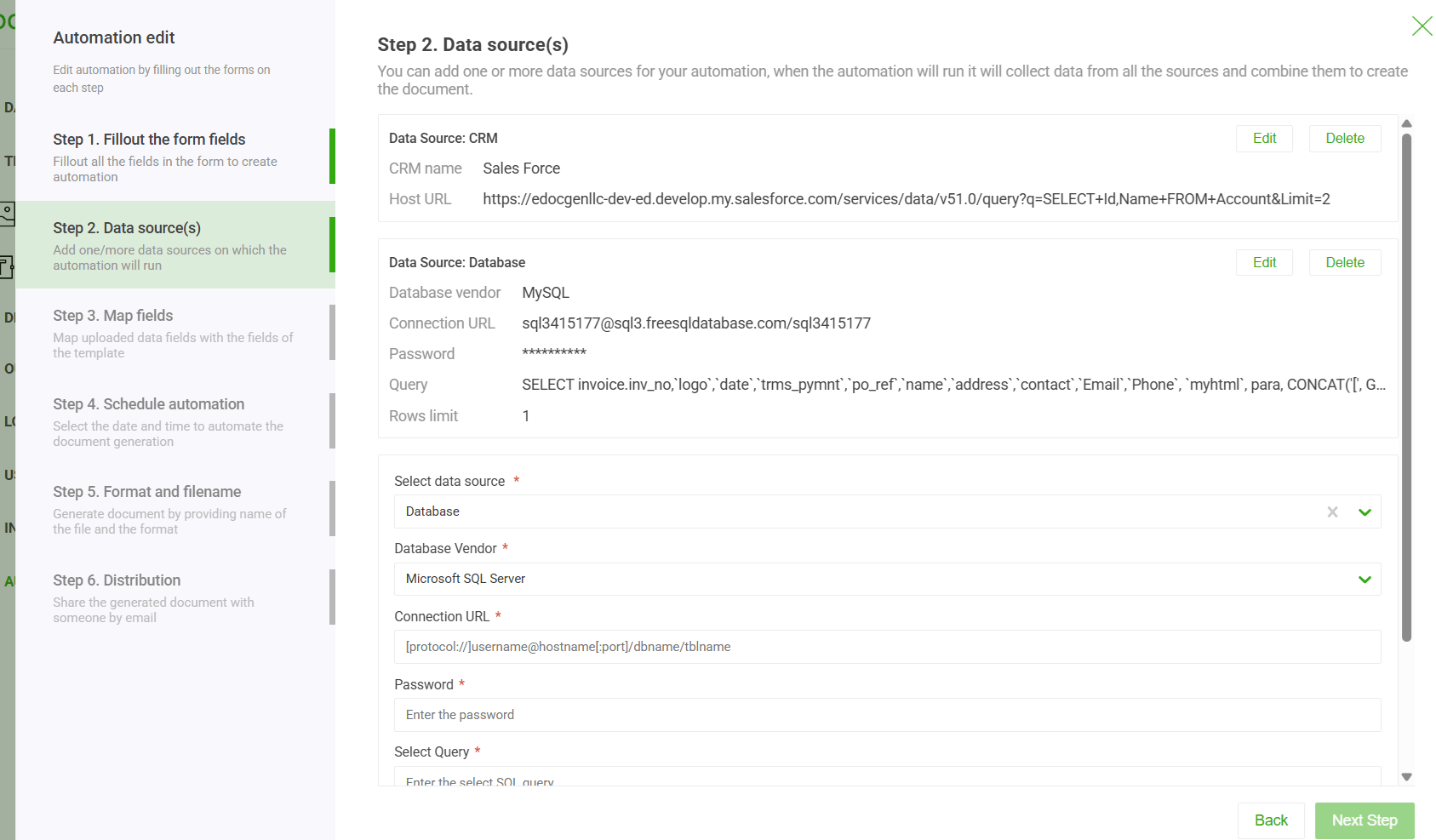
This workflow view shows the practical advantage of a connector-based approach in a real operations setting. Users can connect multiple data sources, add queries for systems like Salesforce and Oracle, map the returned data into the template, and run document generation in bulk. Instead of transforming data in a separate staging process before generation, the platform pulls from the connected sources and populates the template directly, which is what makes high-volume runs across thousands of documents operationally realistic.
Once the template is mapped, the next question is volume. A setup that handles one warranty claim can still fail when operations needs a nightly run of service summaries or a batch of inspection packets for every open case.
The breakpoint is usually not rendering. It is orchestration. You need a way to line up Salesforce records, Oracle data, and spreadsheet inputs so the template receives one reconciled dataset instead of three inconsistent feeds.
A stable workflow usually starts with one of three triggers, a bulk record selection, a scheduled job, or an API call. Once the trigger fires, the generation engine should pull the right Salesforce records, the related Oracle data, and any spreadsheet inputs already staged for that batch.
From there, conditional logic decides which sections appear in the output. A claim with no replacement part should not render a parts table, and a service packet with multiple inspection checkpoints should loop through each checkpoint instead of flattening them into a paragraph. That logic belongs in the template orchestration layer, not in a one-off script that gets patched every time the source mix changes.
Connector-driven platforms usually beat stitched-together scripts because they reduce the number of handoffs between systems. Batch-oriented guidance shows how recurring document jobs can be organized around scheduled runs and source coordination, which is the model that holds up when CRM, ERP, and file-based inputs all need to land in the same output window ( batch document generation ).
A useful operational pattern is to keep one template version tied to one business process, then schedule that template against the relevant source set. That makes bulk jobs easier to predict, especially when the output needs to go to email, cloud storage, print, or back into the CRM record.
The operator view matters too. In practice, the team running the batch needs to see what was queued, what failed, and what was delivered without opening the template or reading source-specific logs. That is the difference between a document factory the business can trust and a process that only the original builder understands.
Document generation touches customer data, operational records, and sometimes regulated content. That means security cannot be an add-on, and performance cannot depend on luck.
A serious implementation needs encryption , role-based access control , and audit logging around the template repository and the generation runs. Published product positioning also calls out AES-256 encryption and compliance features, which is exactly the kind of baseline security language enterprise buyers look for when documents carry sensitive content.
|
Control Area |
What to Look For |
Why It Matters |
|
Template access |
Role-based permissions and centralized repository control |
Limits who can change regulated document logic |
|
Data protection |
Encryption in transit and at rest, including AES-256 where supported |
Protects source data and rendered files |
|
Traceability |
Audit-friendly logs for every generation run |
Helps reconstruct who generated what and when |
|
Performance design |
Async processing for large or batch jobs |
Reduces failure risk under high document volume |
|
Deployment model |
On-premises or cloud choice aligned to policy |
Matters in banking, insurance, and pharma |
Performance is mostly about memory pressure and payload shape. Large PDFs with embedded images, repeated line items, or nested sections can stress synchronous rendering paths long before anyone notices the source data was fine.
The safest pattern is to keep heavy joins, pagination, and flattening out of the rendering step. That lets the document engine focus on presentation while the staging layer handles the source cleanup.
For organizations with compliance-heavy workloads, the internal guidance on HIPAA-compliant document generation software is relevant because the same design instincts apply across regulated domains, even when the policy language differs
A broken generation job usually fails at the first bad assumption in the pipeline. In practice, that is more often the source mapping or the batch shape than the template itself.
Keep the source keys stable. Keep the mapping explicit. Put repeating data in loops, not free text. Keep heavy joins outside the renderer. Keep batch mode asynchronous when the document set gets large.
That is the setup that holds up when Salesforce, Oracle, and Excel all need to contribute to one packet. The systems can stay separate if the orchestration layer makes them behave like one governed document flow.
This is the operating model behind EDocGen. Teams can connect multiple business systems, define source queries where needed, map the returned data directly into document templates, and generate high-volume outputs without building a separate transformation layer first. If you are standardizing multi-source document generation across CRM, ERP, spreadsheets, JSON, XML, and SQL, visit EDocGen to see how a template-driven, connector-based workflow can support enterprise-scale generation in Word, Excel, PDF, and other output formats.