
Instead of painstakingly creating every single contract, invoice, or report one by one, batch document generation process automates the whole show. You take a single template, connect it to a data source, and produce thousands of perfectly personalized documents at once.
It’s the engine that transforms what was once a time-sucking bottleneck into a high-speed, error-free operation.
Making the move to an automated system is more than just a process change; it's a fundamental shift in how your organization handles its information. Document creation stops being a series of isolated, tedious admin tasks and becomes a single, scalable workflow. And the benefits ripple out across the entire business almost immediately.
Document automation technology effectively turns a major operational cost center into a strategic asset. By eliminating the friction of manual paperwork, businesses can operate with greater agility and precision, directly impacting their bottom line.
Think about it like this: you have a master template that acts as a blueprint. Then, you have a data source—maybe a spreadsheet or a company database—that provides all the unique details for each document. The system automatically merges the two, churning out thousands of customized, accurate documents in minutes, not days.
The numbers behind automation are impossible to ignore. Before modern solutions were common, businesses were wasting up to 40% of employee time on manual document chores—a staggering loss in productivity.
This is why the Business Document Work Process Management Market, which includes enterprise-level batch generation, was valued at USD 4.53 billion in 2025 and is projected to explode to USD 16.08 billion by 2035 . This incredible growth is driven by platforms that reclaim 60-70% of that previously lost time, often by integrating directly with company databases and cloud storage.
When a company implements a robust document generation software solution, it’s doing more than just saving time. It's making a direct investment in operational excellence and future growth.
To really get what batch document generation can do, you need to peek under the hood. Think of it as a sophisticated digital assembly line. Each station has a specific job, and they all work together to crank out thousands of perfect documents. For any technical leader or developer, understanding this architecture is the first step to a smooth rollout.
At its core, a batch generation system has four main parts. Each one plays a unique role, but they’re all interconnected, turning raw data into polished, ready-to-go documents.
Everything starts with the data source . This is the raw material for your documents—all the names, numbers, and specific details that make each one unique. This data can live in a few different places across your tech stack.
This workflow shows exactly how templates and data sources come together to produce documents in a typical batch process.
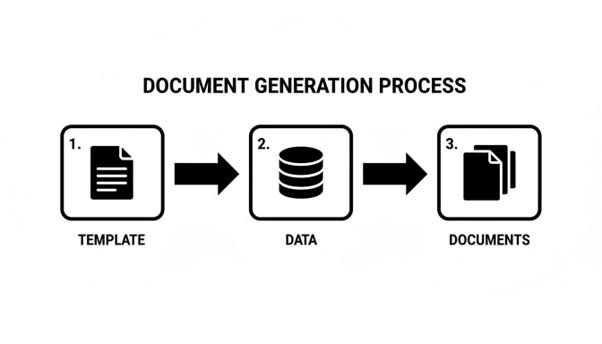
As you can see, the system pulls information from a designated source, merges it with a template, and then outputs the final documents at scale. It’s a beautifully simple concept with a ton of power behind it.
Next up is the template engine , which is basically the "brain" of the whole setup. This is where your business rules, conditional logic, and branding guidelines live. It's so much more than a static layout; a good template engine lets you embed complex instructions right into your master documents.
For example, you can set rules like, "If a customer's account is overdue, insert this specific collections clause," or "For clients in Europe, show all pricing in Euros." This part ensures every document isn't just personalized with data, but also intelligently customized based on your business logic.
This is where Document AI is really changing the game. The market hit USD 32.8 billion in 2024 and is expected to jump to an incredible USD 185.3 billion by 2034 . Solutions that use generative AI now make up 75.3% of the market because they're fantastic at populating templates from messy, unstructured data—a massive win for teams in HR and real estate.
Once the data is queued up and the template logic is set, the generation engine kicks in. This is the workhorse. It does all the heavy lifting, methodically going through each record in your data source, merging it with the template, applying all the rules, and producing the final document.
A solid generation engine has to be built for performance and scale. It needs to handle huge volumes—we're talking tens of thousands of documents—without breaking a sweat. This ensures the entire batch process finishes quickly and reliably. For a closer look at the mechanics, you can learn more about how a document generator works in our detailed guide.
This engine is where you get your ROI. A slow or unreliable engine creates bottlenecks and headaches. A high-performance one unlocks the speed and scale that make batch generation a must-have for any enterprise.
The last piece of the puzzle is the distribution layer . After the documents are created, they have to go somewhere. This component handles the final delivery, automatically sending each document to its intended destination.
Common distribution channels include:
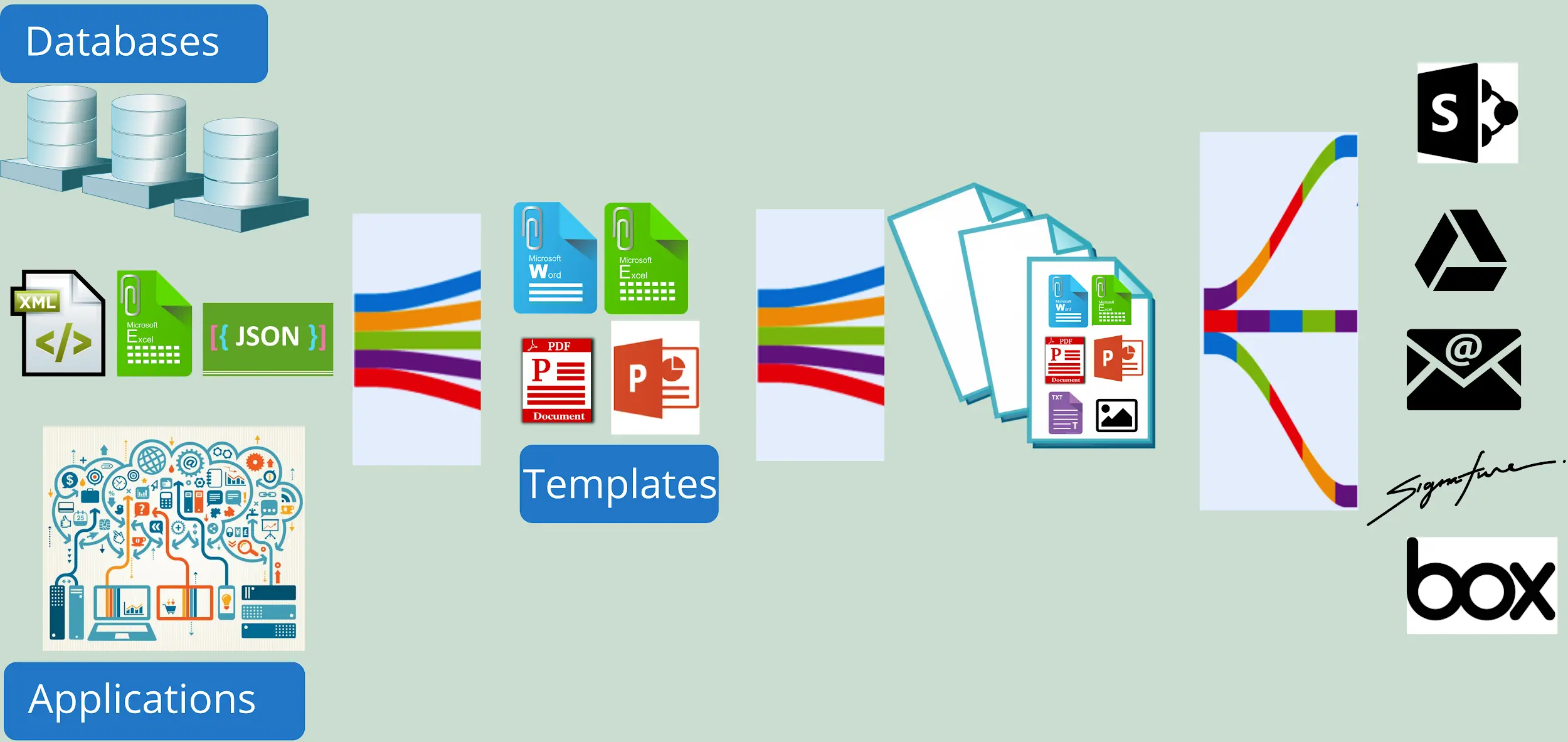
This final layer closes the loop, turning a simple generation task into a fully automated, end-to-end workflow. By understanding how these four components—data source, template engine, generation engine, and distribution layer—work in concert, your team can build a powerful system tailored to your exact business needs.
Theory is great, but let's talk about what batch document generation actually looks like in the real world. This isn't some abstract concept; it’s a workhorse tool that businesses are using right now to solve real problems. By taking high-volume document workflows off people's plates, companies are cutting operational costs, speeding up business cycles, and ditching the risks that come with doing things by hand.
Think about a bank that needs to generate 10,000 personalized account statements at the end of every month. The manual way would be a nightmare—a huge team, weeks of work, and the constant threat of errors. With an automated system, the entire batch runs overnight. By morning, every single statement is generated, error-free, and ready to go. This same logic applies everywhere.
The financial services world runs on documentation. Everything has to be timely, accurate, and compliant. Batch document generation is a perfect match for this kind of environment where speed and precision are non-negotiable.
Here are a few key applications:
One mid-sized bank we know of uses batch generation to handle their loan agreements. They can produce 10,000 personalized PDFs daily , cutting their turnaround time from days to just minutes. The result? They saw their ROI jump by 300% within the first year.
Insurance carriers are buried in client-facing documents, and each one needs to be highly personalized and perfectly accurate. Automating these workflows lets insurers boost their customer service while slashing administrative busywork.
HR departments, especially in big companies, can feel like they’re drowning in paperwork. Batch generation helps them manage employee communications efficiently, particularly for recurring, company-wide events.
By automating routine document creation, HR teams can shift their focus from administrative tasks to strategic initiatives like talent development and employee engagement. This is a clear win for both the department and the entire organization.
Some of the most popular HR use cases include:
Honestly, these examples just scratch the surface. Whether it's a real estate firm generating lease agreements or a logistics company creating bills of lading, batch document generation offers a scalable fix to a universal business problem. It turns what was once a major operational headache into a real competitive advantage.
Bringing batch document generation into an enterprise isn't just about flipping a switch on new software. It's a strategic move that demands real planning to get right. If you want a smooth rollout and a solid return on your investment, you have to look past the flashy features and think about how the system will hold up under pressure, keep your data safe, and actually help your teams.
Getting these things right is the difference between a tool that just creates new headaches and one that becomes a genuine asset. Let's break down the most important factors for a successful enterprise-level implementation.
At the enterprise scale, your system needs to be a workhorse. It’s not enough to create a handful of documents here and there. The platform must handle crushing peak loads without even blinking, whether that’s churning out end-of-quarter financial reports or firing off thousands of customer notifications all at once.
Think of it like a highway. You need multiple lanes to keep traffic moving during rush hour. A scalable batch generation system is no different—it has to process massive volumes of data and complex templates without creating a digital traffic jam. A system that grinds to a halt during crunch time can bring your entire operation to a standstill, wiping out any efficiency gains.
Here are a few key questions to ask potential vendors:
When you're dealing with contracts, financial statements, or employee records, security is simply non-negotiable. An enterprise-grade solution has to offer rock-solid features to protect sensitive data at every single point—from the moment it's pulled from your database to its final delivery and storage.
This is about more than just a simple password. Real security is a multi-layered approach that guarantees data integrity and meets tough regulatory standards like GDPR , HIPAA , or CCPA .
Look for a platform that delivers on these security pillars:
As your organization scales, your library of document templates will explode. Without a central system to manage it all, you're headed for pure chaos—think outdated branding, inconsistent legal boilerplate, and duplicate templates floating around different departments.
Proper template management is all about brand consistency and governance. It establishes a single source of truth so everyone is using the correct, pre-approved versions of your documents. This is especially critical for your legal and compliance teams, who need to enforce standard clauses across thousands of documents. A good system makes updates easy; change a term in the master template, and it should instantly ripple through everywhere else.
The best solutions also empower your business users, not just developers. A no-code or low-code template designer lets teams in HR, finance, or marketing handle simple text or logic updates themselves. This slashes their dependency on the IT department and keeps business processes moving. To explore how this connects with other systems, you can learn more about EDocGen's powerful integrations and how they support centralized workflows.

Knowing the theory behind batch document generation is great, but putting it into practice is where you see the real results. This is exactly where a dedicated platform like EDocGen comes in. It's built from the ground up to handle the messy, complex reality of enterprise-level batch document generation .
The goal is to turn those slow, manual processes into a fast, automated, and scalable operation. EDocGen acts as the bridge between your powerful back-end systems (like databases and CRMs) and the business users who actually need to create documents day in and day out.
At its heart, EDocGen is designed to connect to just about anything. Its powerful API is like a universal adapter, letting you pull data from the systems you already use without a fuss. This flexibility is what makes true automation possible.
This means you can weave document generation right into your existing processes instead of treating it as a painful, separate step.
One of the biggest bottlenecks in document automation has always been the reliance on developers. Every time a template needs a tiny tweak, it becomes an IT ticket. EDocGen flips that script with an intuitive, no-code template designer that gives control back to your business teams.
Imagine an HR manager who needs to update the wording in the annual compensation letters. Instead of waiting in the IT queue for days, they just open the template, make the change, and save it. The system is built for business logic, not code.
A finance user can easily add a rule to an invoice template, like "if the total amount is over $10,000, insert this special payment terms clause." This kind of self-service speeds everything up and frees your tech team to focus on bigger problems.
For a deeper look into the strategies behind this, you can learn more about managing high-volume document generation workflows . It’s a perfect example of the tangible impact you get from a purpose-built platform.
A successful implementation isn't just about the technology; it's about the process. By focusing on data integrity and user empowerment from day one, you set the stage for long-term operational excellence and scalability.
Even with a great plan, some classic challenges can throw a project off course. Knowing what these common pitfalls are ahead of time means you can tackle them proactively instead of scrambling to fix problems later. A lot of organizations stumble by underestimating the initial setup or picking a tool that just can't grow with them.
We've put together a table that breaks down these frequent mistakes and gives you clear strategies to keep your project on the right path.
|
Common Pitfall |
Potential Impact |
Prevention Strategy |
|
Ignoring Data Quality |
Generated documents are full of errors, eroding customer trust and forcing your team into manual correction mode. |
Dedicate real time upfront to a thorough data audit. Put validation rules in place to ensure data is clean before it gets used. |
|
Underestimating Template Complexity |
The project timeline gets blown out as what seemed like simple templates turn into complex, logic-heavy beasts. |
Talk to your business users early and often to map out every possible variation and business rule. Choose a platform with a powerful, no-code rules engine. |
|
Choosing a Non-Scalable Solution |
The system works fine at first but slows to a crawl or even fails as document volume grows, creating a brand new bottleneck. |
Vet potential vendors on their system's architecture and performance under heavy load. |
|
Neglecting User Adoption |
The new system is technically perfect, but your teams go back to their old manual processes because it's too hard to use or they weren't trained. |
Make an intuitive user interface a top priority. Develop a complete training program and find internal champions to promote the new workflow. |
By keeping these potential issues in mind, you can navigate the implementation process with confidence, ensuring your project delivers the efficiency and value you're aiming for.
Think of it like on-demand versus scheduled production.
Real-time generation is all about immediacy. It creates one document, right now, usually triggered by a user's action—like when a customer clicks ‘Download Invoice’ on a portal.
Batch generation , on the other hand, is built for heavy lifting. It’s for scheduled, high-volume jobs, like churning out all end-of-month financial statements at once. The best enterprise solutions handle both, covering everything from interactive user needs to massive backend processing.
The key is finding a platform that offers both. That way, you can support those immediate, one-off document requests while also handling huge, recurring tasks—all with the same system and templates.
Top-tier platforms treat security as a multi-layered defense, not a single checkbox. This typically includes a few critical components:
And for organizations with the highest security bars, on-premise deployment is often an option, keeping every process and byte of data safely inside your own network.
Absolutely. This is one of the biggest wins of a modern system.
You design one master template, and then you simply choose the output format—PDF, Word, even PowerPoint—when you're ready to generate. This kills the nightmare of maintaining multiple, slightly different versions of the same document. It's a straightforward feature that guarantees your brand and legal language stay consistent everywhere.
Ready to put an end to manual document chores and get your operations ready to scale? EDocGen offers a powerful, no-code platform for all your batch document generation needs. Learn more and book a demo today!