
Manufacturers do not need more records. They need a reliable way to turn operational data into accurate documents that move work forward.
That is the real role of document automation in salesforce manufacturing . Across plants, service teams, field operations, finance, and partner networks, manufacturers depend on documents to execute work, confirm compliance, communicate with customers, and keep operations aligned. A single asset event can trigger internal work orders, technician packets, inspection summaries, warranty documentation, parts paperwork, and customer-ready service reports. When those outputs are slow, inconsistent, or manually assembled, the business feels it immediately.
Salesforce positions Manufacturing Cloud now branded Agentforce Manufacturing , as a manufacturing-specific CRM layer that connects sales, service, channel, and asset data on the Salesforce platform, with industry-specific data models and business processes that unify structured and unstructured data from ERP and IoT systems. For manufacturers, the more practical question is what happens next. Once the right context exists, how does the organization generate the documents people actually use?
That is why document automation matters. It helps manufacturers generate the right output, in the right format, from the right systems, with the right controls. Instead of treating documents as an afterthought, leading teams make them part of the operating model.
For a useful comparison point on manufacturing document processing, it helps to look at the document flows that move between plant operations, field service, finance, and customers.
For teams evaluating the broader stack, the better baseline is AppExchange , not another isolated template utility.
A manufacturing business may have strong systems, but the real test is whether teams can generate complete, accurate documents when work needs to happen. Operations teams need plant paperwork. Field teams need service packets. Finance teams need transaction-backed outputs. Customers and partners need clear communication.
That is why manufacturers increasingly use Salesforce as part of the operational context, while document automation becomes the delivery layer for execution, compliance, and communication. Salesforce can surface the customer, asset, case, agreement, and service relationship. Document automation turns that context into outputs that can be routed, approved, sent, stored, and acted on.
In most manufacturing environments, the problem is not a lack of information. The problem is that critical information is spread across systems and often has to be assembled under time pressure. Teams may need to combine Salesforce records with ERP transactions, MES events, service history, quality data, and technician input before they can produce a usable document.
That challenge appears in document flows such as:
These are not simple template outputs. They are business documents that support real operational decisions.
Practical rule: If one operational event creates multiple documents for different audiences, the opportunity is bigger than record management. It is a document automation problem.
Manufacturers are under pressure to move faster, reduce manual work, and maintain stronger control across plants, service teams, and regions. They need documents that are consistent, traceable, and ready for use without repeated formatting, copy-paste work, or manual correction.
The value is not only efficiency. It is also accuracy, governance, and a better experience for internal teams, customers, and partners.
Document automation sits across manufacturing systems and turns operational data into usable outputs. It does not replace ERP, MES, service systems, or Salesforce. It connects to the data those systems already manage and produces the documents teams depend on.
The document layer should not become a separate silo. It should read from governed systems, apply business logic, and produce the right output for each audience. In manufacturing, that usually means:
For a practical view of how this fits into a broader platform, see the EDocGen platform overview .
The clearest way to evaluate document automation is to focus on the document families that drive day-to-day manufacturing work. These are usually the first places where delays, inconsistency, and manual effort become visible.
Work orders are often the first place manufacturers see value. They sit at the center of service execution and usually require data from several systems. A complete packet may include the asset record, issue summary, service history, parts list, technician instructions, and customer details.
Independent implementation guidance for Salesforce in manufacturing calls out work order management , intelligent scheduling and dispatch , a mobile app for technicians , and inventory tracking for spare parts as core support for field execution. Document automation makes those processes usable by packaging them into complete, consistent outputs.
Inspection reports, nonconformance summaries, quality packets, maintenance logs, and regulated documentation often depend on data that lives outside Salesforce. Document automation helps manufacturers assemble those inputs into approved, reviewable documents that can support internal processes or external reporting.
Warranty claims, return paperwork, maintenance notices, and service authorizations often combine service history, product context, and transactional data. Salesforce materials for manufacturing highlight use cases around work orders , warranty claims , cases , IoT connectivity , and inventory visibility for sales and service teams. The document challenge is turning those records into finished outputs with the right formatting, approval rules, and supporting detail.
Many important manufacturing documents begin in finance or fulfillment, not CRM. Invoices, shipment notices, replacement parts paperwork, and adjustment documents often depend on ERP-backed transactions, while Salesforce still provides account, asset, and service context that shapes the final document.
|
Document Type |
Typical Source Systems |
Common Output Need |
Automation Value |
|
Work order |
Salesforce, ERP, service systems |
Internal PDF or mobile-ready packet |
Faster dispatch, fewer missing details |
|
Service report |
Salesforce, technician input, asset data |
Customer-ready summary |
Better handoff and cleaner communication |
|
Quality report |
MES, quality systems, Salesforce context |
Reviewable plant report |
Stronger compliance and traceability |
|
Warranty claim |
Salesforce, warranty data, product history |
Submission packet |
Less rework and faster resolution |
|
Invoice or adjustment |
ERP, Salesforce account context |
Finance-approved output |
Better accuracy and audit trail |
For examples of how these outputs can be produced in a Salesforce environment, the Salesforce document generation examples page is a useful reference.
Many manufacturers begin with a simple template process. That can work at first, but it usually becomes harder to manage as requirements expand across plants, teams, customers, and regions.
One site may need a PDF work order. Another may need a multilingual service summary. Finance may require stricter controls. A distributor may need portal delivery. Operations may need spreadsheet output for scheduling or parts coordination. Over time, simple templates become difficult to govern.
Document processes in manufacturing often need to support:
Manufacturing rarely runs on one object and one output type. It runs on mixed systems, varied document types, and repeatable business rules. ERP usually owns order, billing, and financial truth. MES tracks production activity and plant events. PLM manages product definition. EDI supports external transaction exchange. Salesforce typically holds customer, asset, agreement, and service context.
Practical rule: If the document must combine Salesforce, ERP, and operational data, the generation approach should support multi-source assembly from the start.
EDocGen is designed for that kind of environment. It supports Word, PowerPoint, Excel, PDF from structured inputs like JSON, XML, and spreadsheets , with no-code template tagging, logic, calculations, loops, bulk generation, and centralized template governance. For manufacturers, that means one governed platform can support plant paperwork, customer communications, and finance outputs without forcing a separate document tool for each department.
For teams comparing options, the best Salesforce document generation apps overview can help map feature coverage against actual manufacturing needs.
A manufacturing document automation program has to satisfy both operational teams and governance requirements. Speed matters, but so do control, traceability, and secure access.
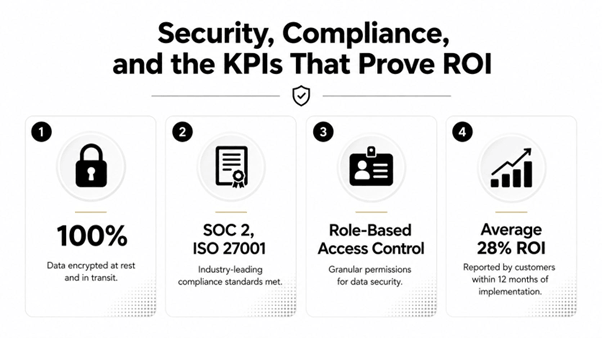
Manufacturing documents often include sensitive pricing, customer data, service history, internal notes, and regulated language. The document layer should support centralized governance, controlled template access, and secure deployment options. EDocGen's published platform details include AES-256 encryption and on-premises or cloud deployment flexibility , which align with the controls many manufacturers expect for cross-system document workflows.
Salesforce permissions still matter for the records behind the document. The generation layer should respect access controls when producing outputs for internal users, customers, or partners.
The most useful metrics are tied to document-driven work, such as:
Salesforce's manufacturing materials note that connected service workflows can improve speed and personalization, and Connected Assets can give teams real-time visibility into service history, status, customer information, and telematics. In practice, that value becomes clear when the right information reaches the right person in the form they can use.
A focused pilot is often the fastest way to prove value. Start with one site, one asset type, and one document family. Then verify that the output arrives complete, accurate, and ready for use.
Readiness checklist
If the goal is to make Salesforce manufacturing more useful to the business, start with the documents that operations, service, finance, and customers depend on every day. Contact EDocGen to map the first manufacturing document flow your team can put into production next week.