
A loan officer gets the final borrower details in a web form, the clock is still running on the offer letter, and the document has to go out with the right clauses, the right branding, and the right approval trail. That's the operational reality behind on-demand interactive document generation from web forms . The hard part isn't getting a PDF out of a template, it's making sure the form, the template, and the downstream governance all stay aligned when the business, the policy team, and the compliance team each want different things.
A borrower submits a web form, the loan officer is waiting on the offer letter, and the document has to reflect the submitted facts, the approved language, and the current template version before the customer moves on. The same pressure shows up in insurance quotes, account opening, onboarding packets, and internal HR letters, where the document only has value if it is produced in the same workflow that captured the data.
That is why enterprise teams moved away from static templates and toward interactive, form-driven generation . The form does more than collect information. It becomes the trigger that assembles the output, applies the right rules, and hands off a document that matches the workflow context. In regulated environments, that shift matters because delays, version drift, and field mismatches usually appear at the boundary between data capture and document creation.
Practical rule: If the business user and the customer are both waiting on the same workflow, the document system has to behave like part of the application, not like a separate export step.
Evaluation starts with governance. Buyers want to know whether submissions are validated before a template ever renders, whether conditional logic reduces manual review, and whether every generated file can be traced back to the data and rules that produced it. That is also why teams compare home-grown pipelines against commercial platforms such as enterprise document automation instead of assuming the first working build is good enough.
A custom build can fit a narrow process very well, especially when the form, the template, and the approval rules are stable. It also shifts the maintenance burden onto the internal team. Commercial platforms reduce the amount of glue code, which matters when the process changes often or when the document flow must be defended to compliance, legal, and operations reviewers. The trade-off is control, because a platform gives speed and governance, while a home-grown pipeline can offer tighter customization if the team is willing to own the engineering cost. A real enterprise system has backpressure, retries, and temporary failures, not just happy-path document creation.
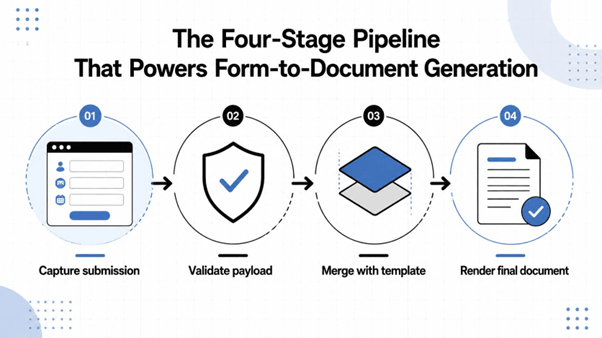
A reliable workflow is usually easier to understand as a pipeline than as a feature list. Document generation is a four-step mechanics chain, request selection, validation, merge into an intermediate representation, then conversion into a final format such as PDF, PPTX, or DOCX, which is the same shape many enterprise implementations follow document generation guide. Microsoft's structured document generation guidance describes the same form submission → merge → generate pattern for user-facing creation structured document generation.
The web form posts structured data, usually through an API endpoint or workflow trigger. In a strong implementation, the form only collects what it should collect, and the submission payload is clean enough to be validated without custom cleanup logic. That separation is what lets the same form-driven experience work for sales, service, or operations without rewriting the document layer.
Validation is where many builds win or fail. Missing required fields, type mismatches, and conditional-rule conflicts are the common breakpoints, so the system has to enforce schema rules before anything reaches the template engine. Microsoft's guidance and the enterprise rollout patterns both point in the same direction, template governance matters because the upstream data quality problem is usually the failure point, not the renderer.
The template engine replaces markers with submitted values, then resolves clause logic, repeated groups, and document-specific fields. A useful way to think about this is that the template is the governed document logic, while the form is just the submission surface. EDocGen's own document-generation overview at document generator how aligns with that split, keeping the reusable document logic separate from the web experience.
The renderer exports the final output, often as PDF, PPTX, or DOCX, sometimes as multiple formats in the same workflow. If the merge layer is disciplined, rendering becomes the easiest part of the pipeline. If the merge layer is messy, format choice won't save you.
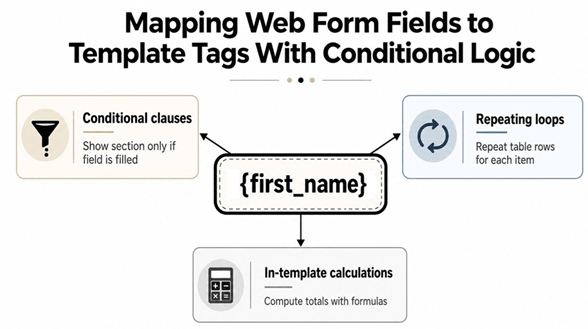
A regulated workflow usually breaks at the handoff between capture and document logic. The form looks clean, the submitted data looks valid, and the downstream packet still comes out wrong because the rules were buried in the form instead of the template. Keeping the form stable and pushing presentation, clauses, and calculations into the template gives the document team a controlled place to version business logic.
A field like {first_name} or {policy_number} is just the entry point. The core work happens when that value is paired with conditional clauses, repeating rows, and in-template calculations so one governed document can handle different scenarios without a form rewrite.
An insurance quote shows the pattern clearly. The applicant data may be straightforward, yet the quote packet can still need optional disclosures, coverage-specific sections, and premium calculations that only appear when the right conditions are met. If those rules stay inside the template, the form team does not have to keep reworking the submission surface every time a policy changes.
The clean enterprise pattern is simple. The form collects facts, and the template decides which clauses, sections, and computed fields belong in the output.
In one large enterprise rollout, up to 100 form fields were split into four linked forms , and moving conditional logic into the template instead of the form cut downstream editing effort by up to 90% . That result matters because it shows where the time goes in practice. Once the document engine owns the rule set, business users can update logic without disturbing the intake experience.
EDocGen’s form settings walkthrough shows how field-level merge behavior and styling controls such as width, height, font, and margins can be applied to a web-form/document project, which is useful when you are aligning the visible form with the final output. The template guidance at if else statement PDF follows the same model, with decision logic kept close to the document.
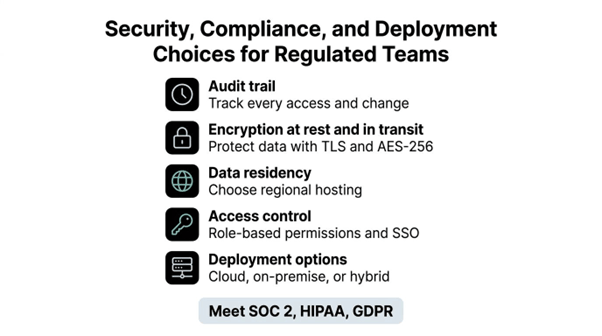
A regulated team can build the form-to-document flow and still fail the review if it cannot prove who changed a template, who triggered generation, and where the system runs. Security is not a separate checklist here. It sits inside audit trails , encryption , access control , and deployment choice , because those controls decide whether the workflow survives scrutiny from compliance, legal, and infrastructure teams.
Before rollout, the questions are straightforward, and they are usually the ones that slow procurement down.
Those questions matter because the deployment model shapes both risk and speed. Teams that want browser-based access and API integration often prefer SaaS delivery, while teams with stricter hosting rules may need on-premises or hybrid deployment. That trade-off shows up early in architecture reviews, long before the first document is generated.
Governance also depends on the template itself. This matters in banking, insurance, and life sciences, where the same approved template may be reused across many submissions and still has to produce consistent output every time. The operational win comes from keeping variation inside the approved structure, not from letting each user improvise the document.
Practical rule: If a compliance reviewer cannot tell which template version produced a document, the workflow is not ready.
If you are evaluating HIPAA-sensitive use cases, EDocGen's HIPAA-compliant document generation software page is the kind of evidence-bearing material buyers usually ask for during shortlist reviews.
The cleanest architectures don't force you to choose between one-off generation and batch production. A web form can trigger a document the moment a customer submits data, while the same governed template can also be called by a scheduled job for renewals, statements, or notices. The difference is in orchestration, not in the template itself.
Keep the generation service stateless where you can and keep the template state governed where you must.
On-demand generation fits service moments where a person is waiting, such as sales, onboarding, or claim intake. Bulk generation fits time-based jobs where throughput matters more than response time, such as month-end statements or policy renewals. The same platform should support both patterns without creating two template libraries.
For teams that need to go further, EDocGen's high-volume document generation material is a good reference for thinking about the same workflow at batch scale. The useful mental model is simple. One path is interactive and synchronous, the other is queued and scheduled, but both should resolve against the same approved document logic.
Monitoring should stay simple at first. Track submission success, validation failures, queue depth, and render latency, then add document-specific exception counts if regulated content starts to drift. That gives operations a real signal without burying them in dashboard noise.
The rollout goes smoother when validation is treated as the main control point. Make required fields explicit, keep templates under central version control, and test every conditional branch before go-live. The mistake I see most often is treating generation as the hard part. Regulated documents usually break on bad input, missing provenance, or template drift before the renderer itself fails.
A practical checklist looks like this:
One sales-presentation rollout made the trade-offs very clear. The team used a single form-driven template to generate presentations, split up to 100 form fields into four linked forms , and moved the conditional logic into the template so downstream editing work dropped sharply. The case study on automated sales presentations from templates shows the practical value of that setup, because it reduced manual assembly without forcing the team to rebuild the workflow around ad hoc edits.
That result matters more than the document format itself. If validation failures, partial drafts, or audit trails are the last questions in your evaluation, the answer should come from the platform design and the governance model, not from hope. EDocGen's template governance and multi-format generation approach fit that kind of enterprise review because they keep approval rules, output formats, and traceability tied to the same controlled process.
For regulated rollouts, EDocGen can generate Word, PDF, PowerPoint, Excel, and fillable forms from structured data while keeping template governance centralized. Review the workflow fit for your forms, templates, and compliance requirements, then compare it with your current pipeline before you decide whether to build or buy.