
You've probably seen this failure mode already. A policyholder finishes a long application, waits for the welcome packet, opens the PDF, and finds a wrong name, missing beneficiary detail, or a coverage summary that doesn't match what sales promised. The call back to support isn't really about one bad document, it's about an onboarding flow that treated the document package as an afterthought.
That's the part most insurance teams underbuild. The insurance customer onboarding process now sits between sale completion and real policy activation, and industry guidance frames it as the stage where insurers set expectations, collect required information, verify details, and help customers manage their coverage and digital tools, using micro-steps, progress indicators, and save-and-resume patterns for long forms with 15 to 25 fields . When that orchestration breaks, the promise made during acquisition gets diluted by fragmented outputs, inconsistent routing, and avoidable service defects.
The hardest part of onboarding usually isn't the application itself, it's the work that starts after the application is technically done. A customer submits data, the policy binds, and then the welcome email, policy packet, compliance forms, and proof-of-insurance output each move through separate paths. If one template pulls stale fields or the approval chain does not fire, the policyholder sees a carrier that looks disorganized, even if the front-end form was clean.
The break point shows up when teams spread responsibility across too many systems. The CRM owns one slice, the e-sign provider owns another, and a separate workflow engine moves PDFs around with brittle field mappings. That setup creates maintenance work, but it also creates service work, because onboarding quality has direct business impact and customers react quickly to confusing or complicated activation flows.
Practical rule: If the document package cannot be traced from source data to delivery, it is not an onboarding system, it is a collection of side effects.
Insurance teams still lean on paper-era assumptions that do not fit this job. Modern guidance pushes insurers toward stepwise activation, pre-fill, progress indicators, and save-and-resume behavior because long proposal flows need less abandonment and less rework. The operational lesson is straightforward. Customers need a coherent package that arrives in the right order, with the right data, at the right time.
For teams that want a closer look at the orchestration layer, automating document workflows maps well to the insurance use case, especially where a single data source has to generate, route, and track multiple document types without custom code.
Data quality is the failure point that shows up late and costs the most. A useful reference on that broader problem is digna and data quality challenges because weak source data does not stay contained in the form layer. It leaks into beneficiary fields, billing setup, mortgagee details, consent records, and every customer-facing artifact that follows.
A reliable insurance customer onboarding process needs five control points, not one long handoff. The reason is straightforward, each point solves a different risk. Pre-bind capture protects data completeness, welcome delivery sets expectations, early follow-up catches missing documents, and the 30- and 90-day touches confirm that billing, coverage understanding, and account setup are working.
1. Pre-bind data capture
Collect the fields that drive every downstream document before binding, not after. That means applicant identity, policy metadata, payment cadence, mortgagee, or lienholder details where relevant, household or business participants, and consent preferences for SMS, email, and phone. A structured pre-bind file reduces the chance that the welcome packet and policy summary get built on partial data.
2. Binding and welcome
The welcome packet should go out within 24 hours, because the customer's sense of momentum is fragile right after purchase. That packet should confirm the effective date, payment method, billing cadence, and what happens next, while also recording delivery in the agency management system or CRM. A same-day message with a clear timeline does more than inform, it tells the customer the policy is real and the carrier is organized.
3. First-week follow-up
The first week is where missing documents, unread disclosures, and confused account owners surface. A short Q&A or consultation call works better than a generic nurture drip because it gives service teams a chance to confirm that the customer received the right forms and understands their coverage. This is also the point where confirmation of signature status, proof-of-insurance delivery, and read receipts matter.
4. 30-day check-in
By day 30, the focus shifts from activation to control. Billing should be verified, coverage understanding should be tested, and any incomplete account fields should be closed out. For commercial accounts, this is the time to confirm whether additional stakeholders need to be added to the file.
5. 90-day review
At 90 days, onboarding becomes a retention and referral conversation. Teams can revisit service issues, see whether the customer has adopted self-service tools, and decide whether claims education needs reinforcement. That structure aligns with the way onboarding quality and early churn are tied together in customer onboarding.
A strong onboarding sequence doesn't end when the contract is signed. It ends when the customer has the right documents, the right contacts, and the right expectations in place.
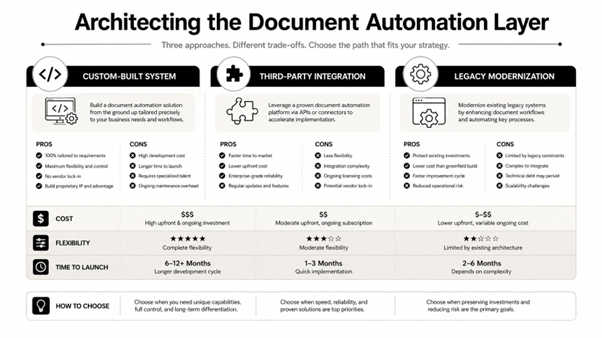
There are three ways teams usually approach onboarding documents. They build a home-grown system, stitch together multiple commercial tools, or adopt a unified platform that can produce multiple formats from the same data source. Each path can work in a narrow context, but the trade-offs get sharper as policy volume, product complexity, and compliance demands increase.
Custom code gives architects direct control over data mapping, conditional logic, and delivery rules. It also creates permanent ownership pressure, because template changes, compliance updates, and format variations all become software changes. That model can fit a narrow product line, but it's usually expensive to keep current once the business starts adding geographies, line-of-business variants, or document exceptions.
A stack built from CRM, e-sign, document generation, storage, and notification tools can look flexible at first. In practice, every integration point becomes a possible failure mode, especially when a document must branch into Word, PDF, Excel, or fillable forms from one customer record. Orchestration gets fragile here because the workflow is only as reliable as the weakest handoff.
A platform like EDocGen handles diverse enterprise use cases by generating Word, PDF, Excel, and PowerPoint from structured sources such as JSON, XML, spreadsheets, databases, and enterprise applications . It auto-creates fillable forms from templates that can be shared with customers via a URL or embedded in customer-facing applications. It also supports bulk generation , conditional logic , loops , calculations , multi-lingual output , and API-based integration with systems such as CRMs and e-sign providers. That matters because the onboarding package often needs to produce several outputs from one master record, not one static file.
The architecture pattern should be simple. Keep the master data sources central, map it once, govern templates in one repository, and push different outputs to the right channels through APIs. That reduces template drift across product lines and makes brand governance much easier to enforce.
For teams comparing implementation patterns, the enterprise automation reference at EDocGen enterprise document automation is useful because it shows how a centralized document layer fits into broader systems. The same architecture also makes room for adjacent AI use cases, including intelligent support workflows, without forcing the document layer to carry chatbot logic or service routing.
The cleanest architecture is the one where business users can update document logic without asking engineering to rewrite the workflow every time a product or regulation changes.
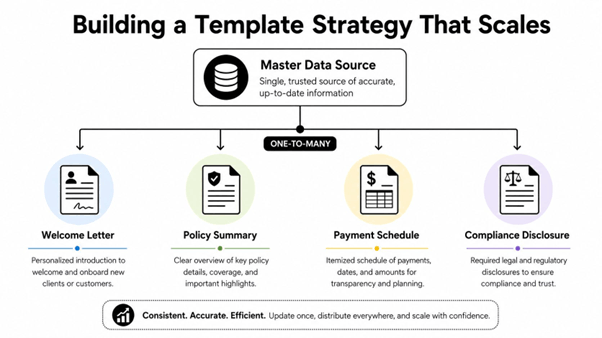
A scalable template strategy starts with one rule, every onboarding document should inherit from the same customer record, but each output should serve a different operational job. The welcome letter introduces the relationship, the policy summary explains coverage, the payment schedule reduces billing confusion, and compliance disclosures capture the required legal record. If those documents are treated as separate projects, version control gets messy fast.
The best pattern is to keep the payload structured and stable, then branch templates by purpose. A single JSON object can feed a personalized welcome letter, a one-page policy snapshot, a fillable consent form, and a claims instruction guide, as long as the template engine can resolve conditional fields and repeatable sections. That's the point where the document package stops being a bundle of files and becomes an orchestration layer.
Dynamic logic matters here. Multi-policy households need conditional blocks, commercial lines need multiple stakeholders, and some products need different language based on state or line of business. If a template can't handle those variations without custom code, the onboarding process will eventually split into exceptions that nobody wants to own.
Generation is only half the job. The package also has to route correctly, whether that means e-sign, email, cloud storage, or portal delivery. EDocGen's template tagging and scheduling model supports that kind of distribution workflow from the same repository, which is why centralized governance scales better than scattered document ownership.
The group-template approach is especially useful when one record needs multiple legal or customer-facing variants, so the implementation detail in grouping templates in EDocGen is worth reading before teams define their document taxonomy. That's where package architecture becomes operational, not theoretical.
A practical package for an onboarding flow often includes:
The key is consistency. One master data source should feed each output, but each output should have a job the customer can use.
Compliance can't be a post-launch patch in insurance onboarding because the workflow itself handles sensitive records. KYC and AML checks, e-signature validation, consent management, audit trails, lienholder data, mortgagee addresses, and third-party account participants all need to be part of the document design from day one.
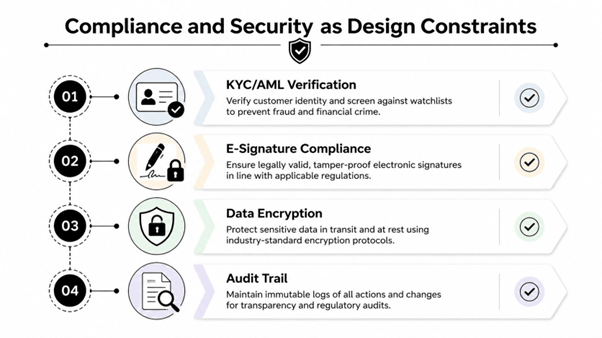
Most onboarding checklists cover the welcome email and policy delivery, but fewer workflows confirm payment method, capture e-signature read receipts, or log consent for SMS, email, and phone. That gap matters because onboarding is partly a controls process, not just a communication sequence. If the policy exists but the consent record doesn't, service teams inherit avoidable risk.
EDocGen supports AES-256 encryption and role-based access controls , which fits the demands of insurance data handling. If document access is not governed at the template and repository level, every downstream integration inherits the exposure. The more teams share onboarding responsibility, the more important it is to lock down who can see, generate, approve, or resend specific outputs.
A good onboarding system surfaces compliance prompts where the user is already working, not in a separate checklist buried in another tool. That includes reminders for proof-of-insurance delivery, disclosure acknowledgments, and record retention. The payoff is cleaner audits and fewer exceptions when teams have to prove what was sent, when it was sent, and who approved it.
For a broader view of how regulated document workflows are structured, the guidance on financial compliance document automation is a helpful companion piece. It reinforces the same design principle, security and compliance should shape the workflow, not follow it.
If a customer-facing document can be generated without a traceable audit trail, the workflow is incomplete.
The safest rollout starts narrow. Launch with one product line, verify that the document package matches the source data, confirm delivery timing, and only then expand into multi-policy or multi-lingual scenarios. That approach catches template errors before they spread into every line of business.
Instrumentation matters more than guesswork here. Teams should track where customers slow down or abandon the flow, especially at long forms, identity verification, and document uploads, because those are usually the highest-friction points in digital onboarding. The point isn't to admire the funnel, it's to know which stage needs redesign.
The useful KPIs are the ones that map to specific control points. Time-to-first-document tells you whether the welcome packet arrived, stage-by-stage completion shows where the process breaks, support tickets tied to onboarding reveal confusion, and 90-day retention shows whether the process created a stable customer relationship.
A phased rollout also gives operations and compliance teams time to validate template governance. If one line of business uses a different claims guide or policy snapshot format, that variation should be deliberate and tracked, not accidental.
For a practical example of structured onboarding modernization in another regulated environment, the bank customer onboarding case study is useful because it shows how document generation and workflow control reinforce each other once the package gets scaled.
Continuous improvement works best when document generation logs, delivery logs, and exception logs sit in the same review cycle. That makes it easier to spot a bad template, a missing field mapping, or a channel-specific issue before it becomes a support pattern
The system gives insurance teams a way to generate onboarding document packages from one data source, then route them into Word, PDF, Excel, and fillable outputs without building custom orchestration code around every variant. If you're ready to tighten template governance, simplify package delivery, and make onboarding documents behave like part of the workflow instead of a separate problem, visit EDocGen and see how it fits your insurance onboarding stack.