
You're probably looking at a form intake screen right now, or at least the aftermath of one. A request came in, someone approved it, a document had to be generated, and another system still needs the result. That gap between data capture and document output is where most enterprise workflow pain shows up, especially when teams try to stitch it together with narrow tools or one-off integrations.
Digital forms and workflow software close that gap by making the form the starting point of a governed process, not the end of one. A submission can validate inputs, trigger routing, create records, generate documents, and preserve the trail for audit and reuse. For technical teams, the key question isn't whether a form can be published. It's whether the platform can carry the request across systems without losing control of templates, logic, approvals, and outputs.
A commercial loan packet is a useful way to understand the category. A relationship manager collects borrower details in a form, the system checks required fields, the packet routes to credit for review, and downstream systems receive the approved record. The form is not the product, it is the starting event that sets the process in motion.
Digital forms become far more useful when they sit inside a workflow engine. A web-based form can validate inputs, store the submission, and trigger notifications, approvals, or record creation. The platform is managing routing, validation, and system handoff , not just capture. If you are comparing categories, the practical question is whether the tool can move a request through the next stage without losing control of the data attached to it.
Practical rule: If the software only stores a response, it is a form tool. If it can also route, transform, and generate the next document, it behaves like workflow infrastructure.
That is why the category blurs so easily. A lightweight builder may be enough for a team that only needs simple intake, but enterprise buyers usually care about the full form-to-document lifecycle, especially when approvals, templates, and archival policy all matter. The contrast shows up most clearly in digital forms hub , where forms are treated as part of a broader document workflow rather than an isolated screen.
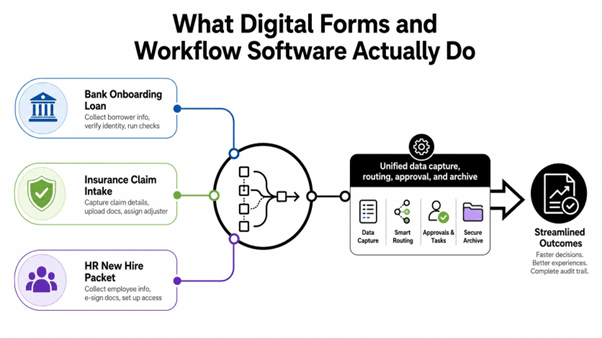
For readers evaluating platforms, the image reflects the core architecture. Data enters once, moves through rules and approvals, then ends up archived in a form that can be reused, audited, or sent into another system without recreating the record by hand.
On the other hand, fillable PDFs often leave the next step trapped in email or upload handling rather than an automated chain.
The easiest way to evaluate the category is to stop asking, “Can it make a form?” and start asking how it behaves when the form gets complicated. In enterprise settings, complexity isn't a bug, it's the job. A request may branch by department, calculate a value, populate a template, and then produce different outputs for different audiences.
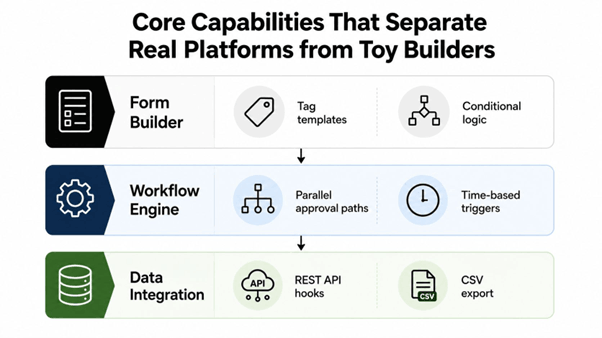
A serious platform usually combines template tagging , conditional logic , and data mapping so business users can control structure without rewriting the document every time. That's where JSON or XML feeds become useful because the form can pull from structured sources instead of forcing a separate entry layer for every variant. EDocGen fits that model because it auto-generates forms from PDF, Word, or PPTX templates , then turns submitted data into filled documents and downstream outputs.
The workflow side adds approvals , notifications , and time-based triggers . Those are table stakes at this point, but the implementation quality varies a lot. Some tools can route a record; fewer can let a business owner maintain the template, preserve logic, and keep the generated output consistent across teams.
A good platform doesn't just accept data, it preserves meaning as the data moves.
The integration layer is where the architecture either holds together or falls apart. APIs to CRMs, databases, and ERPs let the form feed systems of record instead of becoming another dead-end inbox. If you're comparing vendors, the question isn't whether they “integrate,” it's whether they support the exact source and output mix your process needs, including bulk jobs, scheduled runs, and multi-language output where required.
The following workflow illustrates how form submission, document generation, email delivery, and Salesforce opportunity creation can be automated:
Lightweight form builders do one thing well. They get a request into a system quickly, and they can usually push that response into a simple approval path or a downloaded PDF. That works for straightforward intake, but it starts to fray when the document itself is a governed enterprise asset rather than a disposable output.
The core difference is what each platform thinks the response is for. A lightweight builder often treats the submission as the finish line. An enterprise document-generation platform treats the submission as source material for a controlled assembly process, where one record can produce multiple document types, formats, or variants depending on audience and data source.
That matters for template governance. If a department keeps its own version of a form, a home-grown system can end up with inconsistent wording, mismatched calculations, and duplicated logic. A centralized repository changes that pattern by making the template the managed object, not the ad hoc attachment. EDocGen is positioned around that model, with multiple output formats from single or combined data sources and no-code template tagging that supports conditional logic.
|
Dimension |
Lightweight Form Builders |
Enterprise Document-Generation Platforms |
|
Primary job |
Capture responses and route simple approvals |
Assemble controlled documents from structured data |
|
Output diversity |
Usually, one stored response or one PDF |
Multiple formats, including Word, PDF, PowerPoint, and Excel |
|
Template control |
Limited or fragmented |
Centralized repositories with governed templates |
|
Data sources |
Often one source at a time |
Single or combined sources, including structured feeds |
|
Ownership model |
Often IT-led or admin-led |
Shared between business users and technical teams |
|
Fit for scale |
Narrow use cases, fast starts |
Broader enterprise rollout with reuse and consistency |
Business users need enough control to work without waiting on developers, but IT still needs standards for review, deployment, and auditability. The enterprise document automation page is a practical reference for teams comparing that governance model with simpler builders.
The trade-off is straightforward. Lightweight tools are quick to stand up. Enterprise platforms are built to keep the output trustworthy when the process spans departments, formats, and data sources.
The cleanest first deployment usually starts with an existing template, not a blank canvas. Teams often already have a Word packet, a PDF form, or a PowerPoint-based document set that everybody recognizes. The job is to make that asset executable without losing the structure people rely on.
A common path is to let the system auto-convert a PDF, Word, or PPTX template into a fillable form, then tag the fields that should be populated from input data. That creates a controlled starting point because the business doesn't have to renegotiate the document format before the workflow begins. If a field isn't needed at intake, don't expose it yet or hidden with a condition.
Once the form exists, publish it online for customers, vendors, or internal staff to complete. That step sounds simple, but it's where teams need to decide who can see which version, what validations are required, and whether the same form should behave differently for different audiences.
The submit action should create the filled-in document. That's the point where a workflow platform stops being a data collector and starts behaving like a production system. If the output is a contract, packet, or report, make sure the fields map cleanly back to the source template, so the generated document doesn't drift from the business rule it represents.
Useful deployment habit: Route for review only where the risk justifies it. Every extra approval node should exist for a reason you can explain in one sentence.
From there, you can optionally send the generated document into approval workflows or email it to the next recipient. The workflow automation guide is a good fit if your team wants to think through sequencing, reviews, and distribution before opening the rollout to more users.
A strong first use case is usually high-volume, rules-driven, and already annoying enough that teams have standard workarounds. That's the right place to prove the platform without turning the first release into a platform migration.
For most enterprise buyers, the deciding question is not whether the software can create forms. It's whether it can do it safely inside the stack they already trust. That means access control, encryption, auditability, and a deployment model that fits internal policy.
The platform should protect data at rest and in transit , support role-based permissions, and keep a usable audit trail for review and investigation. In regulated environments, that isn't a feature nice-to-have, it's the difference between a controlled process and a shadow workflow.
The integration story matters just as much. APIs should connect the platform to databases, CRMs, and line-of-business tools so approved data lands where the business already works. Independent guidance on modernization stresses that compatibility with legacy infrastructure and records systems is often the blocker to end-to-end automation, especially when different departments still depend on older systems for retention or reporting.
The security review should cover deployment options, identity integration, and records handling. The right question is not only “Can it connect?” but “Can it connect without creating a parallel compliance process?”
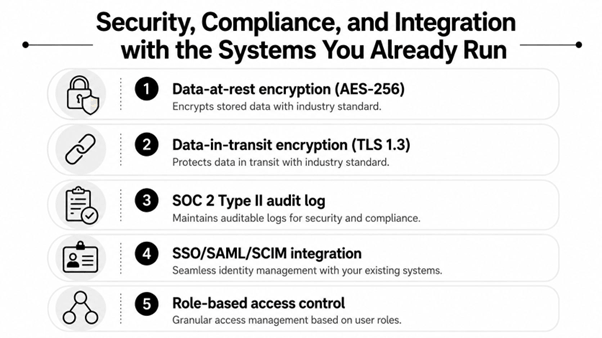
The specific takeaway is simple, if the platform can't fit cleanly into existing identity, storage, and approval patterns, it'll create a new risk surface instead of reducing one.
Banking teams feel the difference first in loan origination. A branch or relationship manager collects borrower data in a form, and the platform generates the packet with branch-specific details already applied. That removes the need for separate document assembly steps, and it gives credit, operations, and compliance the same source of truth.
Insurance teams use the same pattern for policy and endorsement documents. Product details, customer records, and risk inputs flow into the document assembly layer, then the workflow routes the result for review or issuance. The business gain isn't just speed, it's consistency across policy language and a cleaner handoff between underwriting and operations.
Real estate teams often connect forms to Salesforce so offer letters and closing packages can be assembled from structured records instead of copied between tools. That's where output diversity matters, because sales reps, property managers, and admin teams may each need a different version of the same transaction packet. EDocGen's automated sales presentations case study is a strong example of how a document workflow can move beyond intake into creative, reusable output.
The best use cases are the ones where one request creates several documents, not one.
HR teams benefit when onboarding packets and contracts come from a shared template repository. The same source structure can support different languages, different entity types, or different job levels without rebuilding every document from scratch. Life sciences and pharma teams care about a different detail, which is version control across training, validation, and compliance documents while operations keep moving.
That mix of controlled output and flexible intake is why the category keeps showing up in regulated industries. The form is just the entry point. The value shows up in how cleanly the platform moves the record through review, generation, and distribution.
The better internal KPI set is usually cycle time, error rate, and template reuse. If a workflow shortens review paths, reduces rework, and lets the business reuse governed templates instead of cloning them, the financial case becomes much clearer. That's especially true when the output needs to be approved, archived, and repeated across teams.
|
Evaluation area |
What to ask |
|
Template governance |
Can templates be centrally controlled and versioned? |
|
Output formats |
Can the platform generate the document types you actually need? |
|
Data source flexibility |
Can it combine structured sources instead of relying on one feed? |
|
Deployment model |
Can it run in the cloud, on-premises, or both? |
|
Integration depth |
Does it connect to your current CRM, database, and records systems? |
|
Ownership model |
Can business users maintain templates without losing IT control? |
A strong business case starts with one high-friction workflow, then estimates the value of better control, fewer exceptions, and better reuse. The point isn't to promise transformation in the abstract. It's to prove that one repeatable document process can become a managed asset instead of a recurring cost.
Are we ready for workflow automation?
If your team already has one or more repetitive processes that depend on approvals, template reuse, or system handoffs, you're probably ready. The clearest signal is that people have built their own workarounds because the official process is too slow or inconsistent. That usually means the process is worth automating, but only after someone maps the current steps.
What should we start with?
Start with an existing PDF, Word, or PPTX template that already defines the business document. That gives you a known structure, a known audience, and fewer design debates. Structured data sources like JSON, XML, and spreadsheets are practical starting points if you already have them, because they make field mapping easier than free-form input.
How do we avoid version sprawl?
Keep template ownership centralized and make changes flow through one repository. That prevents every department from creating its own variant when a small exception comes up. If different teams need different outputs, separate the governance of the template from the user experience of the form.
The platform category works best when it feels boring in production, because the logic is already settled, the routing is predictable, and the outputs are governed. That's the benchmark for enterprise adoption.
If you're evaluating digital forms and workflow software for governed document generation, EDocGen is built to turn structured inputs into Word, PowerPoint, Excel, PDF, and fillable outputs while keeping templates centralized. Visit EDocGen to see how its form-to-document workflow fits the systems your teams already run.