
Automating your financial reporting is all about connecting your data sources to smart templates and letting a workflow handle the rest. At its heart, you're preparing your data, designing a template in a familiar tool like MS Word, adding dynamic tags, and then using a system like EDocGen to pull that data and churn out reports automatically, even on a set schedule.
Let’s be real for a moment. Manual financial reporting is a nightmare. It’s slow, riddled with potential errors, and a massive drain on your team's time and energy. If you've ever found yourself burning the midnight oil, wrestling with spreadsheets and frantically copy-pasting data, you already know the pain. That old way of doing things isn't just inefficient—it's a liability.
This kind of manual chaos creates significant risk. For anyone in a technical or operations role, the consequences are very tangible. A single misplaced decimal or copy-paste mistake can throw off an entire P&L statement, leading to bad business decisions or, even worse, costly compliance fines.
Think about a loan officer at a credit union. Every week, they spend hours manually pulling data from the core banking system, the CRM, and a handful of spreadsheets just to compile customer financial summaries. Each report is a critical document, but the entire process hinges on one person's accuracy. One wrong number could put a loan approval at risk or flag a compliance audit.
This is more than just an efficiency issue; it's a strategic bottleneck. Instead of using their expertise to analyze a client’s financial health, that loan officer is stuck doing clerical work. Now, imagine that problem scaled across dozens of officers and thousands of reports.
The real cost of manual reporting isn't just the hours spent; it's the opportunity cost of what your skilled team could be doing instead—analyzing trends, advising clients, and driving business growth.
This is exactly where a platform like EDocGen comes in. It’s not just another mail-merge tool that fills in a few fields, nor is it a complex, custom-coded script that becomes a maintenance headache. EDocGen gives you a powerful, no-code solution that puts the people who actually understand the reports—your business users—in control of the automation.
So, what specific pain points does automation solve?
Other alternatives just don't stack up. Generic RPA bots, for instance, are notoriously brittle and can break if someone simply changes a column in a spreadsheet. EDocGen , on the other hand, connects directly to your data systems, making it far more resilient. You can read more on how we solve these issues in our guide to complete report automation .
In this tutorial, I'll walk you through how to leave the chaos behind and automate your financial reporting from start to finish.
Before you jump into creating automated workflows, you've got to do the prep work. You wouldn't build a house on a shaky foundation, and you can't build a reliable automation system on top of chaotic data. Trust me, a few hours spent here will save you weeks of headaches and troubleshooting down the road.
This isn't about ticking boxes. It's about setting up your entire financial reporting project for success. For the IT and integration folks, this is your moment to make sure the whole implementation is smooth, secure, and ready to scale.
First things first: you need to know where your numbers are coming from. Financial data is almost never in one neat, tidy system. More often, it’s spread across a mix of modern platforms and older, legacy systems.
Your job is to create a clear inventory. Start by identifying and listing every single source that feeds into your financial reports. This usually includes a mix of:
For each source, write down what data you need and who "owns" it in the organization. This kind of systematic approach is a core principle behind effective document generation software , which runs best on well-defined data.
Once you know where your data lives, you have to make sure it's clean. Automation is a powerful amplifier; if you feed it messy data, you'll just get messy reports, only much faster. Data hygiene is absolutely non-negotiable.
The most common point of failure in automation projects is inconsistent data. To a human, "Q1," "Quarter 1," and "QTR-1" all mean the same thing. But to an automation rule, they're completely different values that will break your workflow.
This is where you have to enforce some standards. Work with the data owners to get these inconsistencies cleaned up before they ever hit your reporting process.
Many other tools put this whole burden on you, forcing you to write complex scripts to clean everything up first. EDocGen, on the other hand, was built for the realities of enterprise data. While clean data is always the goal, its powerful mapping and logic can often fix minor inconsistencies on the fly, giving you a level of resilience that simpler tools just don't have.
With your data sources identified and cleaned, the final piece of prep is the technical environment. This is all about making sure the right people have the right access, without opening up any security holes.
Start by defining roles on your team. Who’s going to be designing the templates? Who manages the data connections? And who has the final authority to run and send out the reports?
Next, you’ll need to work with your IT security team to set up user permissions. This typically means giving EDocGen secure, read-only access to the databases and APIs it needs. This is where on-premise deployment options really shine, as they let you keep all sensitive data safely behind your own firewall—a must-have for many financial institutions. Getting this done proactively prevents those last-minute access roadblocks that can completely derail a project launch.
With your environment set up, it's time to hook up your data sources. This is the heart of the automation—turning scattered financial data into a unified stream that feeds your reports. Forget wrestling with API documentation; this process is built for business users, not just developers.
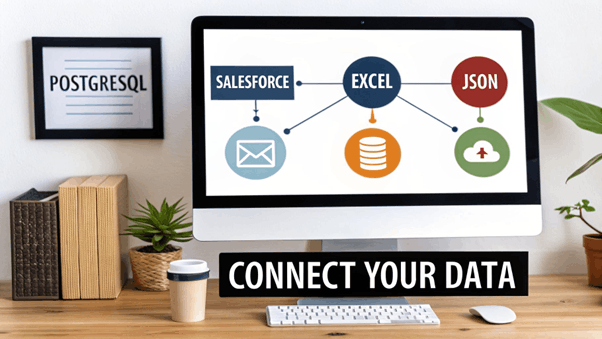
The EDocGen dashboard gives you a live look at your data connections, showing you exactly what’s flowing into your reports from various systems. Having this central view is critical for managing and troubleshooting your data feeds, so you can always be sure your reports are pulling from the right place.
The whole point is to forge a live link between your data and your templates. This isn't just a fancy mail merge; it's a true automation system that kills manual exports and data entry for good.
Let’s walk through a real-world scenario. You need to pull a monthly sales performance report. The transaction data is in your PostgreSQL database, but the customer details live in Salesforce. Normally, this would mean complex SQL queries, exporting CSVs, and painstakingly mashing them together.
EDocGen changes the game. You set up a secure, direct connection to your PostgreSQL database. This isn't a one-off data pull; it’s a live link . The moment a new sale hits the database, your next report run will pick it up automatically.
It’s the same deal with your CRM. By connecting EDocGen to Salesforce, you can pull in customer names, account statuses, and contact info right into your financial statements or invoices.
This direct-connect approach is huge. It ensures your reports are always based on the single source of truth, slashing reconciliation time and all but eliminating the risk of using stale data.
This is a far more robust method than brittle RPA bots that depend on screen-scraping. If a button on a webpage moves, those bots break. For mission-critical financial reporting, direct API and database connections are infinitely more stable.
Let’s be honest, even in the slickest organizations, a ton of financial data is still stuck in Excel spreadsheets. Trying to automate reports from these can be a nightmare of unstructured notes, merged cells, and inconsistent formats. For a lot of teams, figuring out how to master Excel reporting automation is a top priority.
This is where EDocGen’s AI-powered data extraction really proves its worth. Instead of forcing you to perfectly format a table, you can point it at a messy spreadsheet, and its AI will intelligently find and pull the data you need. This feature alone can give your finance team dozens of hours back every single month.
Pulling data from modern web services through JSON or XML feeds is just as straightforward. If your company relies on third-party platforms for payment processing or market data, you can set up EDocGen to fetch this information via their API.
Here’s a quick rundown of the common connection types:
This move toward smarter integration isn't just a small improvement; it's becoming the standard. In fact, industry analysis predicts that by 2026 , a massive 90% of finance functions will rely on at least one AI-enabled solution. A no-code, compliant platform like EDocGen bridges the governance gap, turning what was once a complex integration project into a manageable task.
Once your sources are connected, the last piece of the puzzle is mapping the data fields to your report template. In EDocGen, this is a simple, visual process. You just tell the system that a data field (like customer_name from Salesforce) corresponds to a tag in your document (like {customer_name}).
For more complex needs, you can also define formatting rules—for example, making sure all currency values show up with a dollar sign and two decimal places. This simple mapping step is what brings the automation to life, giving you total control over how your final reports look without ever touching a line of code.
Once your data is connected, it’s time for the magic to happen. This is where you start shaping your financial reports and turn a familiar MS Word or Excel file into a dynamic, intelligent asset that does the heavy lifting for you.
The best part? You don't need to be a developer. We built EDocGen so the people who actually own the reports—the finance and business teams—can design and control the final output. You’ll be working right inside Microsoft Word, not wrestling with lines of code.
The first step is adding simple tags to your template. Think of these as placeholders that tell EDocGen where to slot in specific pieces of data. The format is clean and intuitive, using double curly braces.
For instance, a standard client statement might use tags like:
Just this basic tagging is a massive leap forward. It guarantees every report is built with accurate, source-of-truth data, wiping out the copy-paste errors that plague manual reporting. But honestly, that’s just glorified mail merge. Where things get really powerful is with embedded logic.
Real automation means your reports need to think for themselves and react to the data they’re given. This is where EDocGen's conditional logic really shines. You can build rules directly into your Word or Excel template that change the content, layout, and even the tone of the report based on the data it receives.
Imagine you're generating monthly invoices for hundreds of clients. A few of them have overdue balances. Instead of juggling separate templates, you can use a simple conditional rule.
With a single line of logic, you can tell the template to display a prominent "Past Due" warning section—but only if the payment_status field from your data source is 'Overdue'. For every other client, that section simply vanishes.
This is a complete game-changer. One master template can now handle countless scenarios, which makes maintenance a breeze and keeps your branding perfectly consistent. No more managing dozens of document variations for every little edge case.
Before we dive deeper, let's look at the stark contrast between the old way and the automated way.
Financial reports live and die by their tables—transaction histories, expense breakdowns, performance summaries. Building these manually is not only slow but also a recipe for disaster. With EDocGen, you can design tables that automatically expand to fit whatever data you throw at them.
Using a loop function, you can tell your template to repeat a row for every single item in a dataset. For example, design one table row for a transaction, and EDocGen will automatically loop through an entire transaction history, building a perfectly formatted table with hundreds of entries in seconds. To see this in action, check out our guide on how to create loops and repeating sections in your documents .
Even better, you can perform calculations inside the template itself .
This is a critical point of difference. Many other tools force you to pre-calculate everything in your database or with a separate script. EDocGen lets your finance team embed their own business logic directly into the report. This gives them incredible control and agility—they can adjust a calculation on the fly without having to file a ticket with IT and wait. By building in these intelligent rules, you create a truly automated system that is as powerful as it is flexible.
You’ve built an intelligent template, which is a massive win. But a report sitting in a folder doesn't do anyone any good. The real magic happens when we close the loop and automate the final, crucial steps: generation and distribution. This is how you go from a one-off document to a completely hands-off financial reporting machine.
Honestly, this is where many tools fall short. They help you generate the report but then leave you to manually download, attach, and email everything. EDocGen handles the entire journey, which is a huge advantage for teams who need a process that actually runs itself.
Picture your end-of-month reporting. Instead of someone spending days grinding out hundreds of client statements, you can set up a single bulk generation job. With one click, EDocGen grabs the latest data for every single client, populates their unique statements, and gets them ready for delivery.
Or better yet, put the whole thing on autopilot. Think about those weekly performance summaries your stakeholders are always waiting for. With EDocGen's scheduling, you could set up a workflow that automatically:
This "set it and forget it" approach is what true automation is all about. You’re not just speeding up a task; you're completely removing manual processes from your team's to-do list. When you see how efficient this is, it really puts into perspective the old way of doing things.
Once the reports are generated, the final piece of the puzzle is getting them where they need to go. A big weakness in simpler tools is their limited delivery options. We built EDocGen to handle the complex distribution needs that real businesses face every day.
This flow shows how the template design process—tagging and logic—naturally leads into the automated generation step.
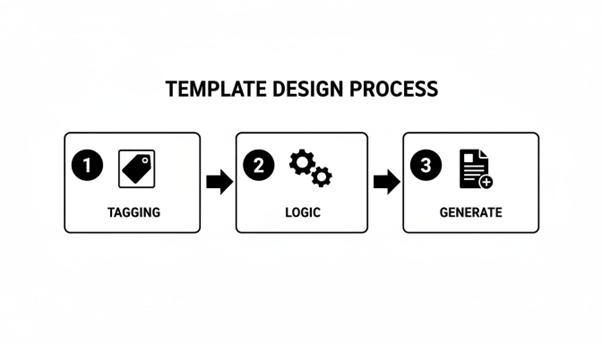
As you can see, generation isn't just a button-click; it's the payoff from a well-designed template, unlocking the automated distribution that follows.
Here are just a few of the ways you can automatically route your financial reports:
This is where the ROI of a true platform becomes crystal clear. You aren’t just making documents. You’re automating an entire business process from data pull to final delivery and archival.
For more technical teams, this means you can build workflows that slot perfectly into your existing tech stack. You can dive deeper into the setup for these channels in our guide on document distribution methods .
When you're dealing with financial information, security isn't just a nice-to-have—it's a non-negotiable. Manually emailing sensitive spreadsheets around is a huge, unnecessary risk. Automating your distribution through a secure platform like EDocGen puts you back in control.
You can enforce powerful security measures like AES-256 encryption for every single document, both when it's stored and while it's in transit.
For an extra layer of defense, you can even automatically apply password protection to individual PDFs. The password itself can be a dynamic field pulled from your CRM, like a client ID number, ensuring only the right person can ever open it. This level of built-in security is a world away from generic scripts that often leave compliance as an afterthought.
When you’re tasked with automating financial reporting, you’ll find no shortage of options. But let’s be frank—not all automation platforms are created equal. Many promise the world but stumble when they meet the messy reality of enterprise data and complex business rules.
Making the wrong choice can set you back months, if not years. This is where EDocGen was built to be different. It was designed from the ground up to solve the real-world problems that both technical and business users actually face every day.
You've probably looked at other routes. Generic Robotic Process Automation (RPA) tools, for example, are often sold as a silver bullet. In practice, they rely on screen-scraping and are notoriously brittle. A minor UI change in an application or a shifted column in a spreadsheet can shatter the entire workflow, leaving your IT team with a constant, frustrating maintenance burden.
Another common path is building custom in-house scripts. While this gives you total control, it’s a massive resource black hole. Your developers end up spending their valuable time writing—and more importantly, maintaining—bespoke code for reporting instead of building your core products. Every time a regulation changes or a new report format is needed, it turns into another development project.
EDocGen delivers the best of both worlds. You get the power and direct integration of a custom solution without the perpetual maintenance costs, combined with the user-friendliness of a no-code platform.
This balanced approach is the key. It empowers your teams without saddling them with technical debt.
EDocGen isn’t just another tool; it’s an enterprise-grade solution built for the specific complexities of financial reporting. Here’s how it directly tackles the shortcomings of the alternatives:
These features aren’t just marketing bullet points; they are direct answers to the bottlenecks that derail most reporting automation projects. This unique blend of accessibility for business users and raw power for developers is what makes EDocGen the smarter, more strategic choice for any serious enterprise.
Can EDocGen Handle Our Complex Security Requirements?
This is a big one, especially for anyone in banking or finance. Keeping sensitive data behind your own firewall is often non-negotiable, and we built EDocGen with that reality in mind. That's why we offer a full on-premise deployment option .
Unlike many cloud-only tools, this means your financial data never has to leave your secure environment. On top of that, every document can be locked down with AES-256 encryption and even dynamic, data-driven passwords for secure delivery.
How Does This Differ From Our Existing RPA Tools?
We see this a lot. Teams try using generic RPA bots for reporting, but they quickly find out how brittle they are. Those bots rely on screen-scraping, so the smallest UI change can cause the whole process to fail—a huge risk for mission-critical reports.
EDocGen works differently by design. It integrates directly with your data sources through APIs and database connections. This creates a much more resilient and stable workflow, getting you off the treadmill of constant RPA maintenance. It’s a purpose-built solution, not a clumsy workaround.
Will This Create More Work for Our Developers?
Quite the opposite, actually. The goal is to free up your developers, not give them another tool to manage.
EDocGen empowers your business users to take ownership. They can design and update templates directly in MS Word, embedding logic and rules themselves through a no-code interface. This breaks the endless cycle of developers having to build and tweak custom reporting scripts, letting them get back to focusing on core product innovation.
Ready to see how a true end-to-end automation platform can transform your financial reporting? Explore what EDocGen can do for your organization at https://www.edocgen.com .