
Most professional services teams describe their Statement of Work process the same way: a salesrep wins interest on a call, then spends days chasing presales engineers and legal for document sections, manually splicing language from old SOWs, and hoping nothing is out of date by the time the prospect sees it.
The result is slow turnaround, inconsistent language, and documents that sometimes reach the client looking like they were assembled under pressure — because they were. The problem is not capability. It is coordination: the wrong people are doing the wrong parts of the work at the wrong time.
A Statement of Work in a professional services sale typically spans three teams, each owning a distinct layer of the document:
EDocGen structures this collaboration so each team contributes their part — without duplicating effort or overwriting each other's work.
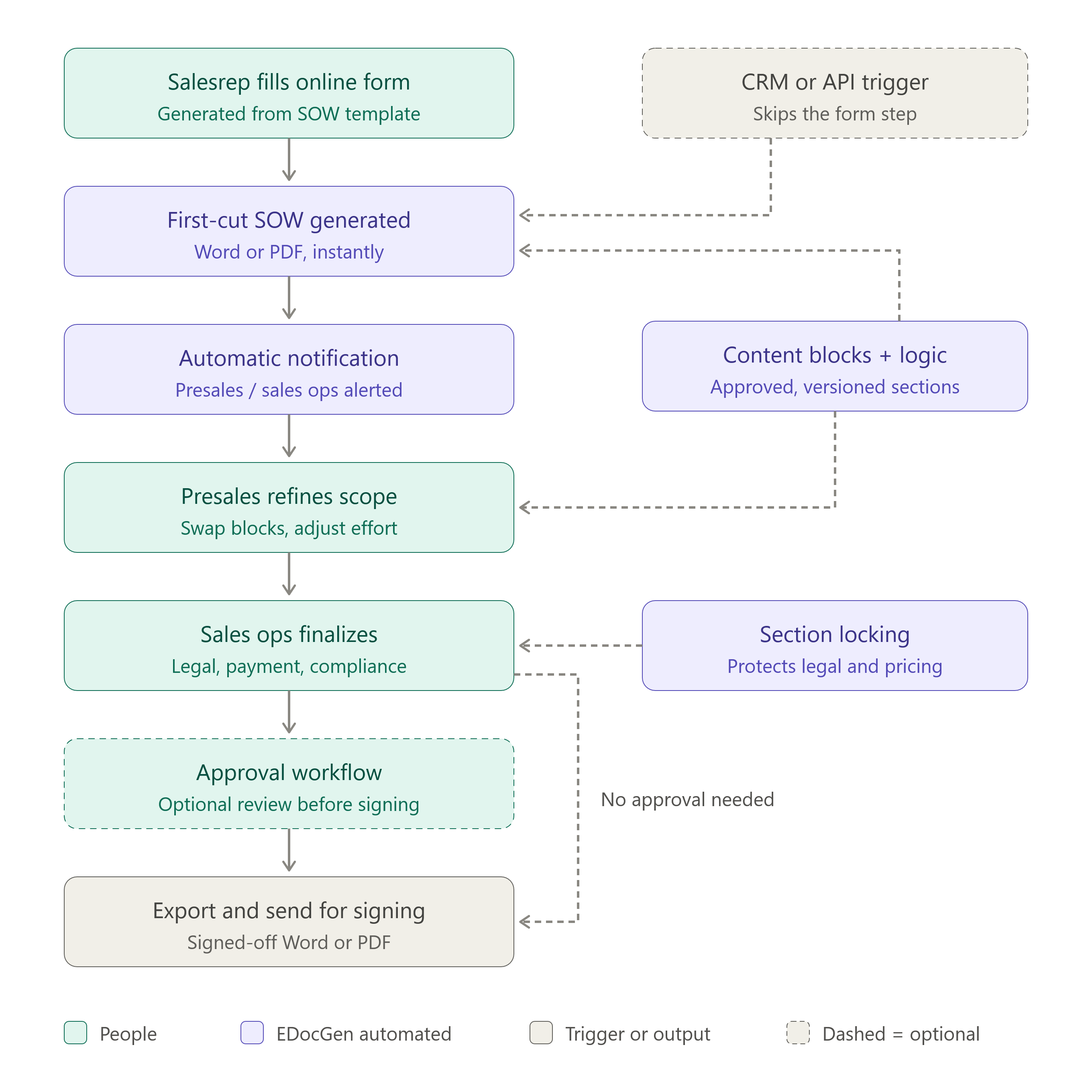
Rather than opening a blank document or a shared template, the salesrep fills out an auto-generated online form. EDocGen generates this form directly from the SOW template — every data field in the template becomes a form field the salesrep fills in.
The form is intentionally constrained. It captures only what the salesrep knows at this stage: client name, project name, proposed start date, services required, pricing tier, and any special terms discussed. Fields are typed and validated — no free-form paragraphs, no copy-paste from emails.
This mirrors the workflow used by enterprise sales teams to automate client-facing presentations. The salesrep interacts with a structured form, not a document. The document is the output. See how digital forms automation works.
Once the salesrep submits the form, EDocGen instantly generates a first-cut Statement of Work. The document is pre-populated with:
The output is a complete, formatted Word or PDF document — not a template with empty fields, but a readable SOW that is already 80–90% complete. The presales or sales ops team receives an automatic notification that a new SOW is ready for their review.
Once the form is submitted, the draft is automatically routed to the presales or sales ops queue based on the services selected and deal owner. No separate handoff message, no chasing — the next team picks up the draft from the notification and continues from there.
With the first-cut SOW ready, the presales or sales ops team opens it in EDocGen and takes over. Presales validates and adjusts the technical scope, adds service descriptions, updates effort estimates, and proposes pricing adjustments based on what was actually scoped. Sales ops then reviews the commercial terms, applies legal and compliance language, and produces the final formatted document.
Because the document is built from versioned content blocks, there is no risk of pulling in outdated language. Every section the presales team adds comes from the same approved library. Custom verbiage can be written inline for non-standard engagements, but standard sections are always sourced from the library — ensuring consistency across every SOW the team produces.
EDocGen's access controls operate at the section level. Each team edits only the layer they own. Salesreps, who supply the deal data via the form, cannot modify scope or commercial terms after submission. Presales engineers own the technical scope and can input proposed pricing based on their estimates — but they cannot finalise or approve commercial terms. Sales ops reviews pricing, applies legal language, and controls locked sections that no other role can touch.
A typical permission structure for a professional services SOW:
| SOW Section | Salesrep | Presales | Sales Ops |
|---|---|---|---|
| Client & Project Details | Form input | View | View |
| Scope & Service Descriptions | View | Edit | View |
| Effort Estimates & Timeline | View | Edit | Review |
| Pricing & Commercial Terms | View | Input | Approve & Edit |
| Legal & Compliance Clauses | Locked | Locked | Edit |
Presales inputting proposed pricing — rather than being locked out entirely — keeps the scope-to-price relationship intact. Sales ops then reviews the numbers in context before approving the commercial terms. No separate handoff conversation is needed; the proposed figure is visible to the approver alongside the scope that justifies it.
The most painful SOW failures do not come from bad relationships or good-faith disagreements. They come from ambiguity that looked fine on paper: a deliverable described in general terms, an assumption nobody wrote down, an acceptance criterion both parties read differently. These disputes surface after the SOW is signed — which is precisely when they are most expensive to resolve.
EDocGen addresses this at the point of origination — the online form — not at the review stage.
Required fields as scope enforcement. Rather than leaving assumptions, exclusions, and acceptance criteria as optional fill-ins, the SOW template makes them required form fields. The salesrep cannot submit the form — and the first-cut SOW cannot be generated — without documenting:
A salesrep who is eager to move a deal forward cannot skip these fields. The form enforces completeness before a document exists.
Conditional logic as a scope safety net. EDocGen's if-else conditional logic can make scope-critical sections appear — or become mandatory — based on what the salesrep selects:
SOW disputes typically surface as one of three failure modes, each tracing back to a missing field in the original document:
| Failure mode | Root cause | EDocGen fix |
|---|---|---|
| "We assumed X was in scope" | No explicit scope boundary | Exclusions — required form field |
| "You didn't deliver Y" | Deliverables not enumerated | Deliverables list — required content block |
| "This doesn't meet our standards" | No acceptance criteria defined | Acceptance criteria — required per deliverable |
| "The price changed mid-project" | Assumptions not tied to pricing | Pricing assumptions — linked to commercial terms |
EDocGen lets you store individual SOW sections as content blocks — reusable, versioned paragraphs that can be inserted into any document. Your library might include:
When a service offering changes or legal updates a clause, you update the content block once. Every SOW generated from that point forward automatically uses the updated language — without modifying templates or re-issuing past documents.
Not every SOW needs every section. EDocGen's conditional logic includes or excludes sections automatically based on what the salesrep selected in the form:
This prevents bloated, generic documents. The presales team receives a first-cut SOW that already reflects the deal's specific scope — not a 40-page template where they must manually delete fifteen irrelevant sections before they can start.
SOW structure, mandatory sections, and compliance requirements vary significantly by industry. EDocGen is used to automate SOW creation across several verticals, with templates and conditional logic configured to each sector's specific requirements.
Information Technology and Professional Services. IT services SOWs vary widely — from a Salesforce implementation to a cybersecurity assessment to managed services. The challenge is maintaining consistent structure while accommodating completely different scope types.
Service-type conditional logic handles this at the form level. When the salesrep selects "CRM Implementation," the form prompts for data migration scope, integration points, training headcount, and go-live criteria — and the corresponding content blocks are inserted automatically. When they select "Penetration Testing," an entirely different set of sections appears: systems in scope, rules of engagement, deliverable format, and confidentiality terms. Reusable content blocks cover implementation methodologies, RACI matrices, testing protocols, and software version dependencies. Cybersecurity firms can store their standard rules of engagement and liability language as locked sections that salesreps cannot modify.
Engineering and Construction. Construction SOWs require phased milestones, payment tied to deliverable completion, materials specifications, and regulatory compliance references. A federal facility project has mandatory sections — prevailing wage, safety plan, inspection milestones — that a commercial fit-out does not.
EDocGen's conditional logic enforces this: if the project is a federal facility → Davis-Bacon Act and prevailing wage sections are auto-inserted; if the work includes environmental remediation → EPA compliance and waste disposal sections appear; if the project exceeds a defined value → a performance bond section is required before the document can be generated. Content blocks store standard safety plans, quality control procedures, and subcontractor terms. Section locking prevents project managers under timeline pressure from editing compliance language.
Government Contracting. Government SOWs — often structured as Performance Work Statements (PWS) or Statements of Objectives (SOO) under FAR — have mandatory sections, specific clause references, and compliance requirements that vary by agency, contract type, and dollar threshold.
EDocGen templates can match the exact structure required by FAR, DFARS, or agency-specific supplements. Conditional logic enforces clause inclusion: if DoD contract → DFARS clauses auto-insert; if IT delivery → FedRAMP authorization requirements appear; if above simplified acquisition threshold → the competition justification section is included; if CMMC Level 2 required → the cybersecurity plan section is mandatory and cannot be skipped. Content blocks store pre-approved, legally reviewed FAR clause language. Only contract officers with the appropriate role permission can modify these — proposal managers and account executives see the final document but cannot touch compliance sections.
For federal proposal teams, content blocks also cover past performance narratives, technical approach language, and management plan sections that can be tagged by NAICS code and inserted into the correct proposal structure automatically — reducing the time spent on Section L and M compliance from days to hours.
A signed SOW is the starting point, not the final word. Scope changes happen — a client adds a feature request, a technical dependency surfaces mid-project, or a timeline shift forces a deliverable adjustment. The question is whether those changes are formally documented or informally absorbed, which is where most project-cost disputes originate.
EDocGen supports change orders using the same workflow as the original SOW. A dedicated change order template links back to the parent document and is pre-populated with the project reference, client details, and current scope. When a change is needed:
The scope, estimation assumptions, and exclusions documented in the original SOW serve as the formal baseline for evaluating every change request. When a client claims additional work was implied, the presales team can open the original assumptions section and show precisely why the change is out of scope — backed by a document the client signed, not a recalled conversation.
Section locking applies to change orders just as it does to the original SOW. Legal language, liability clauses, and payment terms in the change order template remain protected. Only sales ops can modify them. Every change order carries the same legal standing as the original document, regardless of how quickly it needed to go out.
If your salesreps already enter deal data in Salesforce or HubSpot, EDocGen can generate the first-cut SOW directly from the CRM opportunity record — without a separate form step for the data they have already entered.
You can also generate SOWs in bulk from Excel, JSON, or XML data for accounts where the source record already contains everything needed.
The combined effect of auto-generated forms, first-cut document generation, required scope fields, content blocks, conditional logic, role permissions, and CRM integration is a workflow that compresses SOW creation from days to hours — without reducing quality or increasing risk.
Salesreps spend under ten minutes capturing deal information on a form. Presales reviews, adjusts scope, and inputs pricing the same day. Sales ops approves commercial terms and the document reaches the client before end of business. Every team works on the part that only they can do — and nobody waits for a task that was never theirs to begin with.
If your SOW process involves chasing colleagues for document sections, manually assembling content from multiple sources, or discovering that a salesrep changed a legal clause to close a deal — or if your projects regularly start with scope disputes that trace back to something nobody wrote down — EDocGen is built to fix exactly that.