
You can tell a Salesforce rollout is incomplete when teams can see customer and operational data in the system, but still cannot produce a compliant proposal , a clean onboarding packet , a current review summary , or an approved statement of work without emailing templates around and waiting on manual reviews. That gap appears across industries, even after major platform investments. Core systems may be live, but the document process around them still depends on fragmented templates, disconnected approvals, manual handoffs, and weak audit controls.
That is where Salesforce Professional Services for document automation becomes valuable. It is to design a practical document operating model that helps teams generate accurate, client-ready documents at scale, using the relationship and process data they already manage, while improving governance, traceability, and audit readiness.
For teams that want a practical reference point, the EDocGen enterprise document automation overview is a useful place to start because it frames document automation as an operational capability, not just a template tool.
In practice, document automation becomes most valuable when organizations stop thinking about documents as static files and start treating them as part of the transaction itself. A proposal is not just a file. It is part of revenue creation. An onboarding packet is not just paperwork. It is part of service activation. An audit summary is not just a report. It is evidence that the process happened correctly. When those outputs are delayed or inconsistent, the business impact shows up quickly in longer cycle times, avoidable rework, missed approvals, and control gaps.
In most organizations, documents are tied directly to growth, onboarding, compliance, service quality, and internal accountability. A relationship may begin with a proposal or intake package, continue through approvals and reviews, and expand into service requests, renewals, and internal signoff. When those documents remain manual, every stage of the process slows down, and every audit or control review becomes harder than it should be.
A consultative services approach starts with a simple question. Which document workflows create the most friction today? In some organizations, the issue is proposal turnaround time. In others, it is onboarding accuracy, review packet preparation, approval bottlenecks, audit trail gaps, or the constant rework required to keep approved language current.
The best consulting work goes deeper than identifying a slow process. It maps the exact daily problems users face. For example:
A consultative approach addresses those real conditions. It looks at the full workflow, who initiates the document, where data comes from, what approvals are needed, which clauses are conditional, how outputs must be formatted, where final versions are stored, and what evidence should be retained for oversight.
The pattern is familiar. A seller needs a personalized proposal. A service team needs onboarding documents populated with the correct account or customer data. Compliance or legal needs approved language and a clear audit path. Operations needs the file package to match policy before it moves forward. Internal reviewers need evidence of what was generated, which version was used, who approved it, and when it changed. If those steps still rely on copy-paste work across systems, teams are working around the platform instead of through a governed process.
This is the daily reality in many Salesforce environments. Teams may have excellent record visibility and strong reporting, but when it is time to create the actual document, work moves outside the system. Data gets retyped into Word files. Multiple people edit local copies. Terms are pulled from old versions. Required sections are missed. Review happens by email. Final files are saved in inconsistent places. By the time the document is complete, no one is fully confident that it reflects the latest approved content or that the process can be reconstructed later.
That is why strong professional services work does not stop at records, pipelines, or cases. It addresses the real document workflows that move customer and business processes forward, and it adds the control structure needed to support review, oversight, and auditability.
Practical rule: If the system cannot produce client-facing and operational documents accurately, on time, and with a usable audit trail, the rollout is not fully operational.
Home-grown approaches often become fragile here. They usually begin with one form, one proposal, or one review packet. Over time, they expand into a patchwork of exceptions by region, product, team, and approval requirement. Eventually the organization is maintaining custom document logic instead of improving the workflow. Audit requests become manual reconstruction exercises instead of straightforward reporting. If you want a category-level explanation of the problem, the AppExchange covers the fundamentals clearly.
A more sustainable model is to define document generation as its own governed layer. Salesforce remains the system of record for customer, opportunity, service, and workflow data. EDocGen becomes the document execution layer that turns that data into controlled outputs, whether the user needs a proposal, review memo, intake packet, approval form, or audit-ready document package.
A mature setup is consistent, controlled, and repeatable. Data is mapped once. Templates are governed. Teams generate the correct document from the correct record without rebuilding content by hand. The end customer sees the same level of quality across proposals, onboarding packs, review summaries, service forms, and follow-up communications.
That consistency matters because speed alone is not enough. Output also has to be accurate, auditable, and aligned with approved language. Mature programs also make it easier to answer internal review questions, support compliance checks, and prepare for operational audits without scrambling for document history.
In a mature program, users do not ask where the latest template lives or whether they copied the right version. They launch document generation from the right Salesforce record, select the approved template or process, and produce a document that already reflects the correct data, logic, and structure. If a customer name appears ten times in the file, it is populated once from the source data and repeated consistently across the document. If a section only applies to one business line or product type, conditional logic includes it automatically.
Mature programs also standardize exception handling. Instead of users editing controlled language manually, the process can route for approval, include approved alternative language blocks, and retain evidence of who made the decision. That makes a major difference in audit-sensitive environments where the document itself becomes part of the control record.
At a practical level, a professional services engagement should connect data , workflow , template governance , document generation , and auditability into one operating model. Core systems hold the business context. The document automation layer turns that context into finished outputs that sales teams, service teams, operations teams, and compliance stakeholders can trust.
A well-scoped engagement should solve problems such as:
A useful way to think about the environment is in three layers. First is the business data layer. Second is the process layer, which manages workflow, approvals, and ownership. Third is the document generation layer, which assembles compliant outputs from that data.
That separation matters because organizations often assume that once data exists in the system, documents should take care of themselves. They do not. Data visibility does not automatically create a polished proposal, a complete onboarding packet, or a controlled review summary. Those outputs still require logic, formatting, conditional content, approvals, governance, and a reliable record of what happened.
EDocGen addresses this execution layer by letting organizations build controlled templates that draw from Salesforce data and other data sources, then generate the output in the format the process requires. That may be a Word file for legal review, a PDF for client delivery, an Excel workbook for analysis, a PowerPoint deck for executive presentation, or a fillable form used downstream by operations.
This matters in daily work because the same business event often needs more than one document. A new client sale might require a proposal, a scope summary, an intake form, a checklist, and an internal handoff document. Without document automation, users build each file separately. With a better design, one source process can produce the full package in a controlled way.
A business process is only as strong as the documents it can produce, and prove, under real operating conditions.
If your environment includes multiple lines of business, complex data relationships, regulated content, or review-intensive workflows, the document layer is no longer a secondary concern. It becomes core infrastructure.
Consultative solutioning is especially important when professional services must support several operating groups at once. An audit team may need structured review evidence. A sales team may need fast proposal creation. A client success team may need onboarding packs and periodic account summaries. A legal operations team may need approved clause control. These are all document automation problems, but they are not solved by a one-size-fits-all template. They require a common platform with process-specific design.
For audit-heavy organizations, this can be one of the most compelling reasons to invest in document automation. Auditors and control owners do not just care that a document exists. They care whether it was generated from approved logic, whether the right data was used, whether the right person approved it, whether exceptions were documented, and whether the final output can be tied back to the business record in Salesforce.
EDocGen supports that model by helping teams generate controlled outputs from governed templates and attach the finished document back to the relevant Salesforce record. That connection matters. It means the opportunity, case, account, onboarding object, review item, or custom process record can hold both the business data and the generated document artifact in one place. Reviewers do not have to search inboxes or shared drives to understand what was produced for that transaction.
Consider a common audit scenario. A compliance reviewer asks for the exact onboarding packet sent to a client six months ago, along with the approval trail for a nonstandard clause. In a manual environment, operations may need to reconstruct the package from email threads, shared folders, and partial records. In a controlled document automation model, the generated file is already attached to the relevant Salesforce record, the approved template is known, and the process history is easier to trace.
That same logic applies to internal control reviews, regulated service workflows, vendor due diligence packages, policy acknowledgments, and exception approvals. The stronger the document process, the less expensive every future review becomes.
The best consulting engagements usually begin with the workflows that most directly affect revenue, service speed, customer trust, compliance readiness, and internal oversight. These are rarely simple mail merges. They are governed documents with real operational consequences.
Many teams need polished proposal packs that combine account data, pricing details, service scope, supporting content, and narrative commentary. These documents are highly visible and time-sensitive. If they are assembled manually, quality slips and turnaround slows.
This is also where output flexibility matters. Teams may need a formal PDF proposal, a PowerPoint presentation, and an internal summary generated from the same underlying data.
EDocGen helps by generating the proposal from approved templates using live business data, which reduces manual assembly and improves consistency.
For example, a consulting firm may generate a proposal that includes client profile details, phased scope, staffing model, milestones, pricing tables, and terms. A wealth management firm may generate an advisory proposal with account details, disclosures, service summaries, and next-step documentation. A field services company may need a statement of work plus implementation checklist and project summary. In each case, the core problem is the same: turning Salesforce data into a polished, governed client document fast enough to support revenue.
Onboarding is document-heavy from the start. Teams may need welcome letters, checklists, disclosures, intake forms, service summaries, or product-specific packets. These materials have to be complete, consistent, and easy to route for approval.
When onboarding documents are generated inconsistently, operations teams spend more time correcting packages than moving work through the process. It also becomes harder to confirm that required forms, approved language, and policy steps were applied correctly.
This is one of the clearest use cases for EDocGen forms built from templates. Organizations often rely on large onboarding templates containing repeated customer details, account data, dates, addresses, reference IDs, and service selections across many sections. Replacing each field manually is slow and error-prone. EDocGen can create forms from those templates so users fill the data once and generate the completed document quickly.
After onboarding, the document workload does not disappear. Teams need periodic reviews. Service teams need update forms and follow-up communications. Relationship owners need summaries that reflect current data and approved language. This is where document automation creates durable value because the use case is ongoing, not one-time.
The EDocGen integration overview is relevant here because these workflows often depend on pulling structured data from multiple systems, not just one record.
In auditing, recurring documents may include control review summaries, issue tracking reports, remediation packets, quarterly attestations, and exception logs. In legal operations, they may include periodic contract status summaries. In customer success, they may include account review decks, renewal summaries, and service health reports. In financial services, they may include portfolio reviews and compliance communications.
EDocGen helps because these outputs can be generated from approved templates and current Salesforce data without rebuilding them manually every cycle. Teams get repeatability. Leadership gets consistency. Oversight functions get a clearer record of what was sent and when.
Some of the most valuable automation work happens in processes that require extra oversight. These may include exception requests, nonstandard terms, approval-sensitive communications, or document packets that must be retained for control purposes. Professional services can help structure these workflows so that the document output, approval path, and supporting history stay aligned.
While auditing is the primary vertical in this discussion, the same document automation model often extends naturally into adjacent professional services functions. That is important because many organizations do not run audit in isolation. Audit interacts with legal, compliance, advisory, operations, implementation teams, client services, and executive reporting functions.
In auditing, document automation supports engagement letters, planning documents, evidence request lists, review summaries, remediation reports, follow-up notices, exception memos, and committee-ready reporting. The daily pain points are familiar: repeated manual updates, inconsistent language, version confusion, and difficulty proving what was issued.
EDocGen helps standardize these outputs while keeping them tied to the underlying Salesforce process record. That makes it easier to generate consistent reports, preserve a clearer evidence trail, and reduce the burden of reproducing prior-period documents.
Advisory teams often create proposals, statements of work, project initiation packs, milestone reports, and executive summaries. These documents pull from opportunity, account, pricing, staffing, and scope data. Manual creation slows response time and creates unnecessary review loops. A governed template approach improves speed while helping teams maintain approved language and presentation quality.
Legal and compliance teams often manage policy communications, disclosure packages, contract support documents, exception approvals, and controlled clause libraries. Their challenge is not only document creation but document control. EDocGen supports that need by enabling approved templates, repeated field handling, and consistent output generation without forcing users to rebuild files manually.
Implementation and service delivery teams need onboarding packets, intake forms, project summaries, service change documents, and periodic updates. These are often high-volume workflows. Even small time savings per document can produce major operational gains over time. Form-based template generation is especially useful here because users can complete one structured input process and generate the full document package from it.
The real decision is not whether your organization needs documents. It is whether the document process will remain manual, become custom logic that keeps expanding, or move onto a governed model designed to scale.
Some teams can manage simple notices with lightweight templates. Many cannot. Organizations often need conditional sections, nested data, role-specific branding, multiple output formats, approval-sensitive language, and reliable activity history. That is where simpler approaches begin to fail.
The best evaluation questions are practical:
|
Question |
Why it matters |
|
Can it handle data from multiple sources? |
Customer, account, product, and service data often live across systems |
|
Can it generate more than one file type? |
Teams may need Word, PDF, Excel, or PowerPoint outputs from the same process |
|
Can templates stay governed? |
Compliance, brand control, and consistency depend on it |
|
Can teams produce documents without manual rework? |
This is where time savings and user adoption come from |
|
Can it scale across departments? |
Document workflows rarely stay confined to one team |
|
Can it support review and audit needs? |
Control teams need traceability, version discipline, and process evidence |
When evaluating EDocGen in this context, ask how well it supports long and complex templates, repeated field logic, form-based data entry, attachment back to Salesforce records, and multi-format generation. Those are practical workflow questions, not abstract features. They determine whether users actually adopt the solution.
One of the most practical EDocGen capabilities is the ability to create forms from document templates. This is especially valuable for large, repetitive templates that users otherwise edit manually in Word or PDF-like workflows.
Here is the daily problem it solves. A user opens a long onboarding file, review packet, client form set, or audit document. The same customer name, date, address, account number, engagement code, reviewer name, or policy reference may appear throughout the file dozens of times. In a manual process, the user must find each field and replace it carefully. That takes time and creates errors.
With EDocGen, the template can be structured so the user fills the fields once through a form-like experience. The system then generates the completed document with those values inserted everywhere they belong. If the client name appears fifteen times, the user does not type it fifteen times. If the project start date appears across the cover page, summary, checklist, and approval section, it is populated consistently from one entered value.
From a Salesforce workflow perspective, this matters even more when the generated file is attached back to the relevant record. That creates a cleaner end-to-end process:
That workflow reduces manual handling and improves record completeness at the same time. Users spend less time assembling documents, and reviewers have a better chance of finding the final output exactly where they expect it.
Organizations do not invest in document automation because the technology is interesting. They invest because manual document work slows revenue, creates operational drag, raises compliance risk, and increases the effort required to support reviews and audits.
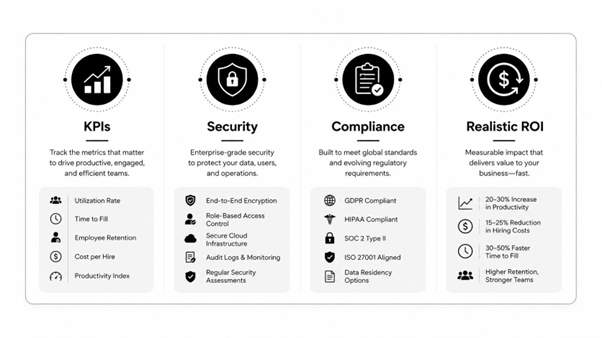
If EDocGen is being used for large templates or recurring packets, consider tracking more specific operational measures as well:
These metrics help show whether the solution is improving not just speed, but control and usability.
If you are deciding how to begin, start with the workflow that is creating the most friction today. A focused engagement with EDocGen is often the fastest way to improve control, reduce manual effort, strengthen audit readiness, and build momentum for a broader document automation program.