
A pharma team usually sees the document problem before it sees the platform problem. Commercial teams send follow-ups from one system, clinical teams assemble enrollment packets from another, quality reviews SOPs and batch records in a third, and safety staff pull case details from email, call logs, and disconnected tools. The issue is usually not missing software. It is the work required to turn scattered data into controlled, compliant outputs.
Salesforce Pharmaceuticals is most useful when it coordinates those outputs. In practice, pharma teams do not just manage records in Salesforce. They use it to trigger, govern, and deliver the documents that move work across commercial, clinical, medical, and quality operations.
Most pharma transformation programs do not start with a blank slate. They start with fragmented outputs. One team has a Veeva environment, another depends on a legacy clinical system, quality may still route approvals through shared drives and email, and safety may rely on a specialized workflow outside the commercial stack. The cost appears every time staff recreates the same information in a packet, letter, form, summary, or report.
That is why document automation becomes the real architecture issue. Pharma teams do not ship CRM records. They ship patient packets, HCP communications, site correspondence, SOPs, quality records, safety follow-ups, approval documents, and compliance-ready files. If data is spread across systems, the document layer has to pull it together reliably. If data already sits in Salesforce, the document layer has to turn it into outputs without manual formatting, copy-paste risk, or approval confusion.
Practical rule: If a process ends with a regulated document, design document automation at the same time as the workflow, not after go-live.
This is why Salesforce keeps showing up in pharma document strategy. It gives teams a central operating layer for permissions, workflow triggers, approvals, and data context. The deeper value comes when that layer is paired with a document engine that can produce the right output, in the right format, from the right data source, at the right moment.
Salesforce matters in pharma, but the platform is only part of the answer. The practical question is this: once commercial, clinical, and compliance data is in Salesforce, how do teams turn it into usable, controlled documents?
In most pharma programs, Salesforce is where a workflow starts, a status changes, or an approval is captured. A rep logs an HCP interaction. A participant moves into enrollment. A quality record reaches review. A safety case needs follow-up. At each point, a document may need to be generated, routed, signed, stored, or reissued.
That is where document automation belongs. Salesforce does not create business value simply by holding data. It creates value when that data becomes a compliant output another team, partner, provider, patient, or regulator can use.
The strongest Salesforce pharma programs treat document automation as shared infrastructure. The use cases differ by team, but the pattern is the same. Structured data enters the workflow, a controlled output is generated, and the organization can prove what was sent, approved, acknowledged, or stored.
Commercial teams need more than account history. They need approved leave-behinds, meeting summaries, follow-up letters, enrollment support documents, and compliant communications that reflect the latest account and consent status. If that content is assembled manually, field teams lose time and compliance teams inherit avoidable review risk.
Salesforce has positioned Life Sciences Cloud for customer engagement around helping HCPs deal with information overload. That is exactly where concise, context-aware document automation becomes useful. Instead of making reps piece together materials from static templates, the document layer can generate personalized, compliant outputs from current Salesforce data.
Clinical workflows create document demands at every stage. Screening packets, e-consent support files, enrollment summaries, site communications, follow-up letters, and randomization-related outputs all depend on accurate participant and protocol data. Teams need to know which version was generated, which data was used, and whether the output matches the approved process.
This is where Salesforce becomes more than a tracking tool. It can initiate the workflow, but the document automation layer turns clinical data into participant-ready and site-ready outputs that move the study forward.
Safety teams face tighter consequences when context is incomplete. Case intake, triage, follow-up requests, and supporting correspondence all depend on structured data and repeatable assembly. A manually built follow-up letter is not just inefficient. It creates inconsistency in a process that has to be traceable.
Salesforce-based pharma programs also extend into patient portals that can support medication refill reminders, symptom tracking, and treatment journals tied back to EHR-connected workflows. In those settings, one workflow can require several outputs at once, such as a patient letter, a provider update, a fillable form, and a stored PDF copy for the record. The integration layer for those flows can be found in EDocGen integrations .
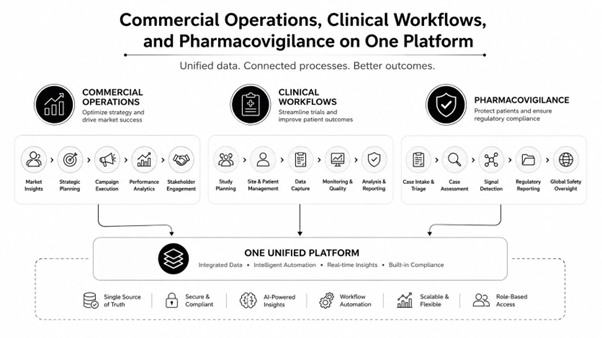
Pharma teams can usually find software to track a status, route a task, or log a note. The harder problem is generating the final output in a way that is consistent, compliant, and usable across departments. That is why document automation often delivers more value than adding another point solution.
A document layer inside the Salesforce ecosystem reduces the gap between system data and regulated output. It helps teams:
In other words, document automation turns a workflow from administratively complete into operationally complete.
In pharma, the quality of a document process is judged by what it can prove. For document automation, those controls are not background features. They are the difference between a generated file that is convenient and one that can stand up in review.
Audit trails show who generated, edited, reviewed, or approved a document and when. Role-based access helps restrict who can view protected data fields or release a controlled file. Electronic signatures under 21 CFR Part 11 matter when signature events are part of the formal regulated record.
Version control matters because teams need to prove which content was current at the time of generation. Tamper-evident logs matter because document integrity is part of inspection readiness. Encryption, authentication, and backup matter because availability and confidentiality are not optional in quality, patient, and safety workflows.
Many pharma teams can produce a document. Fewer can demonstrate lineage, control, and repeatability across its full lifecycle. Homegrown tools often solve formatting first and governance second. That approach tends to break down when the same file has to cross clinical, commercial, quality, and compliance boundaries.
A practical comparison point is HIPAA-aligned document governance. The same concerns show up in other regulated contexts, which is why teams often review a broader compliance pattern before they commit to a tool. HIPAA-compliant document generation guidance is useful as a reference point when building a control matrix.
|
Control |
Salesforce Feature |
Document Impact |
|
Auditability |
Audit trails |
Clear review history and change traceability |
|
Access control |
Role-based access |
Restricted visibility for regulated fields |
|
Signature integrity |
Electronic signatures under 21 CFR Part 11 |
Defensible approval records |
|
Documentation |
Automated documentation |
Consistent output across recurring workflows |
|
Record stability |
Version control |
Fewer disputes over approved content |
|
Integrity |
Tamper-evident logs |
Stronger inspection readiness |
|
Protection |
End-to-end encryption |
Safer handling of sensitive data |
|
Availability |
Real-time backup |
Better continuity for critical processes |
Once Salesforce is part of the operating model, the next decision is how documents will actually be generated. Most teams end up comparing three options: a homegrown document workflow, a competing commercial document platform, or a tool like EDocGen that can generate Word, PowerPoint, Excel, PDF from JSON, XML, and spreadsheets , and can run on-premises or across major cloud platforms .
The requirement is not just template creation. It is controlled, multi-format output from changing data sources across regulated processes.
A batch record is different from an SOP. A safety follow-up letter is different from a participant packet. A field communication is different from a quality approval file. A single product or patient workflow may need several of those formats at once.
That is why the document layer should be chosen based on output complexity, compliance needs, and governance model, not on which tool can create the fastest first template.
Practical rule: Choose document automation based on the range of outputs you must govern, not the easiest single use case to demo.
Homegrown document workflows can offer flexibility, but they usually place maintenance, validation, and long-term support inside the company. Competing commercial tools may shorten implementation time, but some become limiting when one process needs Word, PDF, fillable forms, and presentation outputs from the same source data.
EDocGen is positioned around multi-format output from single or combined data sources , which fits the way pharma work actually behaves. Batch records and Enrollment packets may require structured PDFs. SOPs may need Word. Regulatory packages may involve controlled compilations. Enrollment packets may need fillable forms. HCP communications may require both a letter and a deck built from the same dataset. EDocGen Salesforce document generation examples are relevant because they reflect that multi-output reality inside the Salesforce ecosystem.
Patient communications also have to respect regulated messaging channels, especially when data or reminders move outside the core platform. For that reason, teams often pair document generation with compliant messaging practices such as protecting patient data with compliant messaging, so the output stays aligned with the broader privacy posture.
Pharma leaders rarely approve a document automation initiative because templates look cleaner. They approve it when the security model is defensible, the deployment choice fits the regulatory environment, and the economics are clear within the broader Salesforce program.
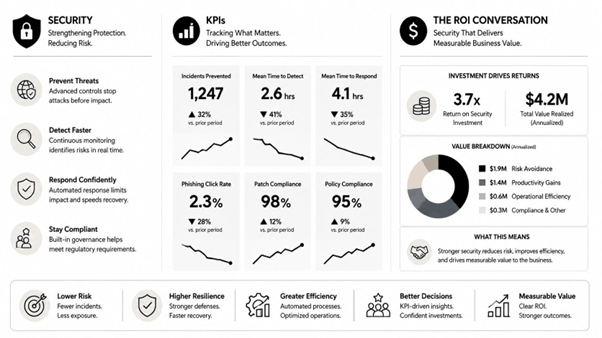
EDocGen emphasizes controls such as AES-256 encryption , and the platform supports on-premises deployment as well as major cloud environments. For global pharma teams, that is not a cosmetic preference. It affects where controlled data is processed, how documents are stored, and how the validation boundary is defined.
Role-based access remains important either way. If document generation happens outside the access and approval model, governance gets harder to defend. That is why integration design matters as much as template design. Enterprise document automation options are usually discussed in the same meeting as security architecture for that reason.
The return is usually not limited to time saved per document. It shows up in fewer manual errors, faster review cycles, cleaner approval trails, more consistent patient and HCP communications, and less operational drag between teams.
The ROI case becomes easier to defend when document automation is treated as part of the enterprise workflow already running through Salesforce. If Salesforce is the system of action, then the document layer should be evaluated by the risk it removes and the outputs it accelerates, not as a disconnected software purchase.
If your Salesforce pharma program still depends on manual assembly, disconnected templates, or too many one-off document tools, EDocGen can sit in the document layer and generate the formats your teams need from Salesforce and adjacent systems. Visit EDocGen to see how it handles regulated document generation across commercial, clinical, safety, and compliance workflows.