
When people talk about multi-lingual document generation, they often just think about swapping out words. But doing it right—at an enterprise scale—is a whole different ball game. It’s not just about word-for-word translation. It’s a strategic process for creating documents that automatically adapt their content, formatting, and language for a global audience.
This means you have to think about all the subtle but critical regional nuances: things like date formats, currencies, and even local legal clauses. The goal is to make every single document feel like it was created locally, every time.
If you're serious about taking your documents global, you need way more than a simple translation tool. You need a rock-solid, scalable architecture. At the enterprise level, this means building a system that hooks cleanly into your core business platforms—your CRM, ERP, and various databases—so that data flows exactly where it needs to, into the correct localized template.
The whole point is to escape the nightmare of maintaining separate, nearly identical document templates for every single language. I've seen companies drown in this kind of complexity. A well-thought-out system centralizes control over the structure while letting you manage language-specific content separately.
The secret to a scalable, sane architecture is what we call the "master template" approach. This is your cornerstone. You create a single, primary template that acts as the universal blueprint for a specific document type, whether it’s a contract, an invoice, or a policy statement. This master file dictates the core structure, branding, and layout.
It contains placeholders for all the dynamic content but remains completely language-agnostic. All the actual text, labels, and localized bits are handled in separate "locale files."
A locale file is just a simple resource that holds all the translated text strings and regional formatting rules (like currency symbols and date formats) for one specific language. When a document needs to be created, the system grabs the master template's structure and merges it with the right locale file.
It's a beautiful thing in practice. Let's say you need a quote for a customer in Germany. The system pulls the master quote template and combines it with your de-DE locale file. Boom—you get a perfectly formatted document in German, with Euros as the currency and dates in DD.MM.YYYY format. And the best part? You didn't need a separate German template.
This approach makes updates a breeze. If you rebrand, you only have to edit one master file, not a few dozen. This architectural shift is a big deal, and it's driving serious investment. The global document generation software market, valued at USD 3.62 billion in 2024 , is expected to race to USD 6.86 billion by 2031 . We're seeing a clear enterprise shift toward intelligent automation to handle precisely this kind of complexity.
When you're designing this system, one of the first big decisions is how you’ll manage your templates. While the master template strategy is inherently centralized, you still need to decide how strictly you want to enforce it across your organization. This often comes down to a choice between a truly centralized model and a more decentralized, per-language approach.
Here's a breakdown of how the two stack up.
|
Attribute |
Centralized Master Template |
Decentralized (Per-Language) Templates |
|
Consistency |
High. Guarantees your branding and structure look the same everywhere. |
Low. Opens the door to brand fragmentation and inconsistent layouts. |
|
Maintenance |
Simple. One update to the master template reflects across all languages. |
Complex. A single change means editing dozens or hundreds of individual files. |
|
Scalability |
Excellent. Adding a new language is as easy as creating one new locale file. |
Poor. Every new language adds another full template to your maintenance burden. |
|
Initial Setup |
Takes more upfront planning and architectural thought. |
Faster to get started for just one or two languages, but it builds up technical debt fast. |
|
Governance |
Strong. Corporate or IT can maintain tight control over the core document structure. |
Weak. Regional teams might make unauthorized changes, introducing compliance risks. |
For almost any enterprise, the centralized approach is the clear winner. It’s just smarter. It builds a strong foundation for governance and makes the entire system much easier to manage as your business expands into new markets. By architecting for scale from day one, you build a resilient system that helps you grow instead of holding you back. You can see how this fits into a bigger picture of enterprise document automation and future-proofing your operations.
The entire quality of your multi-lingual document generation system comes down to one thing: your templates. If you want to avoid a maintenance nightmare, you have to create "smart" templates designed for localization from day one. This goes way beyond just leaving a bit of extra space for translated text; it's about embedding intelligence right into the template file itself.
Modern document automation platforms give you no-code tools to bake conditional logic directly into your templates. This is a game-changer. It means a single master template can dynamically change its own content based on the recipient’s language, region, or other data points, moving you away from the chaos of managing dozens of nearly identical files.
Think about it this way: instead of a "French Loan Agreement" template and a "German Loan Agreement" template, you have one "Master Loan Agreement." This master template contains logic that says, "If the customer's country code is 'FR,' insert the French legal clauses. If it's 'DE,' insert the German ones." That’s the core idea of smart template design.
This approach radically simplifies template management and locks in consistency. When you need to update your branding or a shared structural element, you only edit one file. That single change then cascades across every regional variation automatically.
One of the most common traps in localization is underestimating how much language impacts layout. Text expansion and contraction can completely break a document with a fixed design. German text, for example, can be up to 30% longer than its English counterpart. Meanwhile, languages like Japanese might need less horizontal space but have different line-height requirements.
A smart template is built to anticipate this with a responsive design. Instead of using fixed-width text boxes that can't adapt, you build with flexible containers that expand or shrink as needed.
· Use auto-sizing text areas: These containers automatically adjust their height and width to perfectly fit the content. This prevents text from getting cut off or spilling over into other sections.
· Design for the longest language: A good rule of thumb I've picked up is this: if your layout works for German, it will probably work for most other languages.
· Test with pseudo-localization: Before you even send content for translation, run a quick test. Replace the English text with a version that mimics longer strings (e.g., "Account Balance" becomes "[Áççôûñţ βáļáñçé éééé]"). You'll instantly see where your layout is likely to break.
Beyond just the layout, your smart templates have to handle dynamic data formats correctly. A date like 12/05/2026 means December 5th in the United States, but it means May 12th in most of Europe. Displaying the wrong format not only looks unprofessional but can cause serious confusion in contracts or financial statements.
This is where data mapping with locale-aware tags comes in. You map fields in your template to the incoming data from sources like a JSON or XML feed. The trick is that these tags aren't just dumb placeholders. They are instructed to format the data based on a supplied locale code, like en-US or fr-FR .
Example of JSON Data and Template Tags:
Let's say you have this JSON data for a customer in Germany:
{ "name": "Klaus Müller", "join_date": "2024-10-28", "balance": 1500.75, "locale": "de-DE" }
Your template would use tags that automatically apply the de-DE locale settings:
· Date: A tag like {join_date | format_date} would render as 28.10.2026 .
· Currency: A tag like {balance | format_currency} would render as 1.500,75 € .
This ensures every single piece of dynamic data is culturally and technically correct for the person receiving the document. For a closer look at how these placeholders are constructed, you can explore detailed guides on data formatting for document generation . This level of detail is what transforms a simple document into a truly professional, localized communication tool.
A solid localization workflow is the backbone of any multi-lingual document strategy. Without one, you're looking at a world of manual hand-offs, copy-pasting text, and a constant risk of human error—a combination that just doesn't fly at enterprise scale. Building an automated process is really about creating a seamless pipeline between your content, your templates, and your translation providers.
The secret sauce is connecting your document generation platform with a Translation Management System (TMS) through an API. This creates a digital bridge where any new or updated content is automatically sent for translation and pulled back in when it's ready. No more emailing files back and forth.
At its core, this whole setup runs on that API integration between your document platform and your TMS. The moment a master document template is updated or a new piece of content needs translating, the workflow kicks into gear.
· Content Extraction: The system is smart enough to identify and pull out only the text strings that need translation. No junk, no code, just the words.
· API Push to TMS: It then zips these strings over to the TMS, packaged with all the necessary context, and automatically creates a new translation job.
· Leveraging Linguistic Assets: This is where the magic happens. Inside the TMS, your translation memory (TM) and term bases (glossaries) are instantly applied. The TM reuses previously approved translations, and the term base ensures your brand-specific lingo stays consistent.
This isn't just about convenience; it's about saving time and money. For instance, if 80% of a legal agreement is identical to one you've already translated, you only pay to translate the new 20% . It’s a huge efficiency gain. We dig deeper into creating these kinds of hands-off systems in our guide on document workflow automation .
This flow chart gives you a simplified look at how smart templates separate logic, layout, and data to make this kind of automation possible.
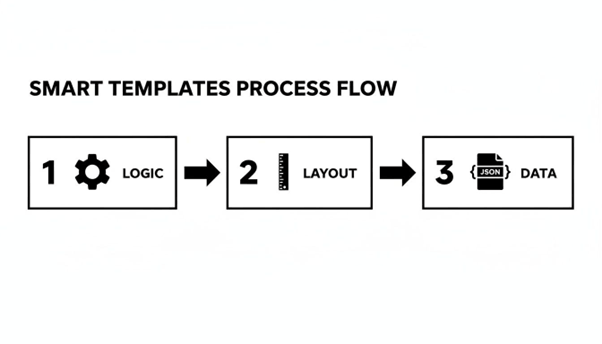
You can see why breaking these components apart is so critical for building a system that’s truly adaptable and ready for localization.
Let’s see how this plays out in a real business. Picture an international real estate company using Salesforce to manage listings and client contracts across several European countries.
Their big goal? To automatically generate a perfectly localized property contract the instant a deal is updated to "Ready for Signature" in their CRM. A powerful legal document automation software is essential here, one that can juggle different languages and content requirements on the fly.
Here's a play-by-play of their automated workflow:
· An agent in Spain closes a deal and changes the opportunity status in Salesforce. The client's preferred language is already set to "Spanish."
· That status change is the trigger. It fires an API call to the document generation platform.
· The platform immediately pulls all the necessary data—client name, property address, sale price—from Salesforce.
· It grabs the master contract template and checks it against the Spanish language file. If any legal clauses have been updated and need a fresh translation, they're automatically pushed to the TMS.
· The system then merges the approved Spanish content with the live Salesforce data, making sure to format dates and currency correctly (e.g., €1.200.000,00 ).
· Finally, the fully localized Spanish contract is generated as a PDF and sent straight to the client for e-signature.
This entire chain of events unfolds in minutes, completely hands-free. The agent never has to leave Salesforce, and the legal team can rest easy knowing every contract uses the correct, pre-approved language for that specific region.
This isn't just about making things easier; it's a strategic must-have in a global market. The ability to automate cross-border compliance and churn out accurate, multilingual documents on demand gives companies a serious competitive edge. It’s why the demand for this kind of intelligent automation is exploding, especially as businesses expand into new regions.
Traditional automation is fantastic when your data is neatly organized and structured. But let's be honest, that’s rarely the case in the real world. Data is often a mess—inconsistent, incomplete, and locked away in formats that just don’t cooperate with standard templates. This is precisely where AI takes over, moving beyond basic mail-merge style automation and adding some serious muscle to your multi-lingual document workflows.
Modern platforms are now baking AI into their core to intelligently parse and pull data from these unruly sources. Think about your HR department trying to onboard global employees. They might get personnel data in a dozen different Excel formats from various regional offices. An AI-driven system can look at those spreadsheets, figure out which column is "First Name" even if it's labeled "nombre" or "given_name," and accurately map everything into a single, structured employment contract template.
This ability to wrangle unstructured data is a game-changer, and it's what’s fueling the explosive growth of the document AI market. That sector is already at USD 32.8 billion in 2024 and is expected to rocket to USD 185.3 billion by 2034 . This isn't just hype; it's driven by a real-world need to make sense of messy information, a core headache for any global enterprise.
This capability slashes the manual effort needed for data prep, which is often the biggest bottleneck in the whole document generation process. By letting AI do the heavy lifting of data interpretation, your teams can focus on what actually matters. To see how this fits into a bigger picture, check out our guide on intelligent document automation . At the end of the day, bringing AI into the mix is about making your entire multi-lingual document system smarter, more accurate, and far more powerful.
When you're generating documents across different countries, getting the quality, consistency, and security right isn't just a "nice-to-have"—it's everything. A single flawed contract or a non-compliant invoice can open the door to serious legal and financial trouble. This means your quality assurance (QA) and security game has to be just as strong as your document generation engine.
A simple spell-check won't cut it. You need a QA framework that looks at every document from multiple angles. This is the only way to make sure nothing slips through the cracks, especially for high-stakes legal or financial documents.
Your first line of defense should always be automated. Set up your system to run automated linguistic checks that go far beyond basic grammar. These checks should flag issues with tone, formality, and make sure everything aligns with your company's specific terminology, which should be defined in a term base.
Next up is the most critical step for getting localization right: the in-country review . Honestly, this is non-negotiable. You need a native-speaking subject matter expert—like a local lawyer or a regional sales manager—to review the final translated document. Their job isn't just to check the words, but to confirm the content is culturally and contextually on point. They are your last line of defense against translations that are technically correct but practically useless.
Finally, every single document needs to be validated against its master template. This last check ensures the core structure, branding, and any non-translatable text remain untouched. It’s all about maintaining brand consistency, no matter the language. You can learn more about structuring these hand-offs by checking out how an approval document workflow can be designed to include these essential review stages.
Operating globally means data security is absolutely paramount. Your document generation system is a goldmine of sensitive information, from customer PII to confidential contract details. Protecting it requires a defense-in-depth approach.
Start with encryption. Every document, whether it’s sitting in your storage (at rest) or being sent to a recipient (in transit), must be locked down with strong encryption like AES-256 . This is the industry standard for a reason—it works.
Beyond just encrypting the files, you need granular access controls. You have to be able to dictate exactly who can view, edit, or generate specific types of documents. For instance, an HR manager in Germany should only have access to German employment contract templates, not the financial agreements being handled by the US sales team.
These controls are what stop unauthorized changes and data breaches in their tracks, which is vital for maintaining both operational integrity and your clients' trust. One unauthorized tweak to a legal clause could spell disaster.
Compliance is a minefield, not a checklist. Regulations like GDPR in Europe, CCPA in California, and countless others impose strict rules on handling personal data. A well-designed document system is one of your best tools for navigating this complexity.
Your system should create a detailed and unchangeable audit trail for every single document it touches. This log needs to capture who generated what, when they did it, what data was used, and where it was sent. When a regulator comes knocking, this information is your proof that you're following the rules.
For example, when generating a customer statement for an EU citizen, your system must enforce GDPR's data minimization principle by including only the necessary personal data. By building this compliance logic directly into your templates and workflows, you can systematically enforce regional rules. This dramatically lowers the risk of big fines and reputational damage, turning your document platform into a core asset for managing global risk.
This is a classic localization problem that trips up a surprising number of teams. The most reliable way to tackle this is with a document generation platform that handles locale-aware formatting natively.
Forget hardcoding formats like "$" or "MM/DD/YYYY" into your templates. That’s a recipe for disaster. Instead, you should pass a locale identifier—like en-US for the United States or de-DE for Germany—right along with your data. The system then does the heavy lifting, intelligently formatting everything based on that region's specific conventions.
So, a raw number like 1234.56 sent to your template placeholder gets rendered differently depending on the locale code:
· With en-US , it becomes 1,234.56 .
· With de-DE , it turns into 1.234,56 .
This isn't just about translation; it's about true localization. Getting these details right is crucial for looking professional and maintaining clarity in every market you operate in.
With legal or compliance-heavy documents, there's zero room for error. The process has to be completely airtight to manage risk. A multi-step workflow is the only way to go.
First, your document platform needs to integrate directly with a professional Translation Management System (TMS). This lets you tap into assets like translation memory, which guarantees that your standard legal clauses are translated the exact same way, every single time. Next, all translations must be done by certified legal translators who are genuine experts in the target country's legal landscape.
The most critical step, and one you can't afford to skip, is the "in-country review." This means having a local legal or compliance expert from that specific country validate the final translated document. They're looking for legal accuracy, local nuance, and overall validity—it's the final, essential sign-off.
The entire process, from the first translation request to the final approval, must be captured in a detailed audit trail. This gives you a clear, defensible record of the document's entire lifecycle..
Yes, and you absolutely should. A good automation strategy doesn't just stop when the document is created. It needs to cover the entire distribution and storage process, too. A solid multi-lingual document generation system should let you build these complete, end-to-end workflows.
For instance, once a contract is generated in Spanish, the system can automatically trigger a sequence of actions. It might email the document to the recipient based on a language field in your CRM, and save a copy to a specific SharePoint folder—all at the same time.
This logic can also be conditional. You could set up a rule where invoices for European customers are delivered via email, while documents for another region are sent to a local print-and-mail partner for physical delivery. It all happens automatically, with no one having to lift a finger.
Ready to conquer the complexities of global document workflows? EDocGen provides the powerful, no-code platform you need to automate multi-lingual document generation at enterprise scale, ensuring every document is perfectly localized, compliant, and delivered instantly. Learn how EDocGen can transform your document processes today!