
Let's be honest: when you hear "document automation," you probably think of just generating a file. But for a technical audience, that’s only the first 10% of the job. True document workflow automation isn't about making a single file; it's about building a fully connected assembly line for your company's information . It takes the entire lifecycle of a document—from creation and approval to e-signing and archival in cloud storage—and turns it into one smooth, programmatic flow.
Think about the typical journey of a single sales contract. It usually starts with a sales rep painstakingly copying customer data from your CRM into a Word template. Then, they email that file to a manager for approval. Once it's finally approved, the rep has to download it, upload it to a separate e-signature platform, and send it off to the client.
After the signature comes in, someone has to remember to download that final version and drag it into the right folder on SharePoint or Google Drive. This disjointed, chaotic process is a silent killer of productivity and a maintenance nightmare for technical teams. This fragmentation isn't just a minor annoyance; it’s a source of real, tangible friction that your teams battle every single day.
The difference here is staggering. Manually processing a document can take anywhere from 15-30 minutes . With automation, that same task is done in just 2-30 seconds . For a team handling 500 documents a day, that adds up to over 120 hours of manual work saved. Discover more about the financial impact of document automation .
Without a unified system, your business is bleeding time and money through thousands of tiny, invisible cuts. Every email attachment, every manual upload, and every "just checking in" status update contributes to a mountain of inefficiency. This is exactly the problem a true document workflow automation platform like EDocGen is built to solve.
Let's cut through the marketing noise. Plenty of platforms out there will tell you they offer "document automation" when all they really do is fill out a PDF template. That’s not the whole story. Not even close.
Real document workflow automation is an intelligent, connected system that handles a document's entire lifecycle —from the moment it's conceived all the way to its final resting place in an archive. Think of it less like a single factory machine and more like a smart logistics network for your company's most critical information.
This network has distinct, interconnected stages that get rid of the risky manual handoffs that plague most businesses. It all starts by pulling data directly from your core systems, like a CRM or database. From there, it dynamically generates a document, using conditional logic to make sure every clause, figure, and detail is exactly right.
The process most companies are stuck with looks something like this:
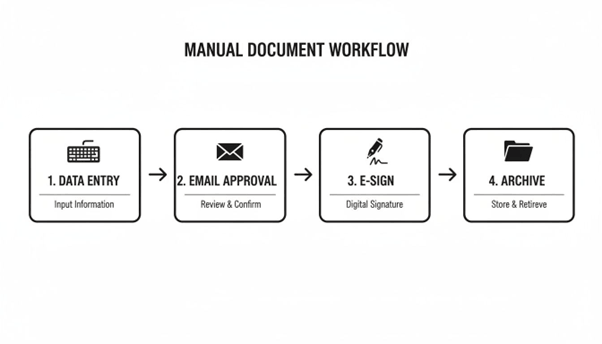
Every single arrow in that diagram represents a potential bottleneck. It's a chance for human error, a compliance blind spot, and a major drain on your team's time. True workflow automation turns this clumsy, multi-step mess into a single, fluid motion.
A complete document workflow goes far beyond just creating a file. Instead of juggling disconnected tools and processes, it unifies every action that happens after generation into one seamless flow. While the exact steps can vary, a mature workflow always includes a sequence of automated actions that kick off once the document is made.
EDocGen is built to manage this entire post-generation journey. It’s what separates a true automation platform from a simple file-maker.
The table below shows just how different the two approaches are. One is a series of frustrating, disconnected tasks. The other is a smooth, predictable system.
|
Lifecycle Stage |
Manual Process (The Disconnected Way) |
Automated Workflow (The EDocGen Way) |
|
Creation |
Manually copy-pasting data into a static template. High risk of typos and outdated information. |
Data is pulled directly from source systems (CRM, DB) into dynamic templates. Always accurate. |
|
Review/Approval |
Endless, confusing email chains. Version control chaos. No clear audit trail of who approved what. |
Rule-based sends the document to the right people in the right order. Fully tracked. |
|
Distribution |
Manually attaching files to emails or uploading to e-sign portals. Easy to send the wrong version. |
Automatically delivered via email, sent for E-Sign, or pushed to other systems once approved. |
|
Archiving |
Someone has to remember to save the final, signed copy to the right folder. Often forgotten or misfiled. |
The final version is automatically pushed to your system of record ( AWS S3, Azure Blob, SharePoint, Google Drive, etc.). |
|
Data Update |
The process ends. Data from the signed document is now siloed and needs to be manually re-entered. |
Key data from the final document can be written back to the source system, closing the loop. |
As you can see, the difference is night and day. Automation gives you a reliable, end-to-end process you can actually trust.
For businesses with unique needs, EDocGen also supports workflows for creating print-ready documents and auto-saving documents to legacy systems like FTP servers . This flexibility means automation can work across your entire tech stack, not just the new and shiny parts.
And for the ultimate level of control, the EDocGen REST API allows your developers to build completely custom document workflows from the ground up, programmatically integrating every step with your own in-house applications. This is the difference between a simple tool and a true enterprise platform.
We’ve all seen it happen. An organization tries to cobble together a document workflow by stitching together a mess of different tools. They’ll use one platform for document generation, another for e-signatures, and then rely on manual uploads to get everything into cloud storage. It’s a fragile, script-heavy system that becomes a complete nightmare to maintain.
EDocGen takes a fundamentally different, and frankly, more sensible approach. Instead of forcing you to glue together a dozen different systems, it gives you a single, unified platform to manage the entire document lifecycle, from the moment it’s created to its final archival. It’s designed to end the post-generation chaos with one powerful, integrated toolset.

Let’s be honest: one of the biggest time-sinks in any document process is the review and approval stage. Chasing down stakeholders with endless email threads isn't just inefficient; it leaves you with no clear audit trail. EDocGen cuts through this chaos by introducing structured, automated approval workflows .
You can easily configure multi-level approval chains that route documents to the right people in the right order. For example, a new sales contract can automatically go to the legal team first. Once they approve it, the workflow can instantly send it over to the finance department for the final sign-off. No more manual forwarding or wondering "who has the document now?"
The platform’s visual interface makes setting up these rules a breeze, ensuring every document follows a compliant and predictable path. This doesn't just speed up reviews—it creates an undeniable record of who approved what, and when.
Once a document is approved and finalized, the job still isn't over. It needs to get to the right places, whether that’s a client’s inbox, an e-signature platform, or your company's official system of record. EDocGen handles all these "last-mile" delivery steps automatically.
Instead of someone manually downloading and re-uploading files, you can build workflows that trigger these critical actions:
· Email Distribution: Automatically fire off the finalized document to clients, stakeholders, or internal teams.
· E-Sign Integration: Seamlessly push the document to leading e-signature providers to capture legally binding signatures—no manual uploads required.
· Cloud Storage Sync: Automatically save the final version to the correct folder in AWS S3 , Azure Blob Storage , SharePoint , OneDrive , or Google Drive .
· Legacy System Support: For companies still using older infrastructure, EDocGen can even generate print-ready documents or auto-save files directly to an FTP server .
This is the real magic of true document workflow automation: creating a single, unbroken chain of events from creation to archival. EDocGen becomes the central conductor, orchestrating every action and making sure your documents flow effortlessly across your entire tech stack.
While the no-code interface is a huge win for business users, EDocGen's real power for technical teams is its REST API . This gives your developers complete programmatic control over the entire workflow, letting you build truly bespoke solutions that hook directly into your proprietary, in-house systems.
Instead of being limited to a predefined set of actions, your team can use the API to:
1. Trigger document generation from any of your existing applications.
2. Kick off complex approval chains based on custom business logic.
3. Manage and route outputs to any destination, including custom-built endpoints.
4. Push final documents to secure cloud destinations like S3 or Azure Blob.
This API-first design transforms EDocGen from a simple tool into a flexible, developer-friendly platform. It provides a robust backbone for your entire enterprise document strategy, allowing you to finally replace those brittle scripts and manual processes with reliable, scalable automation. And with a huge range of integrations available through EDocGen, you can connect all your essential business systems into one cohesive workflow.
Out-of-the-box solutions are often just a starting point. For any serious developer, the ability to programmatically control every piece of a system isn't just a nice-to-have; it's a deal-breaker. This is where EDocGen really separates itself from the more rigid tools on the market.
EDocGen provides a robust, developer-first REST API that acts as the ultimate engine for building truly custom, enterprise-grade document workflow automation .
This means your team can go way beyond the UI to programmatically direct the entire document lifecycle. It's about treating document automation not as a siloed tool, but as a core, plug-and-play service inside your company's architecture.
Instead of wrestling with manual triggers or fragile "zap-style" connectors, you can build deep, reliable integrations directly into your own in-house applications.
Here’s what that actually looks like:
· Trigger Generation from Anywhere: Kick off document creation right from your CRM, ERP, or any custom-built application. A new opportunity marked "Closed Won" in Salesforce could instantly trigger the generation of a personalized welcome packet and contract.
· Manage Outputs Dynamically: Programmatically decide where finished documents land. Based on the document type or data it contains, you can automatically send one file to an AWS S3 bucket, another to a specific SharePoint folder, and a third to a secure FTP server.
· Integrate with Proprietary Systems: This is the game-changer. Your team can connect EDocGen to legacy databases or custom internal dashboards that are completely off-limits to most off-the-shelf automation tools.
This developer-focused resource provides the exact specifications your team needs to turn ideas into functional code. The endpoints are logically organized to cover generation, output management, and all the necessary integration hooks.
Picture a classic enterprise task: a fully automated "generate-approve-sign-archive" sequence for a new client contract. With the EDocGen API, a developer can orchestrate that entire flow with a few simple API calls.
This programmatic approach is essential as businesses modernize their tech stacks.
A Developer's View: A Custom Workflow Sequence
1. POST /api/v1/generate : Your internal system calls this endpoint with customer data (JSON) to create the initial contract.
2. POST /api/v1/approve : The system then kicks off a pre-configured approval workflow for your legal and finance teams.
3. POST /api/v1/deliver/esign : Once approved, another API call sends the document straight to your e-signature provider.
4. POST /api/v1/output/s3/upload/{id} : After signing, a webhook from the e-sign platform triggers one last API call to archive the executed contract in your secure AWS S3 bucket.
This level of control makes EDocGen a flexible and powerful backbone for your entire enterprise document strategy. It's not just another rigid tool; it's a platform built for developers to solve real-world integration headaches. For a deeper look at how this works, check out our guide on the EDocGen document generation API .
Putting automation into practice is a logical process. Think of this as your blueprint, breaking down the project into manageable phases that will take you from the initial analysis all the way to a full-scale deployment.
1. Map Your Current Process: Before you can automate anything, you have to know exactly what you’re fixing. Take the time to meticulously map out every single step of your chosen manual workflow, from the first data entry to the final archival. Pinpoint every handoff, every delay, and every potential point of error—these are your targets for automation.
2. Design the New Automated Flow: With your bottlenecks laid bare, it's time to design the new, streamlined workflow using a platform like EDocGen. This is where you map out the logic: what kicks off the process, who needs to sign off on it, and where the finished document ends up.
3. Configure Templates and Integrations: Now for the core technical setup. This involves configuring your dynamic document templates to pull data directly from your source systems. You'll then connect the key integrations for your workflow—maybe your CRM for customer data, an e-sign tool for signatures, and cloud storage like AWS S3 or SharePoint for safekeeping.
4. Pilot and Refine: Don't go all-in at once. Launch the new workflow with a small, controlled group of users. This pilot phase is your chance to gather crucial, real-world feedback. Use their input to smooth out any friction points and make adjustments before a full rollout.
5. Scale and Measure: Once you've ironed out the kinks, you can scale the solution across the entire department or organization. As you expand, make sure you're continuously tracking key performance indicators (KPIs) like document processing time, error rates, and resource hours saved. This is how you'll quantify your success and prove the ROI.
Following this blueprint gives you a concrete plan to get started. You can begin by simply exploring a platform's foundational tools. For instance, help guide on getting started with EDocGen can walk you through how the initial setup actually works.
This is a big one. Many tools just spit out a file and call it a day, leaving you to figure out what happens next. EDocGen is built differently; it manages the entire document lifecycle, not just the creation part.
Think of it as the conductor for everything that happens after you generate a document. This is where we really stand apart. You don’t have to manually glue together separate systems for approvals, delivery, and storage.
With EDocGen, it's all part of one unified workflow:
· Complex Approvals: You can set up multi-step approval chains that automatically send documents to the right people, in the right order. Our help docs have a great guide on setting up your approval document workflow .
· Automated Delivery: Once everyone signs off, the workflow can instantly fire off the final document via email or route it for an e-signature .
· Secure Archiving: The final, executed document gets automatically filed away in its designated spot. No more dragging and dropping.
The final step—getting your documents securely stored—is critical. EDocGen gives you broad and flexible options here, so your documents land safely in your system of record, no matter what your tech stack looks like. We have native support for pushing documents to all sorts of destinations.
Our platform integrates directly with:
· Cloud Object Storage: Send documents straight to AWS S3 and Azure Blob storage for secure, scalable, and cheap archiving.
· Collaboration Suites: Automatically sync your files to SharePoint , OneDrive , and Google Drive so your teams always have the latest version.
· Legacy Systems: Still running on-prem? No problem. EDocGen can auto-save documents to an FTP server or even generate print-ready documents for physical filing.
This flexibility means you can automate that "last mile" of your document process, whatever your infrastructure happens to be.
Absolutely. This is where your technical team will really see the difference. Our no-code interface is powerful, but the EDocGen REST API gives you total freedom. Your developers can programmatically control every single step to build workflows that match your unique business logic perfectly.
For example, you could use the API to trigger a document's generation from one of your internal apps. After it’s created, you can call a specific endpoint like post_api_v1_output_s3_upload__id_ to push it to Amazon S3 or post_api_v1_output_azure_blob_upload__id_ to send it over to Azure Blob storage.
This API-first design makes EDocGen a true developer platform, not just another rigid tool. It means you can embed powerful document automation right into your own apps—something most alternatives just can't do.
Ready to stop wrestling with disconnected tools and build a truly seamless process? Discover how EDocGen provides a single, unified platform for end-to-end document workflow automation. . Start your journey with EDocGen today .