
Ever stared at a Salesforce record, dreading the copy-paste marathon required just to create a single proposal or contract? A Salesforce PDF generator is the answer. It automates the entire process, turning your CRM data into polished, professional documents—invoices, quotes, agreements—with a single click. No more manual errors, just countless hours saved.
The takeaway is clear: automation isn't just about speed; it's about fundamentally improving the quality, reliability, and security of your entire document workflow.
The market for Salesforce document generation tools is growing fast, signaling a clear shift away from these outdated, manual workflows. If you're looking for ways to streamline your own processes, our guide on how to automate document workflows is a great place to start.
The numbers don't lie. The Salesforce CRM Document Generation Software market, valued at USD 1,208.1 million in 2025, is projected to hit USD 3,308.8 million by 2035. That’s a compound annual growth rate ( CAGR ) of 10.6% , driven by businesses needing automated workflows for better accuracy and compliance. Large enterprises, in particular, are leading the charge, making up a massive 66.4% of the market share.
By bringing this process inside Salesforce, you create a central hub where accurate, compliant, and perfectly branded documents can be generated in an instant.
Let's walk through a classic, real-world scenario: creating a dynamic loan agreement.
The best templates almost always start life in a familiar place, like Microsoft Word or Google Docs. There's no need to learn a new design tool from scratch. Your legal and marketing folks can hammer out the layout, branding, and all the static boilerplate text using the software they already live in. They can get the headers, footers, and standard clauses pixel-perfect without ever needing to ping a developer for help.
Once that static version looks good, the fun part begins.
Now we get to turn that static Word doc into a living, breathing template. The process involves dropping in special placeholders, which you might hear called merge tags or tokens , right into the document. These tags are essentially direct pipelines to specific fields in your Salesforce org.
If you've ever done a mail merge, you're already halfway there—but this is way more powerful. For our loan agreement, you'd place tags like {Account.Name} and {Account.BillingStreet} exactly where the borrower's information needs to go.
The workflow is incredibly straightforward:
This simple mapping is the core of the whole process. It guarantees that whenever someone clicks "Generate" on an Opportunity record, the document is instantly and accurately filled with data from that specific record. No more copy-paste errors.
Of course, real-world documents are rarely that simple. What happens when the data you need isn't neatly stored in a single field on one object? This is where a truly capable PDF generator earns its keep, especially when you're dealing with related records or nested data.
Imagine that loan agreement needs to list out every guarantor or co-signer. In Salesforce, those are probably stored as related Contact records on the Opportunity. Instead of manually adding each one, you can set up a "loop" in your template. You just wrap a section of your document—say, a table row—in special start and end tags. The generator then automatically repeats that section for every single related Contact it finds, filling in their name, address, and other details along the way.
It’s the same idea for a sales quote. You could tag a single table row with fields for product name and price, like {OpportunityLineItem.Product2.Name} and {OpportunityLineItem.TotalPrice} . When generated, the platform automatically adds a new row for every single product tied to that Opportunity, building a perfect, error-free line item table in seconds.
Pro Tip: Don't just think about the data that lives on the record you start from. Think about the data that's related to it. A great document generator can traverse those relationships, pulling in details from the parent account, notes from related cases, or data from completely custom objects to build a truly comprehensive document.
The most sophisticated templates don't just pull data—they make decisions based on it. This is done with conditional logic , which lets you show or hide entire sections of your document based on the data coming from Salesforce. It's basically an "if-then" statement you can build right into your Word file.
Let's go back to our loan agreement. Maybe you have specific legal clauses that only apply to loans over a certain value. You could wrap that entire multi-paragraph section with a simple condition:
This kind of logic is a total game-changer. It means you can stop maintaining dozens of slightly different versions of the same template. Instead, you have one intelligent master template that adapts on the fly, ensuring compliance and accuracy without anyone having to remember which version to use. It's a major reason why over 100,000 companies worldwide now use document automation inside Salesforce to generate compliant, data-driven contracts and reports. You can see how different industries are applying this in this market analysis.
Ultimately, building a dynamic template transforms a static file into an active, intelligent asset. For an even deeper look, check out our guide on creating a fillable PDF template .
Creating a single dynamic document is a great first step, but the real power of a Salesforce PDF generator kicks in when you start automating the process across the entire enterprise. What if you need to produce hundreds or even thousands of documents a day. This is where high-volume automation changes the game.
To really scale your document creation, you have to think beyond individual records. The goal is to build out workflows that run on their own, kicked off by business events or set to a specific schedule, completely taking the human element out of the process. This isn't just about being more efficient; it's about building a reliable, predictable system for your most critical business communications.
There are two main ways to approach this level of automation, and each one fits different business needs.
The first and most common approach is the "push" method. This pattern is all about being event-driven. In simple terms, document generation is triggered in real-time by a specific action or data change right inside Salesforce. Think of it as your CRM proactively pushing a request to create a document the exact moment it's needed.
Salesforce Flow is your best friend here. You can set up a flow that keeps an eye on a record and, as soon as certain criteria are met, it fires off the PDF generation process.
Here are a few real-world examples I've seen work wonders:
This push method is perfect for any time-sensitive document where you need immediate action. Its biggest advantage is responsiveness—the document gets created the very instant the business event happens.
The second pattern is the "pull" method. Instead of a real-time event, this one is based on a recurring schedule. In this model, the document generation platform is set up to query Salesforce at specific intervals—say, every night at midnight—and pull any records that meet the criteria for bulk processing.
This approach is the workhorse for batch jobs and recurring reporting that happens on a predictable rhythm.
This scheduled, query-based approach is the engine of high-volume operations. It lets you process thousands of records in a single, unattended job, ensuring total consistency and freeing up your team from those mind-numbing, end-of-period tasks.
Common use cases for the pull method are things like:
To truly get the most out of your system, you have to know how to properly automate document workflows. Combining both push and pull methods will cover just about any business requirement you can throw at it. For a deeper dive into scaling up, you can learn more about high-volume document generation .
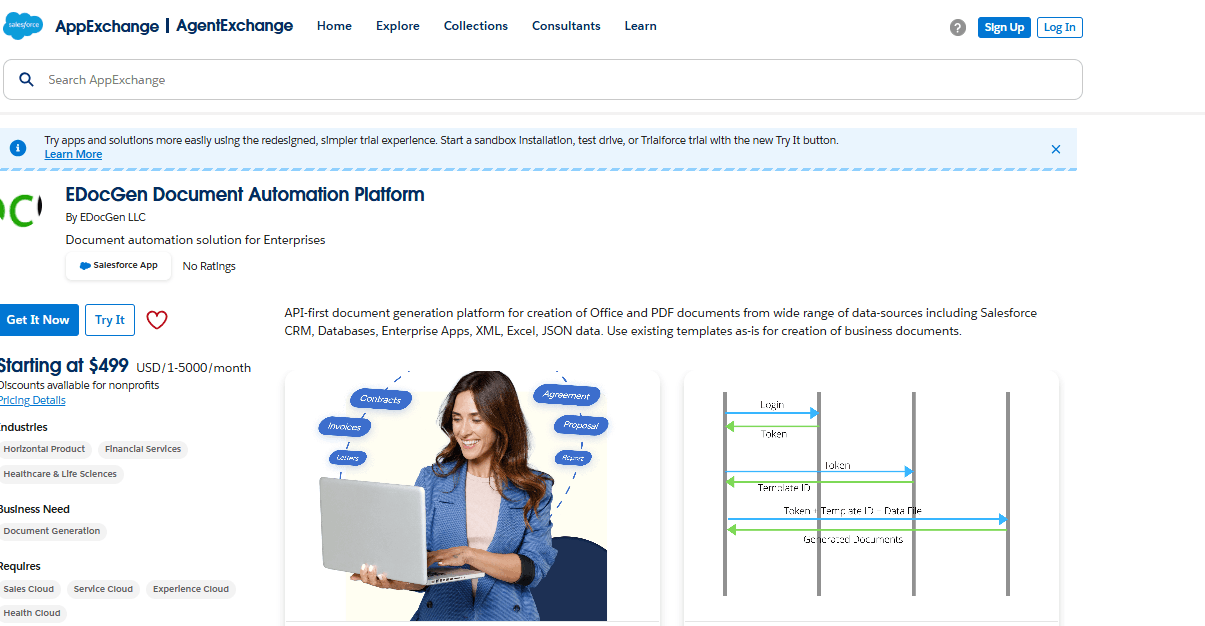
EDocGen offers a REST API as well as an AppExchange App.
This diagram visualizes the three-step process for creating the templates that power all these automations.
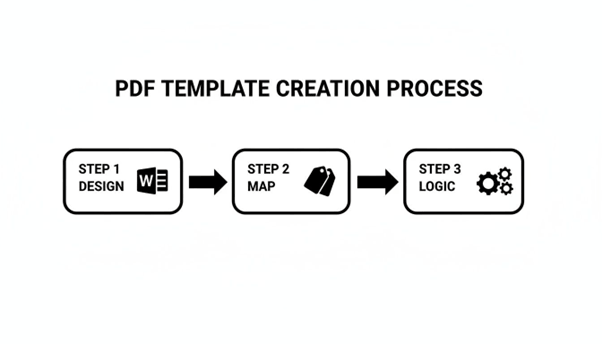
It’s this flow—from designing the layout to mapping data fields and embedding business logic—that makes these automated documents so smart and dynamic.
Whether you're using a real-time push from a Salesforce Flow or a scheduled pull for a massive batch job, the core idea is the same. You are turning your Salesforce PDF generator from a simple on-demand tool into a fully automated engine that drives core business processes without anyone needing to lift a finger.
Getting a perfect, data-driven PDF out of Salesforce is a huge win, but let’s be honest—it’s only half the job. A document doesn't add value just sitting on a server. It needs to get to the right people, get signed, and be filed away correctly.
This final mile, distribution and execution, is where so many workflows completely fall apart. It’s also where a fully integrated Salesforce PDF generator really proves its worth.
The goal here is a completely seamless, end-to-end process. Picture a sales rep clicking a single button on an Opportunity. In the background, the system whips up a personalized contract, shoots it over to the customer for their signature, and once it's signed, automatically files the executed copy right back into Salesforce. This isn't some far-off dream; it's a standard feature for modern document automation platforms.
While e-signatures are a must for agreements, not every document needs one. Your distribution strategy needs to be flexible enough to cover all sorts of communication needs, all driven by rules you set. This means getting beyond just emailing attachments and building a real multi-channel distribution engine.
A powerful Salesforce PDF generator lets you set up rules that automatically route documents to the right place based on the context.
The key is to let your data and business process dictate the delivery method. By configuring these automated distribution rules, you ensure that every document not only gets created correctly but also lands in the right place, with the right people, every single time.
This automated final step is what truly closes the loop. It turns your document workflow from a series of manual, disconnected tasks into a smart, cohesive system. To see how these connections work in practice, you can explore the various integrations available for document automation. By tying generation, e-signature, and distribution together, you create a powerful workflow that speeds up business cycles, slashes administrative work, and delivers a better experience for both your team and your customers.
When your documents are packed with sensitive customer data, financial info, or legally binding agreements, security stops being a feature—it becomes the bedrock of your entire workflow. Moving that kind of data around without iron-clad safeguards is simply a non-starter, especially for industries like finance, insurance, and healthcare.
This is where EDocGen Salesforce PDF generator has to prove its worth. It’s not enough to just create pretty documents. You need a solution that meets the tough security standards your IT and compliance teams live by. The goal is a workflow that’s not only fast but also completely defensible.

One of the first big conversations you'll have with your IT team is about deployment: cloud or on-premise? There’s no single right answer here. The decision hinges entirely on your company's security posture, data residency rules, and the regulatory hoops you have to jump through.
· Cloud Deployment: A SaaS solution gets you up and running quickly with automatic updates and less infrastructure to manage on your end. The provider handles the hardware and security stack, which is a huge plus for teams that need to move fast.
· On-Premise Deployment: For organizations with strict data sovereignty laws or a flat-out ban on third-party clouds touching their data, on-premise is the only way to go. This puts your IT team in the driver's seat, giving them total control over everything from the network firewall to the physical servers. It’s more work for your internal team, no doubt, but it offers the highest level of data isolation possible.
This choice is foundational, as it dictates exactly how data flows between Salesforce and the generation service.
Beyond where the software lives, the platform itself needs to be armed with robust, built-in security features. When your compliance team starts kicking the tires on a Salesforce PDF generator, these are the non-negotiables.
This one’s a deal-breaker. Any data sent between Salesforce and the document platform must be encrypted in transit using protocols like TLS 1.2 or higher . And it doesn't stop there. Any documents or temporary data stored by the service must be encrypted at rest, preferably with AES-256 encryption —the gold standard for protecting sensitive info.
Security isn't a single checkbox; it's a continuous process. Your platform of choice must offer clear, auditable proof that it protects data both in motion and at rest. Anything less is a gamble.
For any kind of compliance, you have to be able to answer the question: who did what, and when? A comprehensive audit trail is the only way to do that. It should log every critical event in a document's life.
This means tracking:
This granular level of logging is your best friend during an audit and is invaluable for any internal security investigations. To see how this fits into a larger process, check out this guide on creating an approval document workflow .
The solution has to play by the rules of your industry and geography. If you're in healthcare, the platform provider must be willing to sign a Business Associate Agreement (BAA) for HIPAA compliance. If you do business in Europe, it needs to be GDPR-compliant and support data subject rights.
Absolutely. This is exactly what a solid PDF generator is built for. You're not stuck with just standard objects like Accounts or Opportunities. Any custom object you’ve created to run your unique business processes can be mapped into your documents.
For trickier scenarios, like pulling every single product line item from an Opportunity into a pricing table, the system uses what we call "looping" tags. You just define a repeatable section in your template—think of a table row or a list item—that needs to duplicate for each record in a related list. The generator handles the rest, automatically building out dynamic tables for quotes, invoices, and reports without anyone lifting a finger.
The real magic is in its ability to walk through relationships. You can start on an Opportunity, pull data from the parent Account, grab related Contacts, and even dig into custom child objects, all to populate one cohesive document.
This is a big architectural decision, and it’s important to get it right. An AppExchange app installs directly into your Salesforce org. The upside is a tight, native integration, but it has to live within Salesforce's governor limits, which can be a bit restrictive for really complex workflows that touch other systems.
An API-based generator , however, runs as its own dedicated service and just talks to Salesforce through secure API calls. This approach usually gives you a ton more flexibility and power because it isn't held back by Salesforce's processing limits. It’s often the go-to choice for companies with high-volume needs or those who need to pull in data from other systems alongside what's in Salesforce.
EDocGen is offers both AppExchange App as well as REST API.
Maintaining brand governance is one of the biggest wins of automating your document workflows. Instead of letting users freestyle their own documents, you create a central library of pre-approved, locked-down templates.
This gives you total control over your brand identity:
The dynamic parts get populated from Salesforce, but all the static, branded elements stay exactly as you designed them. This setup guarantees every single document—from a sales proposal to a customer letter—is perfectly on-brand.
The return on investment here is huge and hits on multiple fronts. The most immediate win is the massive cut in manual work—tasks that used to take hours are suddenly done in seconds. Next up, automation virtually wipes out human error, saving you from costly mistakes in contracts and invoices.
But it goes deeper than that. You'll see your business cycles speed up. Sales reps can fire off contracts faster, which means you recognize revenue sooner. Finally, it’s a powerful way to reduce compliance risk by making sure every document uses approved language and is tracked automatically. You can see more real-world examples in our guide to Salesforce document generation .
Ready to eliminate manual document creation and ensure brand consistency across your entire organization? EDocGen empowers your teams to generate accurate, professional PDFs directly from Salesforce data with just a click. Learn more and see how it works today!