
A REST API that generates business documents from templates your team already owns — populated from JSON, XML, Excel, or a database — without hardcoding a template into your application layer.
Why a Document Generation API Instead of Coding Each Template
The common alternative to an API is coding document logic directly into core systems: one code path per template, per format. It works until a template changes — then every dependent code path needs a matching update, and none of that logic is reusable across templates.
A document generation API separates the two concerns. Business users manage templates in their native editor (Word, Excel, PowerPoint); developers call one API to merge data into whichever template ID they need, in whatever output format the request specifies. The EDocGen API handles generation and distribution together, so a single call can produce a document and route it to email, e-sign, or storage.
Where EDocGen Fits Among Document Generation APIs
"Document generation API" now covers a wide range of tools with different trade-offs. Output format is one of the sharpest lines: Adobe's Document Generation API produces PDF or Word (DOCX) only, and CraftMyPDF, PDFMonkey, and APITemplate.io produce PDF (and, for some, images) only — none generate native Excel or PowerPoint files from a data-driven template. EDocGen generates PDF, Word, Excel, and PowerPoint from the same API and the same template model, so a single integration covers document types that would otherwise need a separate tool.
- Adobe Acrobat Services (Document Generation API) — a strong choice if you're already inside the Adobe ecosystem; outputs PDF or Word only, and it's API-first rather than a business-user template platform, so template changes typically route back through developers.
- CraftMyPDF, PDFMonkey, APITemplate.io — lightweight, developer-friendly, and cheap at low volume; output is PDF (or images) only, templates are usually built in HTML/CSS or a visual editor rather than native Word/Excel/PowerPoint, and bulk/enterprise data-source integration (CRM, live databases) is limited or absent.
- EDocGen — the only one of this group generating PDF, Word, Excel, and PowerPoint natively from the same API, plus enterprise data sources (MySQL, MSSQL, Oracle, MongoDB, Salesforce, Dynamics 365) and asynchronous bulk generation for thousands of documents per run.
For a broader side-by-side across more vendors, see our comparison of the top document generation providers and PDF generation API roundup — this page focuses specifically on how EDocGen's own API works and how to integrate it.
Capabilities Most Document Generation APIs Don't Have
Beyond output format, three features come up repeatedly when comparing EDocGen to HTML/CSS-based PDF generation APIs, which typically render a single flat template per call:
- Sub-templates and content-block population — a master template can pull in reusable content blocks (clauses, standard sections, boilerplate paragraphs) by reference, and each block can carry its own dynamic text, tables, or images. Most single-template APIs have no equivalent — the whole document is one template with no reusable, independently-updatable parts. See the content blocks documentation.
- Charts and graphs from the same data payload — the API can populate charts and graphs directly from the JSON/Excel data driving the rest of the document, rather than requiring a separate charting service or a pre-rendered image passed in as a static asset.
- Central template repository with version history — templates live in one repository with role-based access, rather than as files scattered across a codebase or a third-party dashboard, and prior versions are restorable (including via SharePoint DMS). HTML/CSS template APIs generally version templates informally, if at all, inside their own editor.
Using the API from an AI Agent
Because EDocGen's generation logic is defined explicitly in the template (conditions, calculations, loops) rather than drafted freeform, it's a predictable, auditable step for an AI agent to call — the same input always produces the same output. An agent handling a support ticket, a sales workflow, or a compliance process can call /document/generate as a deterministic action rather than asking a language model to draft the document text itself. The API is also exposed through EDocGen's MCP server for agent frameworks that consume MCP tools directly.
Key Features
Business users create and edit PDF, Word, Excel, and PPTX templates in their native editors — no separate designer tool, no developer dependency for routine template changes. Templates live in a central repository with role-based permissions. Developers then generate documents two ways:
- On-demand generation — a synchronous API call for fast, single-document creation and download.
- Bulk generation — an asynchronous call built for high-volume runs, generating thousands of complex documents in seconds.
Output formats include PDF, Word, Excel, PowerPoint, image, and plain text.
Dynamic Field Types
Templates support dynamic text, tables, content blocks, hyperlinks, and images, plus conditional statements, arithmetic calculations, and loops evaluated at generation time.
- Text and tables — dynamic text, tables, loops, lists, and nested tables.
- Images and codes — Base64 images, image URLs, QR codes, and barcodes.
- HTML, graphs, and charts — populate HTML styling and charts from the same data payload.
- Sub-templates and paragraphs — generate variations of a master template by populating reusable content blocks (see our content blocks documentation).
The API also supports multi-lingual templates (including RTL languages), arithmetic calculations, and if-else conditional logic — used for proposals, invoices, contracts, and similar generated documents.
Data Sources
| Data | JSON, XML, Excel |
|---|---|
| Databases | MySQL, MSSQL, Oracle, MongoDB |
| CRM | Salesforce, Dynamics 365 |
After generation, documents distribute through several channels:
| E-sign providers | DocuSign, SignNow, Signaturely |
|---|---|
| Document management | SharePoint |
| Cloud storage | S3, Azure Blob, OneDrive, Google Drive |
| Email providers | Amazon SES, SendGrid, Office 365, GSuite |
How a Template Gets Populated: A Worked Example
A template is your normal Word/Excel/PDF/PPTX file with tags marking where data goes. Tag names in the template must match the keys in the JSON you send. Say a Word invoice template contains:
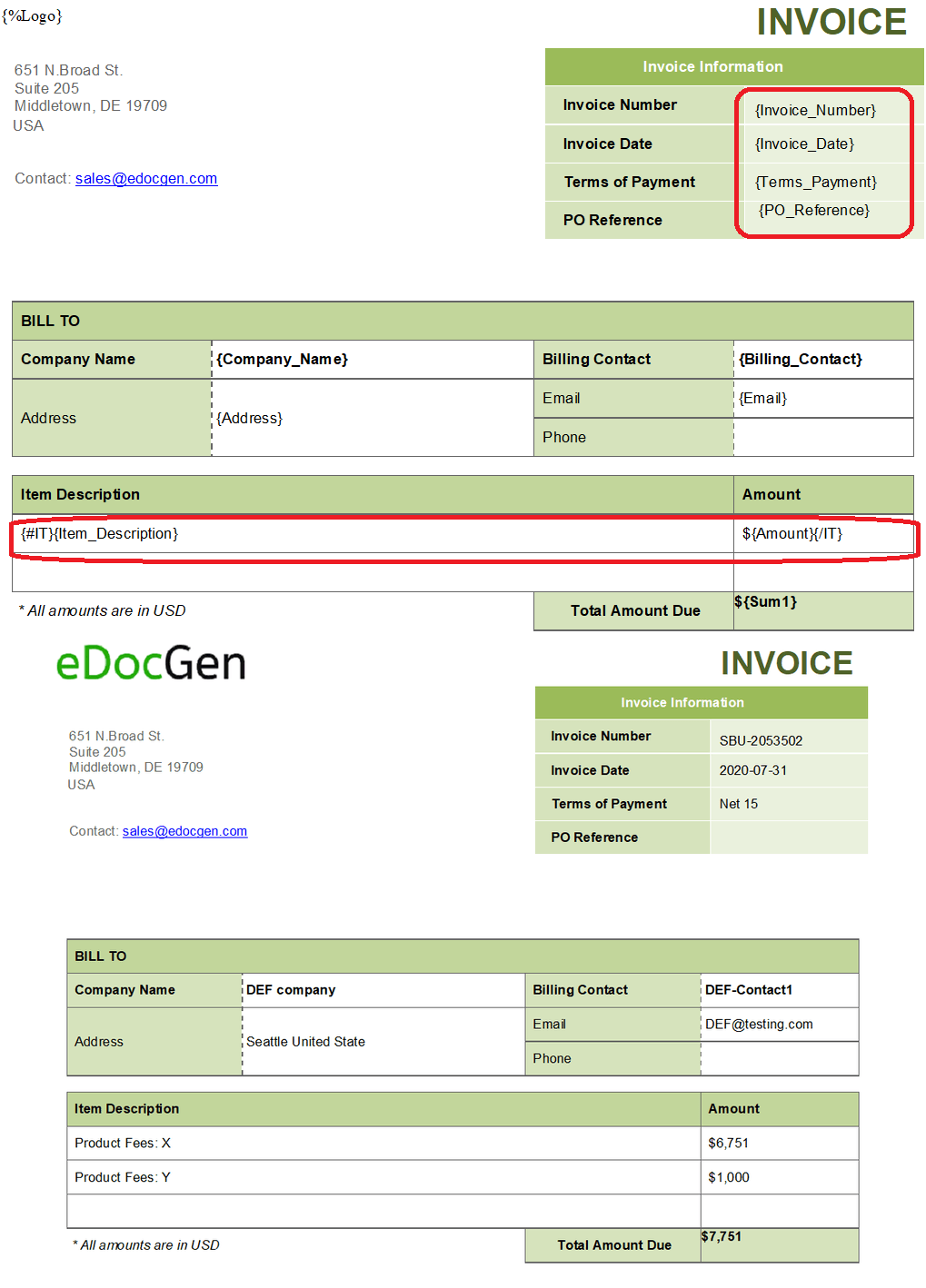
{Invoice_Number}, {Invoice_Date}, {Company_Name}, and {Sum} are simple text tags. {Logo} is image tag . {#IT} ... {/IT} is a loop tag — everything between the opening and closing tag repeats once per object in the IT array, which is how a variable-length line-item table gets generated from a fixed template.
After uploading that template and getting back a documentId, a call to /document/generate supplies the data as JSON markers, with keys matching the template's tag names exactly:
{
  "documentId": "69039b5b360e2742f966102e",
  "format": "pdf",
  "outputFileName": "Invoice-SBU-2053501",
  "markers": {
    "Invoice_Number": "SBU-2053501",
    "Invoice_Date": "31-07-2026",
    "Company_Name": "Acme Corp",
    "Sum": "10,000",
	"Logo":"https://www.edocgen.com/assets/images/logo.jpg",
    "IT": [
      { "Item_Description": "Product Fees: X", "Amount": "2,000" },
      { "Item_Description": "Product Fees: Y", "Amount": "8,000" }
    ]
  }
}
EDocGen matches each key in markers to the corresponding tag in the template, repeats the IT block once per array entry, and renders the result in the requested format (here, PDF). The output is a fully formatted invoice with two line-item rows — the template itself never changes; only the JSON payload does, which is what makes the same template reusable across every invoice you generate.
Same Template, Many Documents: Batch Generation
The example above uses /document/generate, which takes JSON and produces one document per call — the right endpoint for on-demand generation triggered from your application. For batch runs, /document/generate/bulk uses the same template but a different transport: it's a multipart/form-data request, and the data comes from a file or a database rather than an inline JSON body. Two ways to supply the data:
- A data file —
inputFileaccepts a JSON, XLSX, or XML file, with each row (Excel) or object (JSON/XML) becoming one generated document. - A live database query —
dbVendor,dbUrl,dbPassword, anddbQueryrun a query directly, withdbLimitcapping how many rows are pulled.
Other fields handle the details of matching that data to your template: headerMappings maps a template tag to a differently-named column or key when they don't already match; sheetIndex and headerIsIn apply to Excel input; filterName/filterValue filter which rows generate a document; and keyForFileName names each output file after a tag's value. documentId, format, outputFileName, and the x-access-token header are required, same as the single-document call.
An Excel-driven example: upload a spreadsheet of vendor invoice rows, and get one generated PDF per row back:
curl -X POST "https://app.edocgen.com/api/v1/document/generate/bulk" \
  -H "accept: application/json" \
  -H "x-access-token: YOUR_ACCESS_TOKEN" \
  -F "documentId=69039b5b360e2742f966102e" \
  -F "format=pdf" \
  -F "outputFileName=Invoice" \
  -F "keyForFileName=Invoice_Number" \
  -F "inputFile=@vendor_invoices.xlsx"
Or, generating directly from a database instead of a file:
curl -X POST "https://app.edocgen.com/api/v1/document/generate/bulk" \
  -H "accept: application/json" \
  -H "x-access-token: YOUR_ACCESS_TOKEN" \
  -F "documentId=69039b5b360e2742f966102e" \
  -F "format=pdf" \
  -F "outputFileName=Invoice" \
  -F "keyForFileName=Invoice_Number" \
  -F "dbVendor=mysql" \
  -F "dbUrl=jdbc:mysql://db.example.com:3306/billing" \
  -F "dbPassword=YOUR_DB_PASSWORD" \
  -F "dbQuery=SELECT * FROM invoices WHERE status = 'pending'" \
  -F "dbLimit=100"
The 200 response acknowledges that bulk generation has started asynchronously. Generated documents are retrieved afterward the same way as single-document output, or delivered directly to email, e-sign, or storage. A hundred-row spreadsheet becomes a hundred documents in one call. See the bulk generation endpoint reference for the full parameter list.
Getting Started: Four API Calls
Full reference is in the API documentation. At a minimum, generating a document takes four calls:
- Get an access token — register and log in, then call
/loginto get a token used on every subsequent request. - Upload a template — POST your Word, Excel, or PDF template to
/documentand note the returned template ID. - Generate the document(s) — call
/document/generate(JSON body) for a single document, or /document/generate/bulk (multipart form data) for batches. - Download or distribute — pull the file(s) from
/output/download/, or route them to email, e-sign, or cloud storage.
curl -X POST "https://app.edocgen.com/api/v1/document/generate" \
  -H "accept: application/json" \
  -H "x-access-token: YOUR_ACCESS_TOKEN" \
  -H "Content-Type: application/json" \
  -d '{
    "documentId": "69039b5b360e2742f966102e",
    "format": "pdf",
    "outputFileName": "Test Invoice",
    "markers": {
      "Invoice_Number": "SBU-2053501",
      "Invoice_Date": "31-07-2022",
      "Company_Name": "Company A",
      "Sum": "10,000",
      "IT": [
        { "Item_Description": "Product Fees: X", "Amount": "2,000" },
        { "Item_Description": "Product Fees: Y", "Amount": "8,000" }
      ]
    }
  }'
The REST API can be consumed as SaaS or deployed on-premise. Full working examples in JavaScript, Java, Python, PHP, Ruby, and C# are in the quick-start docs.
Book a DemoWhy Choose EDocGen's API
EDocGen is chosen most often for business-user template ownership (no separate designer tool), enterprise data-source breadth (databases and CRMs, not just JSON/HTML), and asynchronous bulk generation at volume.
Business-User Friendly Template Management
Business users create and edit PDF, Word, Excel, and PowerPoint templates in their native editors, without a separate designer tool or a developer in the loop for routine template changes.
Complex Document Support
Nested tables, loops, images, QR codes, HTML content, arithmetic calculations, and if-else logic run directly inside the template. Output covers PDF, DOCX, XLSX, PPTX, and TXT, with multi-lingual and RTL support.
Enterprise Integration and Distribution
Data sources include JSON, XML, Excel, and databases (MySQL, MSSQL, Oracle, MongoDB), plus CRMs like Salesforce and Dynamics 365. Distribution is pre-built for email, e-sign providers (DocuSign, SignNow), and cloud storage/DMS (OneDrive, SharePoint, Google Drive).
Performance and Scalability
Bulk requests are asynchronous and built for high-volume, enterprise-level throughput. Deployment is flexible — SaaS or on-premise — to fit specific security and performance requirements.
Enterprise Security, SSO, and Compliance
EDocGen supports SAML-based Single Sign-On, so an organization's entire team authenticates through its existing identity provider — Okta, Microsoft Entra ID, or any SAML 2.0 IdP — instead of maintaining separate EDocGen passwords. SSO is configured by registering the IdP's SAML metadata via the /api/v1/sso/connections endpoint; see the SSO setup guide for the full request format.
On infrastructure, EDocGen runs on Google Cloud with AES-256 encryption, ISO 27001 certification, and GDPR and HIPAA compliance, alongside role-based access control and full audit trails. Structured-data processing is deterministic (no LLM in the generation pipeline); AI is used only where a customer opts into unstructured Excel extraction. Deployment on Azure, AWS, GCP, or fully on-premises is available where a security policy requires it.
Frequently Asked Questions
- Does EDocGen support Single Sign-On (SSO)?
- Yes. EDocGen supports SAML-based SSO with identity providers such as Okta and Microsoft Entra ID, configured by registering your IdP's SAML metadata through the API. See the SSO documentation for setup steps.
- Is EDocGen HIPAA and GDPR compliant?
- Yes. EDocGen is hosted with AES-256 encryption, ISO 27001 certification, and GDPR and HIPAA compliance, with role-based access control and audit trails. On-premises and multi-cloud (Azure, AWS, GCP) deployment options are available for organizations with stricter data-residency or security requirements.
- Is it possible to create password-protected PDFs with watermarks?
- Yes. You can generate password-protected PDF files with watermarks, and send the instructions for opening the file to the recipient by email along with the attachment.
- Can I populate a template with multiple data sources?
- Yes. You can create drafts and update them by populating data from multiple data sources until you generate the final output.
- Do you support Office 365 and Google Docs?
- Yes. You can generate documents using templates and data files residing in OneDrive and Google Drive.
- What are the delivery options for generated documents?
- Download (optimized for mobile browsers), email to recipients, sync to AWS S3/OneDrive/SharePoint, send for e-signature, or output in print-ready PCL5 and PostScript formats.
- How is this different from a no-code document generation tool?
- No-code tools are built for business users generating documents directly. This page covers the developer-facing REST API — for embedding generation inside your own applications, triggered from your own code, database, or CRM rather than through EDocGen's UI.
- Does the API support AI agent workflows?
- Yes. Because generation logic is defined explicitly in the template, calling the API produces the same output for the same input every time, which makes it a predictable step for an AI agent to call rather than asking a model to draft the document itself. The API is also exposed via EDocGen's MCP server.