
Think about a single health insurance claim for a moment. Let's trace the journey of that one claim form. It arrives, gets sorted, and then sits in a queue, waiting. Eventually, an employee has to pick it up, read it, and manually type all the data into another system. A single typo—a misspelled name or a transposed digit in a policy number—can send that entire claim right back to square one. This creates maddening delays for both patients and providers, damaging relationships and slowing down cash flow.
If your claims team is juggling intake packets, policy letters, and enrolment forms across shared inboxes, the bottleneck is probably not one system failure. It's the handoff between document types, source systems, and the rules that keep changing underneath them.
That's why health insurance document automation has become more than a productivity upgrade. In payer environments, the pressure comes from document volume, layout variability, compliance traceability, and the need to regenerate outbound correspondence quickly when policy language changes.
Getting started with health insurance document automation can be a gradual process. You might begin with something simple, like auto-filling forms where customer data is automatically pulled into a new policy document.
But the real magic happens when you weave these technologies together into a completely integrated system that manages entire workflows from start to finish. The automation of health insurance documents has become the go-to solution for the age-old problem of slow, error-prone claims processing.
Modern platforms like EDocGen give insurance companies the power to use low-code or no-code tools, meaning your own team—not just IT—can create and manage document workflows. With centralized templates, keeping up with changing healthcare regulations becomes simpler and less risky. This approach also tightens data security for rules like HIPAA and creates searchable databases so your team can find patient information in a flash.
An automated system doesn’t just digitize your existing process; it completely redesigns it for maximum efficiency, accuracy, and security.
This connected approach creates a seamless flow of information from the moment a patient walks in all the way to claims settlement. When you explore the specifics of insurance document generation , you see how automation pulls all these separate pieces into one cohesive, efficient machine. It’s in this unified environment that businesses really start to see a major return, turning a tedious cost center into a real strategic advantage.
A health insurance document automation stack only holds up when it treats inbound and outbound documents as one connected flow. In practice, that means ingesting mixed file types, classifying them, extracting fields, validating those fields, and then pushing clean data into the right claims, policy, or member workflow.
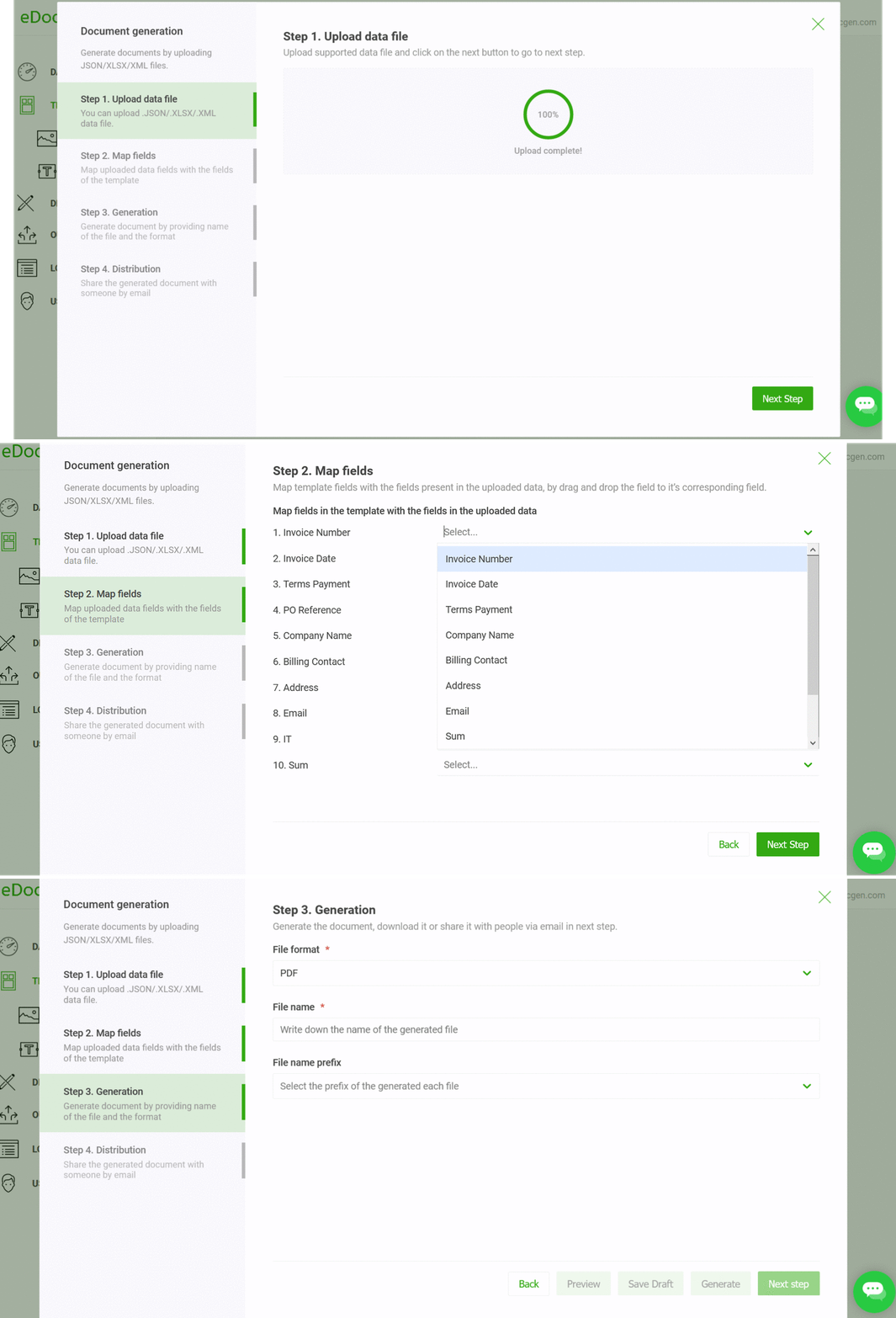
A common enterprise pattern looks like this.
1. Ingest: pull the data set from the source system.
2. Generate or assemble: populate the right template, apply logic, and create the output format needed by the business.
3. Deliver: route the final document to email, e-signature, print, or cloud storage.
That sequence holds up because it keeps inbound processing and outbound generation on the same governance path. A single source record can support a claim letter, a policy packet, or an enrolment notice without duplicating logic in three places, and without forcing operations teams to maintain separate exception rules for each downstream channel.
Outbound generation closes the loop. A durable platform needs conditional logic, loops, calculations, and synchronized templates so the same source data can produce policy letters, claims correspondence, or member notices without manual rebuilds. EDocGen's product documentation describes this kind of document generation flow, including API-based integration and template-driven output from structured sources.
In payer environments, durable document automation is usually the harder path because the same member or claim record has to feed more than one output, and each output has its own formatting rules. EDocGen is built for that kind of reuse, with multiple output formats from single or combined data sources , bulk generation , complex nested templates , and a no-code interface that business users can work with after the integration layer is in place.
The platform also handles multilingual work in a way that reduces brittle post-processing. Its multi-language templates are supported by default , and date and number formatting can be controlled in the template itself according to the language . That matters because payer teams do not want to keep patching formatting rules after the document is already assembled, especially when different member groups, regions, or notice types pull the same data in different ways.
Competing commercial software can cover parts of the same ground, but the trade-off is usually depth versus convenience. Many tools generate documents well enough until the workflow needs centralized template governance, complex conditional sections, or integration with several enterprise systems at once.
|
Capability |
EDocGen |
Home-Grown Systems |
Competing Commercial Software |
|
Integration depth |
API-first integration with databases, CRMs, and enterprise apps |
Usually depends on custom code and internal ownership |
Often solid, but integration depth varies by vendor |
|
Template governance |
Centralized repository and version control |
Harder to standardize across teams |
Usually available, but sometimes less flexible |
|
Multi-language support |
Supported by default, with date and number formatting controlled in the template itself |
Must be built and maintained internally |
Often supported, but implementation differs |
|
Complex document logic |
Conditional logic, loops, calculations, nested templates |
Possible, but costly to maintain |
Common, though not always easy for business users |
|
High-volume generation |
Built for bulk output |
Scales only as far as your engineering team can keep up |
Usually strong, but licensing and tuning can be limiting |
|
Auditability and control |
Designed for enterprise governance |
Depends on internal discipline |
Vendor-dependent, sometimes opaque |
The comparison point is maintainability. A custom build can look attractive when the first workflow is narrow, and the requirements are still soft. The cost shows up later, when the team has to maintain the template logic, keep integrations stable across source systems, and explain why one document class behaves differently from the rest. Enterprise platforms are not free of trade-offs, but they usually absorb that complexity better than a stack assembled from scripts, brittle mappings, and forgotten assumptions.
A policy issue file is usually the cleanest place to see document automation working in production. A member or broker record feeds the template engine, which then generates policy documents, endorsements, and renewal letters from governed content and the same approved fields. The value is in consistency. The same source record produces the right output without rekeying or hand-editing at each step.
Claims correspondence is more complex because the packet is assembled from multiple document types, not one source. A claim can pull in clinical attachments, policy details, correspondence, and supporting evidence, then route the assembled packet to claims, billing, or member systems through email, e-signature, or cloud storage.
That workflow puts pressure on the integration layer. If document classification, field extraction, and delivery logic live in separate tools, the handoffs become harder to control and the exception path gets messy. Enterprise deployments usually work better when the same orchestration layer governs ingestion, validation, template selection, and output routing, because that keeps traceability intact when a packet crosses systems.
Enrolment flows follow a similar pattern, but the inputs are less predictable. Forms, and attached records arrive together, the automation layer classifies the document, validates the fields, and sends the output to onboarding or benefits administration. Multilingual source material adds another layer of work, since the template layer has to handle locale differences cleanly instead of relying on a post-processing script that can break under volume.
Finally, the impact of automation reaches far beyond your office walls. It fundamentally changes the experience for your most important stakeholders: your patients and providers. For them, speed and clarity are what count.
When a provider can submit a claim and get paid quickly, it builds loyalty and strengthens your entire network. When a patient receives a clear, accurate Explanation of Benefits (EOB) right away, it builds trust and cuts down on confused, frustrated phone calls.
This improved experience is a massive differentiator. In an industry where customer service can be the deciding factor, offering a fast, transparent, and hassle-free process gives you a huge advantage. Your team is happier, your partners are more satisfied, and your members feel genuinely cared for.
Home-grown systems can cover the basics, but they usually become expensive to maintain once document variants multiply and business rules change. Commercial point solutions can speed up one part of the flow, yet they often leave integration gaps between template management, orchestration, and auditability. EDocGen fits the cases where teams need API-connected templates, bulk output, multi-language documents, and centralized governance in one platform.
If you want to compare that approach with your own claims, policy, or enrolment stack, visit EDocGen and map the platform against your current document bottlenecks.
This is usually the first question on everyone's mind, and for good reason. Protecting patient data isn't just a priority; it's a must. The good news is that modern automation platforms are built from the ground up with security at their core, not as an add-on. They use several layers of defense to make sure HIPAA compliance is rock-solid.
Here’s how they do it:
· Data Encryption: All your data, whether it’s just sitting there or being sent between systems, is locked down with powerful encryption like AES-256 . Think of it as a digital safe that makes information completely unreadable to anyone who doesn't have the key.
· Access Controls: You get to be the gatekeeper. You decide exactly who can see or edit sensitive information, setting permissions so granularly that employees can only access the specific data they need to do their jobs. Nothing more.
· Audit Trails: Every single action taken in the system is logged and timestamped. This creates an unbreakable record of who did what and when, which is absolutely critical for passing compliance audits and tracking down any security issues.
Yes, and they're built to do it smoothly. A good automation platform is designed to be a team player, not a lone wolf. It needs to connect with the software you already rely on every day, whether that's your core claims management system or your CRM.
This connection happens through what’s called an Application Programming Interface (API) . An API is like a secure translator that lets different software programs talk to each other and share data automatically. It means you don't have to rip out and replace what's already working. The automation tool simply plugs into your current setup.
Not like you used to. One of the biggest game-changers in automation is the rise of no-code platforms . These tools are built for the people on the front lines—the business users—not just for developers.