
At its core, insurance policy document automation is about ditching manual, error-prone tasks for a smarter, faster digital workflow. It connects your core systems directly to intelligent document templates, letting you generate pixel-perfect policy packets in seconds, not hours or days.
The right insurance policy document automation platform is more than just another piece of software. It’s a complete change in how you work, connecting your data directly to your documents and cutting out the risky manual steps for good.
Think about an underwriter trying to piece together a complex commercial policy. They're jumping between multiple spreadsheets and system screens, cross-referencing information, and hoping they don't miss anything.
Now, picture an automated workflow. Platforms like EDocGen give your business users the power to build and manage the templates themselves, often in a tool they already know, like MS Word. This is a game-changer. It puts control back in the hands of the people who understand the policy logic.
This is a practical approach to document generation that bypasses the common IT bottlenecks you see with other systems, where even a tiny template change requires a developer. The end result is a system that can produce a flawless, fully compliant document packet in seconds.
Once you’ve decided to automate, it's time to map your data. This is where your tech team gets into the weeds of your core systems—your CRM, policy administration system (PAS), or claims platform—to find where every single piece of data lives. This is a meticulous exercise, tracing data points like policyholder.name or coverage.limit back to their source tables and fields.
The reality for most carriers is that data is messy. It’s rarely in one tidy place. You might have customer info in a CRM, policy details in a legacy database, and rider specifics in a surprisingly complex Excel file. This is where many automation platforms hit a wall. They force your IT team into a long, expensive process of transforming all that data just to fit a rigid, predefined schema.
This is exactly where we see a huge difference in outcomes.
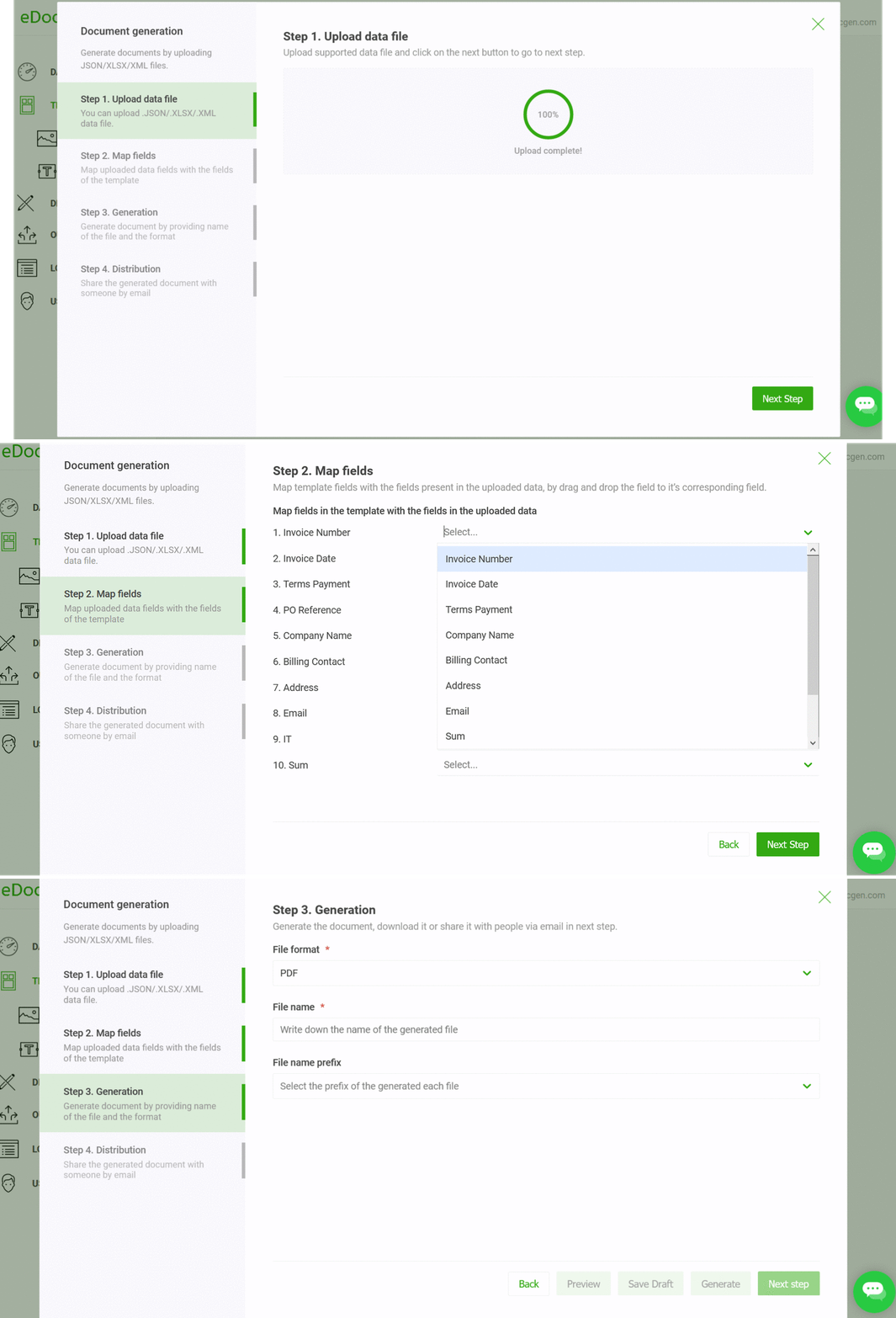
Instead of forcing you to bend your data to fit the tool, a flexible platform like EDocGen works with your data as-is. It can natively process JSON , XML , or connect directly to your databases. This completely sidesteps the need for a painful and costly ETL (Extract, Transform, Load) process.
This flexibility is a massive win for your technical teams. It means they can hook into existing API endpoints that are already spitting out JSON or point the system directly to a database view they’ve already created. You can see the full range of supported systems by exploring the available EDocGen integrations.
This direct-connect approach dramatically cuts down on initial setup time and the technical debt that so often comes with new projects. It’s what separates a truly powerful automation engine from a more basic tool.
You have several options for getting data from your systems into your document templates. Each has its pros and cons, depending on your technical setup and the specific document you're generating.
Choosing the right path isn't just a technical decision; it impacts the speed, scalability, and maintenance of your entire automation workflow. A platform that gives you options is a platform that adapts to your business, not the other way around.

A powerful generation engine doesn't mean much if your templates aren't just as smart. We're not talking about a glorified mail merge here; this is about building documents that practically think for themselves, using sophisticated business rules without anyone needing to write a single line of code.
What you're really doing is creating a single, master template that can automatically morph into hundreds of unique variations. It's a huge departure from the old way of doing things—trying to manage dozens of nearly identical Word files, which is not only a headache but a massive compliance risk.
The industry has felt this shift in a big way. Before this kind of AI-driven automation became common, we saw manual document handling chewing up about 80% of the total time spent on claims processing. Now, with document AI at scale, that number has dropped to just 20% . That's a staggering 75% reduction in manual work, freeing up teams to actually focus on what matters.
The real magic happens when you empower the people who actually know the policies inside and out—your underwriters, product managers, and legal teams—to embed the business logic themselves. Many platforms completely miss this, and it’s a critical mistake.
Think about it. So many other solutions force you to submit an IT ticket for every tiny wording update or a change to a state-specific clause. That creates a huge operational bottleneck. What should be a quick business fix turns into a multi-day development cycle.
With a platform like EDocGen, your business users can stick to a familiar tool like MS Word. They just use simple, clear tags to set the rules that control how the final document is assembled.
This is a complete game-changer. When you put template control in the hands of the business, you get rid of the IT dependency that grinds so many automation projects to a halt. Your teams can react to market changes and regulatory updates in hours, not weeks.
Conditional logic is the brain of your dynamic template. It allows the document to make decisions based on the data given, which is how you ensure every single policy is perfectly customized and 100% compliant.
Here are a few real-world examples of how we see this used every day:
· State-Specific Clauses: An if statement checks the policyholder's state and instantly pulls in the correct regulatory language for Texas versus California. No guesswork.
· Adding Riders: You can set a rule to automatically include a flood insurance rider only if the property's address is in a designated flood zone.
· Tiered Coverage Levels: Based on the premium tier—Gold, Silver, or Bronze—the template can show or hide specific paragraphs detailing benefits and coverage limits.
Getting this right every time with a manual process is next to impossible. Automation guarantees the right clauses are in the right documents, without fail.
But what about when a policy covers multiple assets? Think of a commercial auto policy for a fleet of 20 trucks or a property policy for a whole real estate portfolio. Building those tables by hand is not only slow but an open invitation for errors.
This is exactly what loops are for. In your template, you can design a single table row and tell the system to "loop" through a list of vehicles or properties from your data source, creating a new, perfectly formatted row for each one.
For example, your data source might have a simple JSON snippet like this: "vehicles": [ { "make": "Ford", "model": "Transit", "vin": "123XYZ" }, { "make": "Chevy", "model": "Silverado", "vin": "456ABC" } ] Your template's loop logic will automatically turn that into a two-row table with all the correct details. The same logic works for listing multiple insured individuals, properties, or any other scheduled items. The ability to handle this kind of nested data is a core feature of any true insurance policy document automation platform.
For even more advanced structures, you can build reusable components using EDocGen's powerful content blocks to keep your branding and language consistent across every template you create.
You’ve mapped your data and built out your templates. Now for the exciting part—putting it all together to create a fully automated system that runs on its own.
This is where you move from design to execution. We’re talking about connecting your systems so that when a policy is bound in your CRM, the right document packet is instantly generated and delivered. No manual steps, no intervention needed. That's the goal: a true "lights-out" process.
Getting your document engine to talk to your other software is make-or-break. A clunky integration will cause more headaches than it solves, which is why a flexible, API-first approach is non-negotiable for any serious automation project.
Think of a good REST API, like the one EDocGen provides, as a universal translator. It lets your core systems—whether it’s a modern Salesforce instance or a legacy AS/400—communicate seamlessly. Your tech team doesn't need to waste time building custom adapters. They just make a standard API call, sending policy data as a simple JSON or XML payload.
This is a huge advantage. Many platforms force you into their rigid data structure, which means your team has to perform a painful data transformation step for every single workflow. A better approach is to work with your data as is , letting your developers stick with the tools and formats they already know.
Not all document needs are the same. Your system has to be just as good at handling a single, urgent request as it is at churning through massive, scheduled jobs.
· Real-Time Generation: This is perfect for time-sensitive documents. When a customer finalizes a policy online, a webhook from your system can call the API instantly. Within seconds, their welcome packet and policy documents are generated and on their way.
· Bulk and Batch Generation: This is your workhorse for operational tasks like annual renewals or monthly statements. You can schedule a job to pull data for thousands of policyholders and generate every unique document overnight in a single, reliable batch.
The real test of a platform is how it handles scale. Trying to run 50,000 renewal documents through a basic mail-merge tool is a recipe for system crashes and days of manual checking. An enterprise-grade solution is built for this kind of high-throughput work, ensuring your most critical jobs run without a hitch.
The impact of getting this right is massive. Recent industry analysis shows that insurers using AI-powered automation are resolving claims 75% faster, while the cost per claim drops by 30–40% . Even better, the time adjusters spend on manual document chores has been slashed from 80% down to just 20% , freeing them up for higher-value work.
Creating the document is only half the job. The last, critical step is getting it to the right place securely and automatically. A smart distribution workflow is the final piece of the puzzle.
Your system should let you set up different delivery channels based on the document type, customer preferences, or internal rules. This isn't just about firing off an email; it's about orchestrating a complete, multi-step process.
Here are a few common automated distribution paths:
· Email Delivery: Automatically send the generated PDF as an attachment, using data from your CRM to personalize the email subject and body.
· E-Signature Integration: Push contracts and declarations pages straight into services like DocuSign or Adobe Sign, kick-starting the signing workflow and automatically archiving the final, executed copy.
· Cloud Storage Archiving: Send a copy of every generated document to a secure folder in SharePoint, Amazon S3, or Google Drive for compliance and easy access.
· CRM Pushback: Attach the final document directly to the contact or policy record in your CRM, giving your service team a 360-degree view of all customer communications.
By mixing and matching these methods, you build a powerful, resilient system that closes the loop on your automation. For a closer look at what’s possible, check out our guide on document distribution options . This is how you go from just making documents to running a truly end-to-end automated operation.
Let's be blunt: in the insurance world, any automation that compromises security or compliance is dead on arrival. It doesn't matter how efficient a new system is; if it introduces risk, it's a non-starter. This is where your insurance policy document automation platform has to do more than just speed things up—it needs to act as a fortress for your governance policies.
We’ve all seen the nightmare scenario that keeps compliance teams up at night: an employee uses an old, unapproved policy template they saved to their desktop six months ago. This "template sprawl" is a huge, unadaptable risk, and it’s precisely the problem a centralized template repository is built to solve.
By creating a single source of truth for all templates, you completely eliminate the problem of rogue documents. Every single policy is generated from a master, pre-approved version. This doesn't just keep your branding consistent; it's a foundational control for staying compliant.
When regulators come knocking, you can't afford any ambiguity. You need a clear, indisputable audit trail. A major weakness I've seen in many document systems is their flimsy version control, which can leave you dangerously exposed during an audit.
A rock-solid system lets you see exactly who changed a template, what they modified, and when they did it. This level of detail is critical. If a compliance issue pops up, you can instantly pinpoint where things went wrong and, just as importantly, roll back to a previously approved version with a click.
This is the kind of control that separates a true enterprise tool from a basic mail-merge add-on. It provides the detailed logging and versioning your compliance and IT departments absolutely require, turning your documents into fully auditable assets.
Your document generation platform should actively strengthen your compliance posture, not just meet the bare minimum. Features like a centralized repository and meticulous version control are what separate a true enterprise solution from a simple mail-merge tool.
This diagram shows how governance and control are baked into every stage of the process.
From the moment data comes into the final distribution, a unified platform ensures security is maintained from start to finish.
Security is the last, non-negotiable piece of the puzzle. Any platform that touches sensitive policyholder data must be built on an enterprise-grade security foundation. That starts with protecting data both in transit and at rest—features like AES-256 encryption aren't a nice-to-have, they're the baseline.
But for many insurance carriers, cloud security isn't the full story. The need for complete data sovereignty —having absolute control over where your data physically resides—is a top priority. This is a critical point of difference for a platform like EDocGen. Unlike many cloud-only tools that push your data into a shared, multi-tenant environment, you get total deployment flexibility.
You have the choice to deploy the entire platform:
· On-premises right inside your own data center.
· In a private cloud (like AWS, Azure, or GCP) that you manage.
This gives your organization the final say over your data, keeping it entirely within your security perimeter and satisfying even the strictest internal policies and regulations. For any organization handling protected health information, looking at how a HIPAA-compliant document generation softwarek is architected offers a great model for this level of control. The flexibility to choose your deployment proves that robust automation doesn't mean you have to compromise on security. It means you get to strengthen it.
This is a big one. Many document tools can handle a simple mail merge but completely fall apart when you throw a real insurance policy at them. This is exactly where EDocGen shines because it was built from the ground up for this kind of complexity.
Take nested data, for example. Think of a commercial property policy that covers multiple locations, and each location has its own unique set of coverages and insured items. EDocGen’s engine is designed to process this kind of hierarchical JSON or XML data right out of the box. This means your templates can easily use loops within loops—like, "for each property, list all covered items and their limits." Many other tools would force your IT team to flatten this data first, which is a slow, frustrating, and unnecessary step.
When it comes to conditional logic, EDocGen's no-code approach is just more intuitive for the people who actually manage the policies. You can set up rules like, 'If state is CA, then insert the earthquake exclusion clause,' directly inside a standard MS Word template. This is a game-changer for empowering your business users.
With competing systems, you’re often stuck writing complex code or trying to figure out a clunky, proprietary interface just to manage business rules. This creates a huge bottleneck where even a tiny change has to go through a developer. EDocGen’s AI capabilities can even populate templates from unstructured Excel data, which sets it apart when your source data isn't perfect.
This is, and should be, a major concern for any IT team. The good news is that EDocGen was built with an API-first philosophy . This makes integration far more straightforward than what you’d experience with a legacy or closed-off system.
If you're using cloud platforms like Salesforce, integration can be as simple as using a pre-built connector or writing a few lines of Apex code to call the EDocGen REST API. This can trigger document generation right from a customer or policy record. Our API is well-documented and follows modern standards, something your tech teams will definitely appreciate.
For on-premise systems, EDocGen offers the flexibility you need. You can install EDocGen on your own servers or within your private cloud, keeping all your data and processes safely behind your company's firewall. This lets your core policy admin system talk to the EDocGen API over your internal network without ever exposing sensitive data to the outside world. This ability to support both cloud and on-premise integrations is a key difference from many cloud-only tools.
Instead of a drawn-out integration project that takes months, your team can often get a proof-of-concept up and running in a matter of days. All it takes is sending a JSON payload to the API and getting a perfectly generated document back.
Absolutely. High-volume batch jobs, like processing all your annual renewals at once, are a core use case that EDocGen is engineered to handle efficiently.
The platform's entire architecture is built for scalability and performance. You can kick off bulk generation jobs through the API or use the built-in scheduler. A typical monthly renewal run looks something like this:
· Query your database for all policies that are up for renewal.
· Bundle the data into a single large JSON array or a list of individual JSON objects.
· Send that data to the EDocGen bulk generation endpoint.
The system then gets to work, processing the job asynchronously. It can generate thousands of unique, personalized policy documents in a tiny fraction of the time it would take to do it manually. It even supports parallel processing to speed things up even more.
Unlike basic mail-merge tools that tend to crash or grind to a halt with large datasets, EDocGen is built for enterprise-level demands. This ensures your critical month-end processes run smoothly and reliably, without needing someone to watch over them. That kind of reliability is crucial for staying stable during your busiest times.
Ready to see how EDocGen can transform your document workflows? Move beyond manual processes and unlock new levels of efficiency, accuracy, and compliance. Start your journey with EDocGen today!