
For anyone on the technical or semi-technical side—developers, IT managers, system architects—the frustration with manual documents is all too real. It’s a constant stream of low-value, repetitive work that eats into your day. You get pulled away from mission-critical projects just to tweak a template or run a one-off report for the sales team. It’s a massive drain on skilled resources and, frankly, a terrible use of your talent.
The concept behind document composition is brilliantly simple. The software connects directly to your data sources—a REST API, a legacy database, a CRM, or even a simple JSON file. It then pulls that raw data and merges it into intelligent, pre-designed templates.
The result? Perfectly formatted, personalized, and compliant documents, churned out at a scale that manual work could never hope to achieve.
This isn’t just a nice-to-have. The market growth tells the story. Valued at USD 7.42 billion in 2025, the global document management system market is expected to hit USD 25.28 billion by 2033 . This massive jump is driven by the urgent need for better, more secure document workflows in industries like banking, healthcare, and insurance.
The whole system is built on three key parts: your data, smart templates, and how you get the finished documents out the door.
First up: data sources . A truly capable document composition platform has to be able to connect to data wherever it lives. That could be a sleek CRM like Salesforce, an old-school SQL database humming away in a server rack, or even a real-time JSON feed from a web app.
A platform’s real strength shows in its flexibility here. EDocGen works just as well with modern APIs as it does with legacy systems, giving your technical teams the versatility they need without forcing brittle, custom-coded data transformation scripts. You can see for yourself how these integrations for document automation cover a huge range of systems.
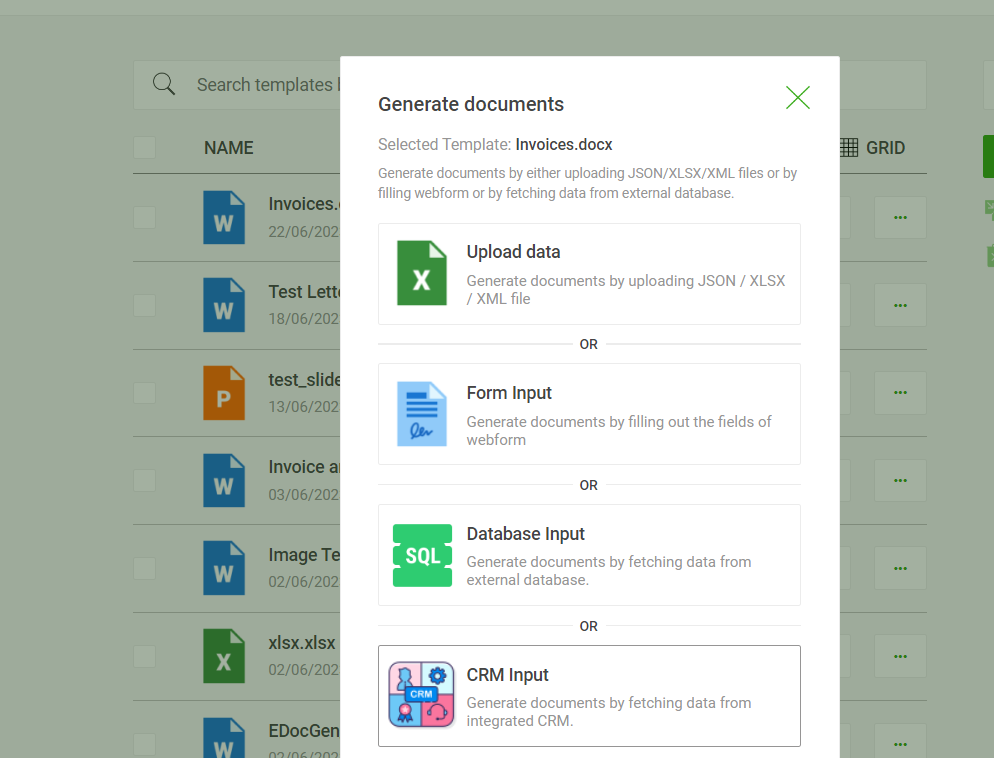
The second piece of the puzzle is the template . A template is so much more than a static layout with a few blank fields; it's the intelligent core of the whole operation. It holds not just the design and branding, but also the business rules that decide how the final document gets put together. EDocGen pulls away from the more basic tools. Inside an EDocGen template, both developers and business users can embed powerful logic, often without writing a line of code:
· Conditionals: You can use "if-then-else" logic to show or hide entire sections on the fly. For instance, IF customer_region = 'EU', THEN insert GDPR clause .
· Loops: The system can run through arrays of data, like a list of purchased items in a JSON object, to automatically build perfectly formatted invoice tables.
· Dynamic Calculations: Perform math right inside the document—like totalling a column of numbers or figuring out a payment due date.
The real genius of this architecture is the separation of duties. Developers get the powerful, API-first control they need to manage the data flow, while business users get a friendly, no-code interface to manage the template logic themselves. That balance is the secret to moving fast, and it’s a core design philosophy for EDocGen.
The last step is the output channel . Once the data has been merged with the smart template, the system generates the final documents—and it can do it in massive batches. We're talking thousands of personalized account statements, hundreds of sales contracts, or a wave of new employee offer letters.
The software doesn't just stop at creating the files; it automates their delivery. Documents can be automatically emailed to customers, sent off for e-signature, printed, or archived directly to a cloud storage system like SharePoint or Google Drive. This creates a true end-to-end workflow.
Sure, document composition software saves time on paperwork, but that's just scratching the surface. The real payoff is the strategic business impact—the kind of tangible return on investment (ROI) that gets the attention of your leadership team.

When you automate manual processes, you're not just getting faster. You’re fundamentally changing how your business runs. The benefits are felt everywhere, from accuracy and compliance to pure performance.
Improve Accuracy and Reduce Risk
One of the first and most critical wins is a massive jump in accuracy.
By automating the data flow, document composition software creates a secure pipeline directly from your system of record to the final document. It completely cuts out the manual data entry step, and with it, the risk of human error. This is a foundational benefit that immediately de-risks your entire operation.
This shift does more than just stop errors—it builds trust. Customers get accurate statements, partners get reliable contracts, and regulators see compliant reports. Every business relationship gets stronger.
With document composition software , you create a single, controlled space for all official templates.
· Brand Consistency: Every document, from a marketing piece to an invoice, follows the correct brand guidelines, making your company look sharp and professional.
· Legal Compliance: Your legal team can update a disclaimer or clause in one master template, and the change instantly applies to every new document created. You always know you're using the most current, compliant language.
This central control is the key to good governance. It delivers the peace of mind that every document leaving your organization is on-brand and legally sound.
They can manage and edit templates themselves in native interface—adjusting logic, updating text, and tweaking layouts without ever writing code. This self-service frees up countless developer hours, letting your tech talent focus on innovation instead of tedious maintenance. This is a game-changer for departmental agility and a huge morale boost for your dev team. You can see how large organizations apply this with enterprise document automation .
Finally, the right software gives you the raw power needed for the big jobs.
Modern document composition software is built for generating huge volumes of documents on a tight schedule. EDocGen is architected for mission-critical batch jobs, capable of producing thousands of complex, personalized documents in minutes, not days. This kind of scalability ensures your business can run at full speed without getting bogged down by paperwork.
Picking the right document composition software is a strategic choice that ripples across your operations, development cycles, and even how customers perceive your brand. Making a smart decision means looking at the software from two different angles: its deep technical capabilities and its day-to-day usability for your business teams.
This table breaks down the key areas to investigate when you're comparing different platforms. It's designed to make sure you’re asking the right questions and understanding why each feature really matters, especially from a developer's perspective.
|
Feature Category |
Key Evaluation Questions |
Why It Matters for Developers |
How EDocGen Excels |
|
API & Integration |
Is it a true REST API? Is the documentation interactive and clear? What languages are the SDKs in? How well does it handle errors? |
A clean, well-documented API reduces integration time from weeks to hours. Good error handling prevents fragile connections and simplifies debugging. |
API-first design. Clear, example-rich documentation. Built for developers by developers. |
|
Template Designer |
Can business users manage templates without code? Does it support conditional logic, loops, and dynamic tables? |
An intuitive designer for business users means fewer "simple change" tickets for the dev team, freeing them up for complex integration work. |
Powerful no-code designer empowers business users while supporting complex logic, separating content from code. |
|
Data Handling |
Does it natively support JSON and XML? Can it connect directly to SQL/NoSQL databases? How does it handle nested data and arrays? |
Flexible data support avoids brittle, custom-built data transformation scripts. The platform should adapt to your data, not the other way around. |
Natively handles complex JSON/XML, including nested data, without requiring pre-processing. Connects to virtually any data source. |
|
Performance & Scale |
What is the document generation throughput (docs/minute)? How does it handle bulk generation of 10,000+ documents? |
The system must be able to handle peak loads (like end-of-month reporting) without falling over. Performance is a core architectural feature. |
Architected for high-throughput batch processing. Proven to handle enterprise-scale loads without breaking a sweat. |
|
Security & Compliance |
What encryption is used (in transit/at rest)? Does it offer robust RBAC? Are there immutable audit trails for compliance? |
Developers are the first line of defense for data. The platform must provide the tools (encryption, access control) to build secure workflows. |
End-to-end encryption, granular RBAC, and comprehensive audit trails are standard. |
|
Deployment |
Is it SaaS only? Is there an on-premise or private cloud option? Can it be deployed in a Docker container for hybrid-cloud setups? |
Deployment flexibility is critical for data governance and fitting into existing infrastructure, especially in regulated industries. |
Unique flexibility with SaaS, on-premise, and private cloud options, giving you full control over your data. |
By systematically going through this checklist, you can move beyond the sales pitches and get a real sense of how a solution will perform in your specific environment.
Deployment flexibility is just as important. Can the software run in the cloud, on-premise behind your own firewall, or in a hybrid model? EDocGen offers all three, giving you total control over where your sensitive data lives—a critical feature for anyone in a highly regulated industry
The best way to get started? Run a focused pilot project. Pick a high-impact, high-visibility process, like automating sales proposals or client onboarding packets. When you can show a clear and fast ROI, you’ll build the momentum and stakeholder buy-in you need for a more ambitious rollout. If you're currently weighing your options, our guide to the best document generation software for 2026 takes a deeper dive into what separates the leading platforms from the rest of the pack.
This is often the first question I hear from technical teams. It's one thing to drop a name and address into a template. It's a completely different challenge to build a multi-page contract where clauses appear or disappear based on a customer's state, their purchase history, and the specific products they chose.
EDocGen tackle this by moving the logic out of your application code and into the templates themselves. Think of it as separating the "what" (your data) from the "how" (the rules for presenting that data). This is a huge relief for developers.
You're not writing custom code for every document variation. Instead, you use simple, clear syntax right in the template:
· Conditional Statements: You can wrap entire paragraphs, tables, or pages in logic. A rule like if customer_country is USA, show this legal clause means one master template can work for multiple regions. No more forking templates for every little change.
· Loops and Iteration: Got a JSON array of line items for an invoice? The system can loop through it to build a table row by row. This is essential for invoices, order confirmations, or any document with a variable number of items. It support 8-level JSON for nested table creation.
· Calculations: The platform can handle math on the fly. Summing up a column, calculating sales tax, or figuring out a payment due date can all happen right in the template, which means less data pre-processing for your team.
The real win here is the separation of concerns. Your developers can focus on what they do best: building and managing the data pipeline via an API. Meanwhile, the business users—the legal team, for instance—can actually own and update the business rules within the templates. That means fewer IT tickets for simple content changes. This is a core strength of EDocGen's architecture.
A document generation tool is worthless if it's a black box. It has to talk to your core business systems, and that’s where integration patterns come in. The most flexible and powerful way to connect everything is with a REST API .
A solid, well-documented API—like the one EDocGen provides—becomes the central hub for all your document workflows. It lets your existing applications tell the system when to create a document as part of any business process.
Here are a few ways we see this play out in the real world:
1. Event-Driven Integration: This is the most popular modern approach. An event happens in one of your systems—a deal is marked "Closed-Won" in your CRM, for example. That event fires a webhook that calls the document generation API, sending a JSON payload to instantly create the sales contract and welcome packet.
2. Scheduled Batch Processing: Think high-volume jobs, like generating thousands of end-of-month bank statements or weekly payroll summaries. Here, integration usually involves a direct connection to a database. A scheduled script runs, queries the database for all the necessary records, and sends the data to the API in batches for efficient processing.
3. User-Initiated Generation: In this scenario, a user in one of your internal apps (like an ERP or a custom-built dashboard) clicks a button labeled "Generate Report." That click triggers an API call, which pulls the right data, generates the document, and delivers it right back to the user's browser for a download or preview.
The point is, a true API-first platform doesn't lock you into one way of doing things. It gives your developers the building blocks to design the exact workflow you need, whether you're running on a cutting-edge serverless architecture or connecting to a 20-year-old legacy system.
For anyone in finance, healthcare, or insurance, this is the make-or-break question. A data breach stemming from your document platform is a nightmare scenario. Security can't be an afterthought; it has to be baked into the core design.
When you're vetting a platform, you need to look for security in layers. Here's what actually matters:
· End-to-End Encryption: This is table stakes. All data, without exception, must be encrypted in transit using TLS 1.2+ and at rest with a strong algorithm like AES-256 . If a vendor can't confirm this, walk away.
· Role-Based Access Control (RBAC): Your teams need specific, granular permissions. Someone in marketing shouldn't be able to touch a legal template, and a junior analyst shouldn't have free rein over all customer PII. RBAC ensures people only see and do what their job requires.
· Detailed Audit Trails: To meet compliance standards like GDPR, HIPAA, or SOC 2, you need an unchangeable record of everything. The system must log who generated what document, when they did it, what data they used, and who accessed it later.
This is also where your deployment options become a critical piece of the security puzzle. While a multi-tenant SaaS is convenient, platforms like EDocGen that offer on-premise and private cloud deployment give you a massive advantage. This keeps all your sensitive data behind your own firewall, under your complete control—an absolute must for many organizations and a key differentiator from many cloud-only solutions.
Ready to see how a truly flexible document composition software can fit into your technical environment? EDocGen is built with developers in mind, offering a robust API, powerful template logic, and the security controls enterprises demand.
Request a demo of EDocGen and let our experts walk you through a technical deep-dive.