
To automate PDF creation from complex spreadsheets , you need a system that gets the context of your data, not just its cell reference. It needs to read the spreadsheet the way a person would, adapting to changes without breaking your whole workflow.
For anyone on an operations, IT, or finance team, turning spreadsheet data into professional PDFs is a painfully familiar routine. What seems simple at first quickly spirals into hours of mind-numbing copy-pasting, reformatting, and double-checking for errors.

The real trouble is that business spreadsheets are rarely clean, static grids. They’re living documents, often messy and built for human eyes, not machines. They’re packed with merged cells, notes in adjacent columns, and layouts that change from one month to the next.
In fields like finance, insurance, and real estate, the pressure is even more intense. The accuracy of loan agreements, policy summaries, and sales contracts is non-negotiable. Manually creating these PDFs introduces an unacceptable amount of risk.
A tiny data entry error could lead to a major compliance breach, legal trouble, or huge financial penalties. If you're wrestling with these issues, our guide on https://www.edocgen.com/blogs/high-volume-document-generation offers a deeper dive into managing them. In these environments, sticking with manual processes just isn't a scalable or safe strategy.
If you’ve been in operations or IT for any length of time, you’ve probably inherited a few of them—those ancient, macro-enabled Excel workbooks that are somehow critical to a business process. For years, VBA scripts felt like a clever way to automate tedious Excel tasks.
But many of us have learned the hard way that they're a massive source of technical debt. When the person who wrote the macro leaves the company, you're left with a black box that no one understands, and everyone is afraid to touch.
Trying to automate PDF creation from complex spreadsheets using VBA is like building with LEGOs without the instructions. It might hold together for a while, but one wrong move—or a tiny change in your data—and the whole thing collapses.
Think about how real business spreadsheets work. They aren't static databases; they're living documents. Columns get added, headers get renamed, and data gets rearranged constantly. This is exactly where VBA falls apart.
A VBA script is completely rigid. It's built on hardcoded instructions like, "copy cell C5 and paste it into H12." The script has zero understanding of what that data actually represents. So, when your accounting team adds a new "Project ID" column and everything shifts one cell to the right, your script doesn't know how to adapt. It just grabs the wrong data or, more often, errors out completely.
This kicks off a frantic scramble to find a developer who can wade through the old code and manually update every cell reference. A simple spreadsheet update suddenly becomes a week-long IT emergency.
This is where a modern platform like EDocGen fundamentally changes the game. Instead of relying on brittle, location-based scripting, EDocGen’s AI-powered engine is designed to understand the meaning and context of your data, just like a human would. This isn't just an incremental improvement; it's a paradigm shift away from the fragile, high-maintenance world of VBA. You can read more about how EDocGen's AI handles complex data structures at https://www.edocgen.com/blogs/export-excel-to-word .
Let’s be direct about why EDocGen AI is the superior choice for any technical professional tired of patching broken scripts.
The table below breaks down the practical differences. For anyone who has managed technical debt, the advantages of an AI-driven approach are stark.
|
Feature |
Legacy VBA Scripts |
EDocGen AI |
|
Maintenance |
Requires a developer to fix "broken" cell references. |
Self-healing; understands data context even if rows move. |
|
Flexibility |
Brittle; minor layout changes crash the script. |
High; interprets "human-styled" layouts naturally. |
|
Ease of Use |
Requires knowledge of Macro-Enabled workbooks. |
Plain English instructions (No-Code). |
|
Security |
Often blocked by enterprise IT (Macro security risks). |
Secure, cloud-native, and API-ready. |
|
Data Reasoning |
Can only copy/paste specific cells. |
Can summarize, categorize, and clean messy data. |
As you can see, EDocGen AI isn’t just an upgrade—it's a fundamentally different, more intelligent way to automate. It's built to handle the messy reality of business spreadsheets, freeing you from the endless cycle of breaking and fixing that defines life with VBA. Deeper insights into this method are available in our article on automating Excel reports .
What if your automation tool could read a spreadsheet just like a human colleague? Imagine if it understood context, could interpret messy layouts, and didn't crash every time someone added a new column. This isn’t some far-off idea; it’s the game-changing shift that AI-powered platforms like EDocGen bring to the table right now.
This is a critical leap forward. The move toward AI-enhanced PDF generation for populating templates from unstructured data is a major trend. In fact, by 2026, it's expected that 35-40% of enterprise document automation platforms will have integrated these AI features. For example, financial services firms have reported that AI-assisted data extraction from spreadsheets boosted accuracy by 30-45% compared to the old, rigid mapping methods.
The core difference here is moving from "data mapping" to "data understanding." Legacy systems and VBA scripts are built on a simple premise: you tell the system exactly where to look. "Take the value from cell F10 and put it here." This works great, right up until the day your spreadsheet inevitably changes.
EDocGen’s AI works differently. It doesn't just see a grid of cells; it recognizes headings, tables, and relationships within your data. You can give it instructions in plain English, almost like you would a junior analyst.
· "Find the table under the 'Quarterly Expenses' heading."
· "Extract all line items from the 'Project Deliverables' section."
· "Summarize the notes in the 'Comments' column and place them in the summary field."
This contextual awareness means the AI adapts to your data, not the other way around. It can handle unstructured layouts, interpret information even if rows or columns shift, and even perform tasks that are impossible for rigid scripts, like categorizing data on the fly before populating a template.
Imagine you work for a real estate firm and need to generate detailed property portfolio reports. The data lives in a single Excel workbook, but it’s all over the place, spread across multiple sheets with totally different layouts.
Our mission is to wrangle all this scattered information into one, clean PDF report for each property.
By adopting an AI-first mindset, you move away from the fragile, high-maintenance world of scripts. Instead, you build robust, adaptable workflows that empower your team to focus on results, not on fixing broken code. This approach aligns with modern software development principles like Doc as Code, which brings versioning and automation to documentation. For a deeper look into this approach, our article on intelligent document automation offers valuable insights.
Let's get practical and actually build a modern, resilient workflow that solves the spreadsheet-to-PDF nightmare once and for all. This is your hands-on guide to setting up your first automated process in EDocGen. This is for anyone—technical or not—who is just tired of the manual workarounds.
The first mental shift is to stop thinking about static documents and start thinking in terms of dynamic templates. With EDocGen, your foundation is any standard Word document. Instead of pasting in data, you just insert simple tags like {client_name} or {invoice_total} where you need information to go. This simple change turns your basic document into a smart blueprint.
This goes way beyond just plugging in simple text. Your spreadsheets are complex, with variable data, and your templates need to be smart enough to handle that.
· Conditional Logic: For example, you can make an "Overdue" notice appear only if a payment is late. You just wrap that section of your template in a conditional block that checks the data from your spreadsheet (like payment_status = 'Overdue' ).
· Dynamic Tables and Loops: What about invoices with a varying number of line items? You can set up a loop that automatically adds a new row to a table for every single item in your spreadsheet data. No more manually building tables to fit the data.
With this approach, you build the logic into one master template that can spit out thousands of unique variations, each one perfectly matched to its data source. You do the thinking once, and the automation handles the repetitive work forever.
Once your template is set, it’s time to hook it up to your spreadsheet. This is where EDocGen’s AI really shows its power, and it's nothing like the rigid, script-based tools you might have fought with before. You get a no-code interface where you simply guide the AI.
You get your Excel file into the system, either via UI upload or an API call. EDocGen is built to handle complex files, so it won't choke on different sheets and formats.
This is the basic flow of how the AI handles it.
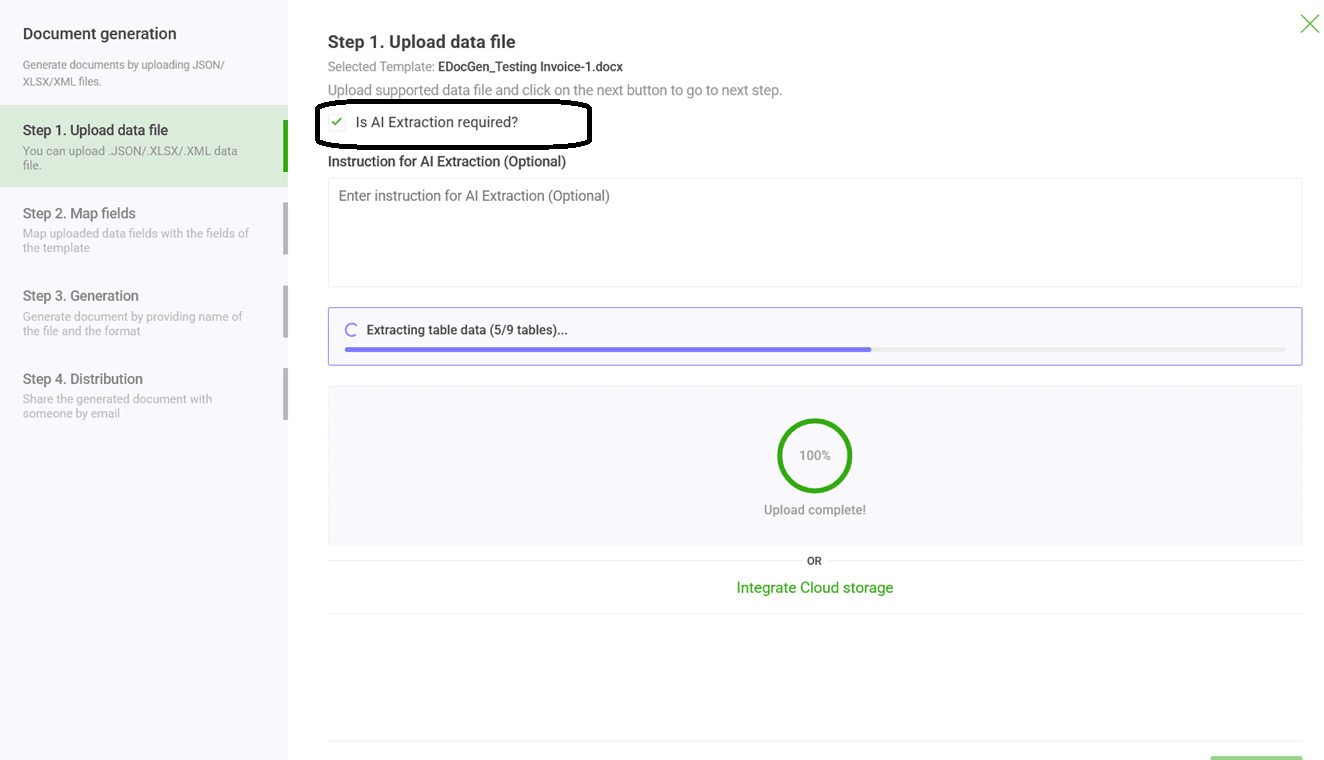
This is where the magic happens. The system populates the Excel data into your Word or PDF template. Instead of pointing to Sheet1!B2, you use AI-powered contextual tagging. For instance, you create a tag like {property_address} and simply tell EDocGen to find the value next to the "Property Address" label in the "Property Summary" sheet. It doesn't matter if it's in cell B2 or C15—the AI finds it.
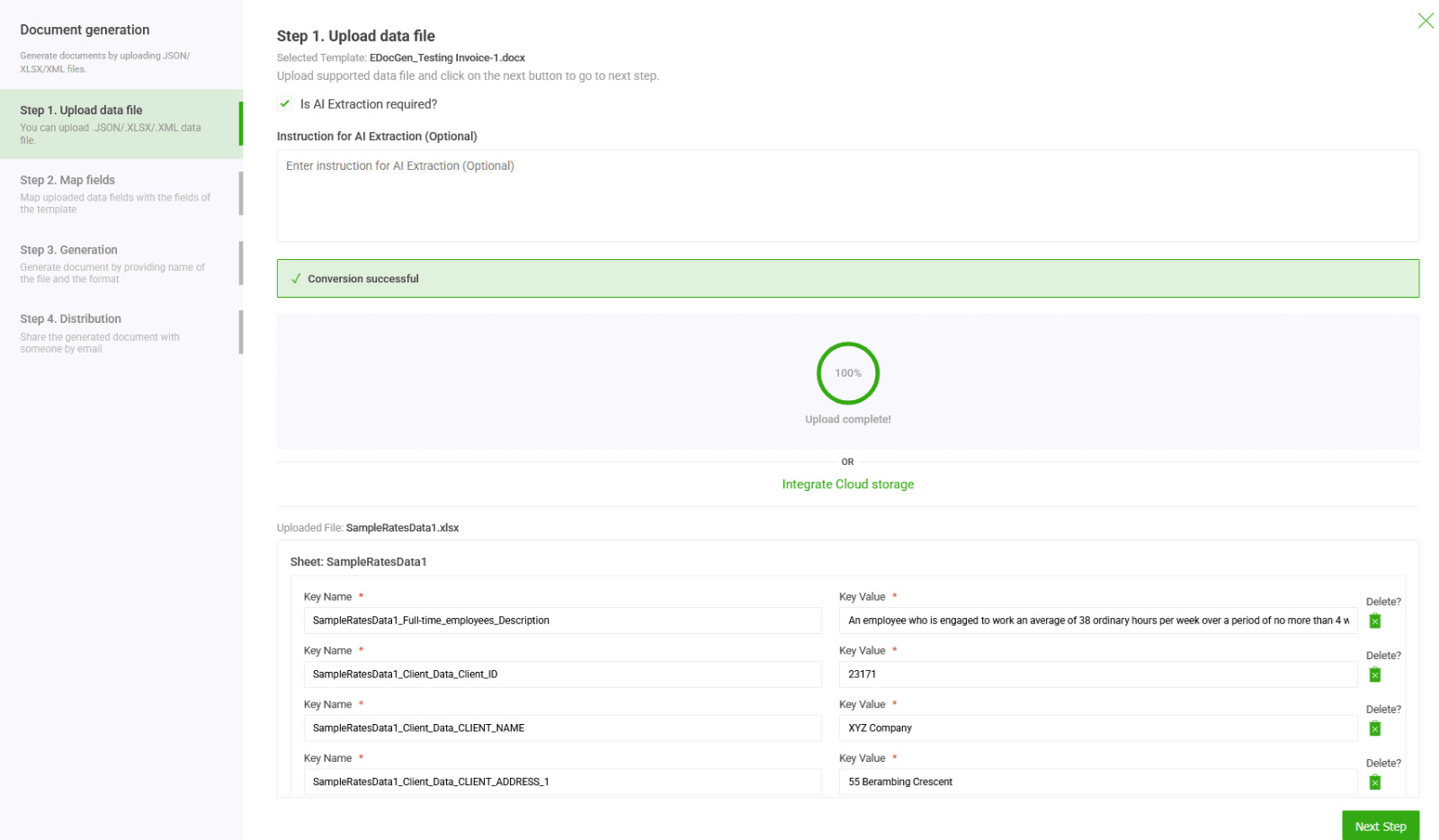
The AI engine essentially translates your human-readable spreadsheet into structured data that the template can understand.
This ability to understand "human-style" layouts is a massive unlock. The AI can navigate merged cells, understand context, and find data based on nearby headers, even if someone messes with the spreadsheet's structure next month.
The real power here is resilience. When a team member adds a new column to the source spreadsheet, a VBA script breaks. EDocGen’s AI adapts, finds the data based on the context you provided, and keeps the workflow running without interruption.
This struggle is real across the industry. A 2026 survey of over 500 enterprise IT teams found that 58% see inefficient document generation as a major operational bottleneck, with spreadsheet data being the number one culprit. But teams using no-code platforms saw business users taking over these workflows, cutting IT dependency by 40-50% and shrinking project timelines from months down to weeks.
Making one PDF is a good start, but the real win is scaling it. Once you’ve mapped your data, you can kick off a bulk generation job to process a whole spreadsheet with hundreds or thousands of rows. EDocGen will run through every single record, apply your template's logic, and generate a perfect PDF for each one.
For a completely hands-off, "lights-out" workflow, you can plug this process directly into your other systems using EDocGen’s REST API. This is where you hit full automation.
· Trigger from a CRM: Automatically create a sales contract PDF the second a deal is moved to "Closed-Won" in Salesforce.
· Automate Financial Reports: Schedule a daily job to pull data from your finance system, push it to a spreadsheet, and generate all your management reports.
· Onboard New Hires: When a new employee is added to your HRIS, automatically trigger the creation of their entire onboarding document package.
By moving away from brittle scripts and toward an intelligent, API-first platform, you're doing more than just finding a better way to automate PDF creation from complex spreadsheets . You’re building a scalable, secure asset for your entire organization. For those who want to see a bit more, we’ve got several examples showing how to convert Excel to PDF using our platform .
Moving away from manual data entry or fragile scripts to an intelligent automation platform isn't just about making things a little faster. It's about seeing a tangible, measurable return on your investment. When you automate PDF creation from complex spreadsheets using a platform like EDocGen , you're directly boosting your bottom line by speeding up operations, cutting costs, and seriously cutting down on risk.
We see the biggest wins in industries where getting it right and getting it done fast are absolutely critical. Let's look at a few real-world examples of how different sectors are solving specific, high-value problems with this approach.
In financial services, automating things like loan agreements and investment summaries is a game-changer. Teams we've worked with can now generate thousands of personalized client documents from one spreadsheet, turning days of work into minutes. This doesn't just get clients onboarded faster; we've seen it cut document errors by over 80% , a huge win for compliance.
It's a similar story in the insurance world, which is buried in policy documents. By automating the generation of personalized policies straight from underwriting spreadsheets, carriers can shrink processing time from weeks down to a few hours. This speed makes customers happier and lets underwriters do what they do best: assess risk, not push paper.
Even in real estate, automating sales contracts, lease agreements, and property reports helps close deals much faster. Agents and brokers can create accurate, branded documents on the spot, giving clients a professional and quick experience that gets signatures on the dotted line.
The main benefit is crystal clear: when you automate the tedious and error-prone work of document creation, you free up your skilled people to focus on generating revenue and working on strategic projects instead of getting stuck in administrative quicksand.
There's a reason the global document automation market is exploding. Enterprises are seeing a clear payback. For instance, banking and insurance firms have reported that automating bulk PDF creation from customer spreadsheets cut document errors by a whopping 85% . That directly reduces compliance headaches and the expensive rework that follows
Most organizations that put spreadsheet-to-PDF automation in place see a full return on their investment within 6 to 12 months . The cost savings alone can range from $200,000 to over $1.2 million a year, all depending on the sheer volume of documents they're churning out.
This is where EDocGen’s AI-powered approach really shows its value, especially when you compare it to old-school methods like VBA scripts. A smart platform like EDocGen, is built for the complexity and change that modern businesses deal with every day.
This "self-healing" ability is what separates basic automation from true operational resilience. It's the difference between a tool that creates more work for your IT department and a solution that lets your business users manage their own workflows. By solving these specific, high-stakes problems, EDocGen offers a clear path to lower costs, better compliance, and a more agile business.
Ready to stop fighting with brittle scripts and messy spreadsheets? EDocGen provides the intelligent, secure, and flexible platform you need to automate your document workflows and free up your team for more valuable work. Explore EDocGen and request a demo today!
This is where EDocGen's intelligence really makes a difference. Older tools depend on rigid cell references like 'B2' or 'F10', which break the second someone adds a column or changes the layout. That’s not how we work. Instead, EDocGen lets you use plain English instructions.
For example, you can tell the system to: "Find the table under the 'Total Revenue' heading and get the sum from the 'Grand Total' row."
Our system understands human-style layouts. It intelligently reads merged cells, finds data based on nearby labels, and adapts even if the structure changes. Something that would instantly crash a traditional VBA script is just another day at the office for EDocGen.
Absolutely. We designed EDocGen with security as a core principle. This is a huge contrast to VBA macros, which are a known vulnerability that most enterprise IT departments now block by default.
EDocGen is a secure, cloud-native platform built for enterprise needs. All your data is protected with AES-256 encryption , both in transit and at rest. The system provides robust access controls and can be deployed to meet strict corporate security policies, including on-premises or private cloud options.
This approach creates a secure, auditable trail for every single document generated. It's a must-have for maintaining compliance in industries like finance, insurance, and HR, so you can feel confident handling your most sensitive information.
Yes, integration is one of our biggest strengths. EDocGen was built with an API-first approach, so you can use its REST API to trigger document generation from just about any application you already use.
For instance, you could set up a workflow where updating a deal in Salesforce automatically pulls the latest numbers, merges them with a pricing spreadsheet, and generates a new contract PDF. We also have pre-built connectors for platforms like Zapier, making it simple to build powerful automations without touching a line of code.
You can learn more about how to set up these kinds of workflows in our getting started guide . This flexibility means you can embed intelligent document automation right into your existing business processes, turning a painful manual task into a hands-off operation.