
At its core, populating a Word document from a database is about connecting a data source—like a SQL database or your CRM—to a Word template. You use placeholder tags in your document that get automatically swapped out with the right data, letting you generate customized reports, contracts, and letters in an instant. It’s a foundational step for any enterprise serious about automation.
Shifting to an automated system where you populate a Word document from a database isn't just an efficiency gain. It's a strategic move toward operational excellence. It guarantees data accuracy and gives your organization the ability to scale effectively.
The market has already made up its mind: automation is the way forward. The global document automation software market is on track to hit USD 37.24 billion by 2035, which tells you everything you need to know about how critical this technology has become.
For teams in HR and pharma, this kind of shift can cut document generation costs in half, all while ensuring strict brand governance and compliance. If you want to dig deeper, you can discover more insights about the document automation market and its growth. This move is no longer a "nice-to-have"—it's a core component of digital maturity.
Before you can dream of populating a Word doc straight from your database, you’ve got to get your house in order. Think of it like a chef's mise en place—you wouldn't just start cooking without prepping your ingredients first. The same logic applies here. The success of your entire automation hinges on how well you prepare both your data source and your Word document.
A clean, well-structured database isn't just a "nice to have," it's non-negotiable. This always starts with some good old-fashioned data cleansing: hunting down and removing duplicates, correcting errors, and just making sure everything is consistent. If your data is a mess, your final documents will be, too. It’s that simple.
Equally important is nailing down your field naming conventions. I've seen it a hundred times: vague names like c_fname or inv_dt cause a world of confusion and lead straight to mapping errors down the road. Do yourself a favor and adopt descriptive names from the start, like CustomerFirstName or InvoiceDate. It's a small change that makes the mapping process far more intuitive and less prone to mistakes.
In any enterprise setting, giving an application direct access to your live production tables is usually a bad idea. It's a security risk and can drag down performance for everyone. The much smarter, more secure approach is to create a dedicated database view. A view is essentially a virtual table that’s built from the results of an SQL query.
This strategy pays off in several huge ways:
Once your database is ready to go, it’s time to shift your focus to the Word template. This is about more than just looks; it's about building a structured, intelligent document. The key is to insert dynamic placeholder tags that correspond directly to your database fields.
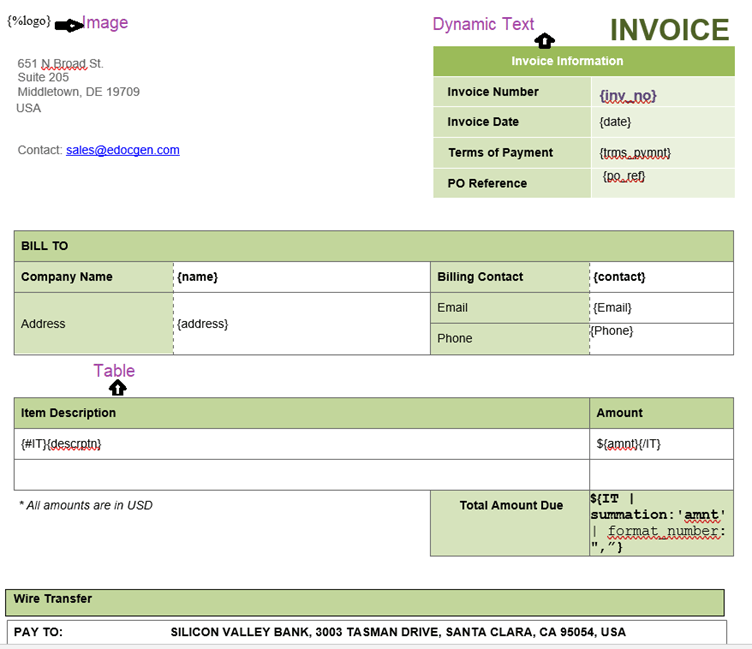
These tags are like little signposts that tell the system exactly where to drop each piece of data. A common and easy-to-use format is double curly braces, like {Customer_Name} or {Policy_Number}. This kind of no-code tagging turns what could be a complex technical headache into something a business user in banking or insurance can easily manage on their own.
Remember, the goal is a perfect one-to-one match. Every placeholder you put in your Word document needs a clear, corresponding field in your database view. This meticulous mapping is the bridge that lets data flow seamlessly and accurately.
For instance, a section in a loan agreement template might look like this:
Loan Agreement for: {Client_FullName}Account Number: {Account_ID}Loan Amount: {Loan_Amount_Formatted}
This simple method is incredibly powerful. It ensures that when you populate the Word document from your database, every piece of information lands in exactly the right spot.
To get the best results, having a solid understanding of how to structure your data for this process is key. You can find some excellent pointers in our guide on best practices for template development. Honestly, getting this preparation phase right is the most critical step for successful automation.
Alright, your database is clean and your Word template is tagged up and ready to go. Now for the crucial part: linking them together. This is where we build the bridge that lets your data flow automatically, turning a static document into something dynamic and powerful. How you do this depends on your tech stack, but the goal is always the same—populating your Word document from the database, smoothly and reliably.
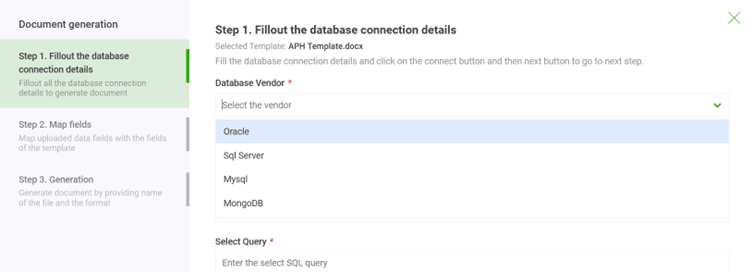
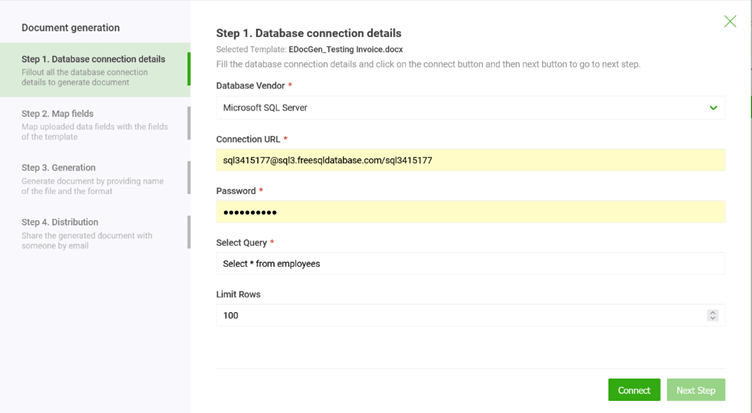
In traditional enterprise setups, a direct database connection might seem like the obvious path. You can use connectors for SQL Server, Oracle, or MySQL to pull data straight from the source. The downside? This approach can be pretty rigid and might introduce security headaches if you're not careful about managing access.
A much more flexible, modern way to handle this is with APIs. Instead of a direct link, you package your data into a structured format like JSON or XML and send it over to a document generation service. This method neatly separates your database from the template, which gives you far better security and makes it easier to scale.
To really get this right, mastering effective financial data integration is a game-changer. That knowledge helps ensure even the most complex data structures, like those in financial reports or customer statements, are handled correctly.
At its heart, the idea is simple: turn a row of database information into a neat data packet that an automation engine can instantly read. This packet is just a collection of key-value pairs that perfectly match the tags you created in your Word template.
For most modern systems, an API-driven workflow using JSON is the way to go. It's simple, and pretty much everything can work with it. Let's say you're generating an invoice. Your system would query the database for a specific invoice ID and then build a JSON object with that data.
Here’s a quick look at what that JSON payload might look like:
{"customerName": "Global Corp Inc.","invoiceNumber": "INV-2024-00123","invoiceDate": "2024-10-26","dueDate": "2024-11-25","lineItems": [{ "description": "Enterprise Software License", "quantity": 1, "price": 5000 },{ "description": "Premium Support Package", "quantity": 1, "price": 1500 }],"totalAmount": "6,500.00"}
This tidy bundle of data is then sent through an API call to the document generation platform. The platform catches the JSON, reads the keys (like customerName), finds the matching {customerName} tag in your template, and slots in the value. The whole thing happens in milliseconds.
The growth here is huge. The Document AI market is valued at a massive USD 32.8 billion in 2024, and enterprises are jumping on these solutions to handle incredible volumes of documents. Cloud-based platforms are leading the charge, holding a 72% market share thanks to their scalability and on-demand access.
If you want to see how EDocGen can plug into your existing systems, take a look at our guide on available integrations.
Once your database is connected and the template is mapped out, you can get to the good stuff: generating single, on-demand documents and churning out massive bulk reports. This is where the real ROI of automation kicks in, shifting your team from tedious manual tasks to strategic, system-driven workflows that can populate a Word doc from your database in a flash.
The value is immediately obvious in on-demand situations. Take a loan officer at a credit union who needs to draft a personalized loan agreement. Instead of manually copying and pasting details from their CRM, they can just click a button. The system instantly grabs the customer's name, loan amount, and terms from the database, plugs it into a pre-approved Word template, and produces a compliant, error-free document.
This isn't just about speed; it fundamentally reshapes the workflow. It frees up your people to focus on building client relationships instead of getting bogged down in administrative paperwork.
While on-demand generation is a game-changer for day-to-day tasks, bulk reporting is where you see the sheer power of automation. Think of an insurance company that needs to send out thousands of customized annual policy renewal letters. Each one has to include specific details like the policyholder's name, any coverage changes, and the new premium amount—all sourced from a central database or multiple-datasources.
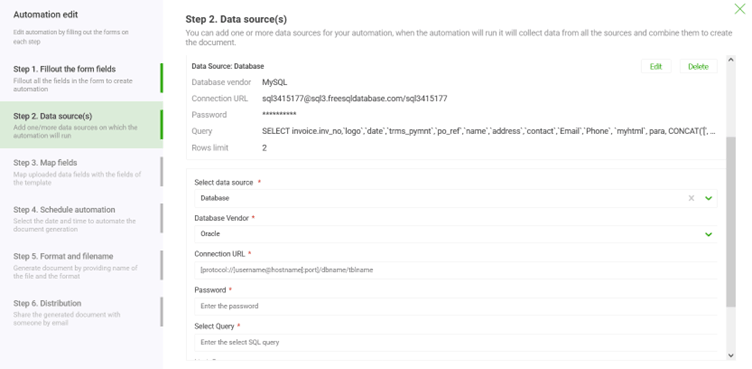
Trying to create these manually would be an absolute nightmare, but an automated system handles it without breaking a sweat. You can set up a single job to:
By automating this process, you guarantee that every single document is accurate, consistent, and delivered on schedule. It turns what could be a month-long headache into a simple, overnight job.
Modern platforms are much smarter than simple find-and-replace tools. You can embed sophisticated business rules directly into your Word templates using conditional logic. This is a huge deal for handling variations in your documents without having to maintain a dozen different versions of the same template.
For instance, a real estate firm generating lease agreements can use conditional tags to:
This ability to intelligently populate a Word document from a database is at the heart of effective automation. For a deeper look at the mechanics, check out our guide on bulk document creation. The impact here is massive; enterprise automation is a cornerstone of a market expected to top USD 17 billion by 2026. Why? Because it’s proven to slash processing times by 50-70% and cut document costs in half—a pretty compelling reason for any organization to get on board. Learn more about these enterprise automation market findings.
Connecting your database to a Word template is a great start, but the real magic happens when you turn that connection into a fully automated and secure workflow. This is where you graduate from manual, on-demand tasks to a reliable, hands-off operation that runs like clockwork. For any enterprise, that level of consistency and security is non-negotiable.
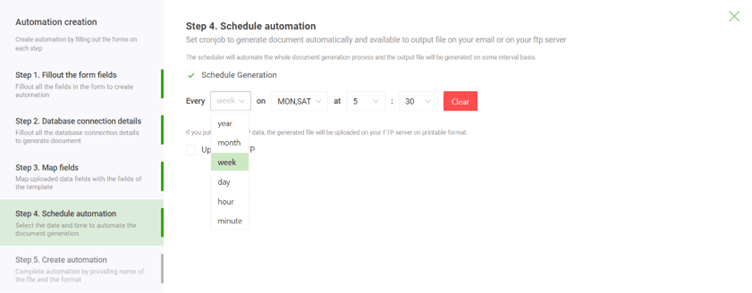
Instead of needing someone to click a button every time a report is due, you can schedule document generation jobs to run automatically. Think about nightly batch processes that crank out daily sales reports, or weekly jobs that generate compliance summaries. These automated triggers ensure your teams always have the critical documents they need, right on time, without any human intervention. If you want to get serious about efficiency, it's worth looking into how to automate data integration using tools like AI and RPA.
In any enterprise environment—especially in heavily regulated sectors like banking, insurance, or life sciences—security isn't just a feature; it's the foundation of everything. When you’re pulling data from a database to populate a Word document, you're often dealing with sensitive financial details or personal information. That data has to be protected at all costs.
A solid security strategy needs to be multi-layered, covering your data at every single stage of its journey.
A secure workflow isn't just about preventing breaches; it’s about building a trustworthy system. For IT teams, the ability to prove who did what and when is just as important as the automation itself.
When you're evaluating any document generation solution, your IT team needs a clear checklist to make sure it meets strict enterprise standards. This goes way beyond a simple feature comparison—it’s about confirming the platform’s fundamental commitment to security and compliance.
Your evaluation should confirm the platform supports:
By making these security measures a priority, you can confidently build automated workflows that don't just boost efficiency but also uphold the highest standards of data protection. This is what transforms a simple process into a true enterprise-grade solution.
While you can certainly connect directly to a database, you get a lot more flexibility by using structured data formats like JSON or XML, especially if you're driving the process through an API.
JSON is the modern favorite. It's lightweight, easy for humans to read, and it’s what most web services use today. XML, on the other hand, is a bit more verbose, but its ability to enforce a strict schema is a huge advantage for complex documents where compliance is key.
The best format? It's really the one that already fits into your IT architecture. The good news is that enterprise-grade platforms are built to handle both without breaking a sweat.
This is where the magic really happens, and it's much simpler than you might imagine. You don’t need to be a developer to build sophisticated logic into your documents. Advanced generation platforms manage this using special tags right inside the Word template.
This whole approach is a game-changer because it puts the power in the hands of the business users. They can control complex rules using the Word documents they already know inside and out. It cleanly separates the document’s logic from the application code, which makes future updates incredibly fast and simple.
Absolutely. In fact, if it doesn't integrate, you're missing the whole point. Seamless integration is what makes this a true end-to-end automated process.
Most modern automation tools are built with robust REST APIs designed specifically to talk to your other core systems, whether it’s a CRM like Salesforce or an ERP like SAP.
Imagine a workflow where a sales contract is automatically generated and emailed the instant a deal is marked "Closed-Won" in Salesforce. That's what we're talking about. It gets rid of manual handoffs, slashes delays, and makes sure the process to populate a Word document from a database is just another integrated part of how your business runs.
Ready to stop copying and pasting and start automating? With EDocGen, your teams can generate accurate, data-driven documents in seconds, not hours. See how our powerful, no-code platform can transform your workflows at https://www.edocgen.com.