
PDF document automation is exactly what it sounds like: using technology to create, fill out, and send PDF files automatically, without anyone having to lift a finger. Think of it as a smart assembly line for your company’s paperwork. It takes data from sources like a database or a web form and instantly places it into the right spots on a pre-made template.
This simple but powerful process gets rid of mind-numbing repetitive tasks, slashes errors, and can seriously speed up how your business runs.
Imagine your team spending hours every single week creating invoices, reports, or contracts by hand. They’re copying and pasting customer details, punching in financial numbers, and then double-checking every field, hoping they didn’t miss anything. This isn't just slow—it's a recipe for costly mistakes.
PDF document automation swaps out that entire manual process for a clean, digital workflow. At its heart, it’s all about connecting a data source (like a spreadsheet) to a PDF/Word template. The system acts as a bridge, pulling specific information—a client's name, their address, or the details of their last order—and perfectly inserting it into the correct placeholders.
The result? A perfectly formatted, personalized document, generated in seconds, not hours.
But this isn't just a fancy mail merge. It's a key piece of a much larger puzzle: improving how your business operates. To really get it, it helps to understand what workflow automation is on a broader scale. PDF automation is just a specialized slice of that, zeroing in on one of the most common file formats in the business world.
Let's look at the key things it can do:
As more business moves online, handling documents efficiently has become a make-or-break issue. Companies are scrambling for a competitive edge, and the demand for these tools is exploding. The document automation software market is expected to jump from around USD 2.9 billion in 2024 to USD 8.5 billion by 2033 . This growth is fueled by a simple need: to work smarter and cut costs.
By automating high-volume, rule-based document tasks, businesses can free up their teams from monotonous administrative work. This allows skilled employees to focus on strategic initiatives, customer relationships, and other activities that truly drive growth. It transforms paperwork from a bottleneck into a seamless part of your operations.

We've covered the "what," so let's get into the tangible gains that PDF document automation brings to the table. This isn't just about shaving a few minutes off a task; it’s about fundamentally changing how your business runs. The positive effects ripple out across the company, touching everything from employee happiness to the bottom line.
Think about generating thousands of personalized customer statements in the time it takes to brew a pot of coffee. That's the kind of shift we're talking about—moving your team from a reactive mode of fixing manual mistakes to a proactive one focused on real growth.
The first thing you'll notice is a massive jump in speed and productivity. Manually creating documents is a notorious time-eater, filled with endless copying, pasting, and proofreading. Automation completely wipes out these tedious, repetitive steps.
A task that once took an employee hours can now be done in seconds. That reclaimed time is pure gold. It allows your skilled people to stop pushing paper and start focusing on high-value work like improving customer service, planning strategy, or developing new products. It’s not about doing the same work faster; it’s about empowering your team to do better work.
Let's be honest, human error is a natural part of any manual process. But a single typo on an invoice, a misplaced decimal in a financial report, or the wrong address on a contract can cause major headaches. We're talking costly rework, compliance troubles, and a serious blow to client trust.
PDF document automation dramatically cuts down this risk. It works by pulling data directly from a single source of truth—like your CRM or database. There’s no retyping and no manual data entry, just a clean, seamless flow of information.
By taking manual data handling out of the equation, you trade a mistake-prone process for one that guarantees consistency and precision in every single document you create. That level of accuracy is absolutely essential for upholding professional standards and keeping clients confident.
If you're in an industry like finance, healthcare, or insurance, you know that regulatory compliance isn't optional. Trying to manage documents manually in these fields is like walking a tightrope. One missing clause or an outdated form can lead to steep penalties.
Automation locks down standardization by making sure every document is generated from an approved, up-to-date template. You can set up rules to automatically insert required legal disclaimers, privacy policies, or specific clauses based on the client or region. Our guide on financial document automation solutions, for instance, shows how this is applied to stay on the right side of regulations.
The result is a clear, consistent, and easily auditable paper trail that makes the whole compliance process simpler and lowers your company's risk.
Paper documents and scattered digital files sitting on local drives are a huge security risk. They can be lost, stolen, or accessed by people who shouldn't see them.
A centralized document automation system tightens up security in a few key ways:
These are just a few of the benifits that forward-thinking companies are embracing. By locking down your document workflows, you're not just getting more efficient—you're actively protecting sensitive company and customer data.
To really get what pdf document automation is all about, it helps to look under the hood. The whole thing is a surprisingly logical, step-by-step workflow that turns raw data into polished, professional documents. Think of it as a digital assembly line—one that's incredibly precise and efficient.
The beauty of this process is that it doesn't need someone manually checking things at every stage. It just follows a sequence you've already defined, moving smoothly from gathering data to sending out the final product.
Stage 1: Data Extraction and Collection
It all starts with data. Before anything can be automated, the system needs the raw information it's going to use to fill in the documents. The good news is this data can come from pretty much any digital source you're already using.
The system acts like a smart funnel, pulling only the specific pieces of information needed for the document. This might be a customer's name from your CRM, the details of an order from your database, or financial figures from an Excel spreadsheet. This first step is so important because the information is pulled directly from the source of truth, killing the risk of manual typos right from the start.
Stage 2: Template Design and Mapping
Okay, so the system has the data. Now what? It needs to know exactly where to put it. This is where the template comes into play. A template is just a master version of your document—like an invoice, a contract, or a report—with designated placeholders for the information that will change each time.
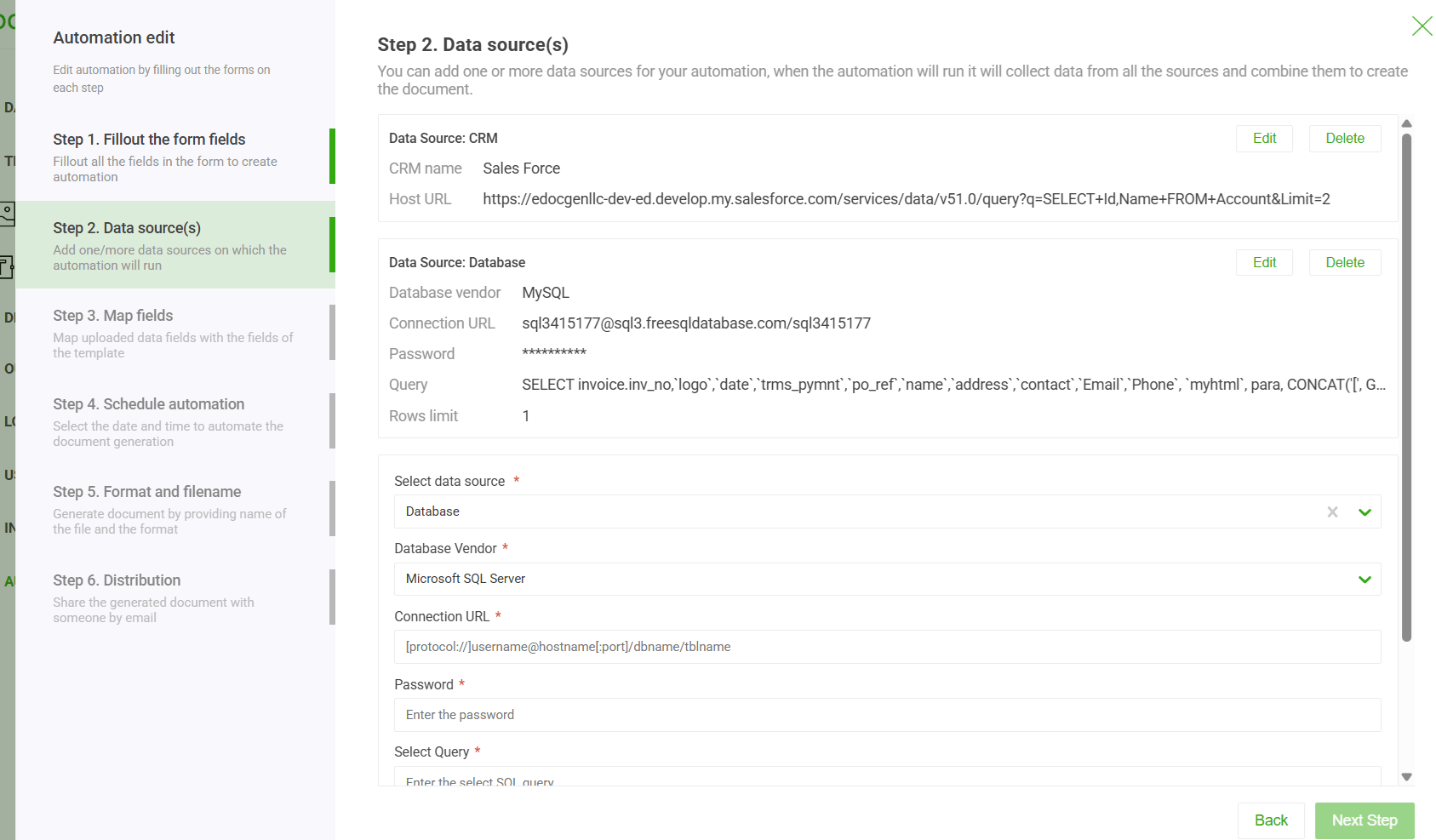
You design this template once, creating a blueprint for all future documents. Then comes the mapping phase, where the system maps data from your source to a specific field in that template. It's like telling the system, "Hey, see the 'ClientName' from the database? I want you to put that right here in the '{Customer_Name}' field on the invoice."
Beyond simple field mapping, you can infuse smart logic into your PDF automation. Think conditional rules, custom number and date formatting, dynamic population logic, and more. You set the rules once, and the system repeats them flawlessly every time—delivering perfectly consistent PDF documents.
This simple, three-part workflow is laid out in the infographic below.
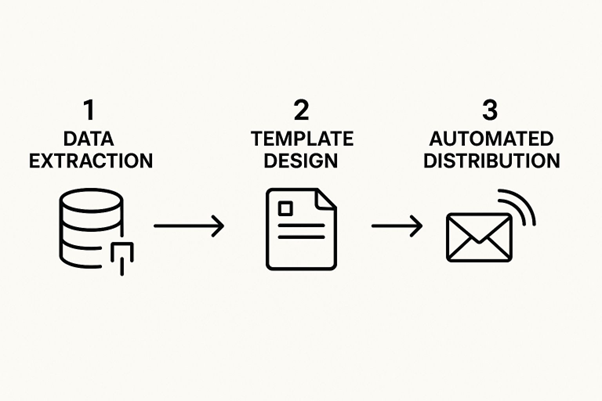
As you can see, it's a straightforward flow: raw information gets poured into a predefined template, and a final, ready-to-go document comes out the other end.
Stage 3: Automated Generation and Distribution
With the data pulled and the template mapped, we get to the final stage—this is where the magic happens. The automation software takes over, instantly merging the data with the template to generate the finished PDF. This can be for a single, on-demand document or for thousands at once in a bulk run.
But it doesn't just stop at creation. A huge part of the value is what happens next. The system can be set up to automatically handle distribution based on your business rules.
Here are a few things that could happen next:
When you start looking at how this works in the real world, you'll see that tools inside larger platforms often have specific features for these tasks. For instance, a helpful resource explains how the business document automation works, which is a perfect example of an integrated generation feature. This end-to-end automation, from data to delivery, gets rid of bottlenecks and makes sure your documents get where they need to go without delay.
Theory is one thing, but the real "aha!" moment with PDF document automation comes when you see it solve actual business headaches. Across every industry, companies are using this to fix specific, costly problems—slashing processing times, sidestepping compliance risks, and seriously upgrading their customer experience.
Let's look at a few tangible scenarios. These aren't just minor tweaks; they represent a complete operational overhaul. Think of them as a blueprint for how you can apply the same thinking to your own challenges.
The entire financial world is built on a mountain of paperwork. We’re talking loan applications, compliance reports, account statements—you name it. A single typo or misplaced decimal can lead to huge financial penalties or, worse, a damaged client relationship. This high-stakes environment makes the industry a perfect candidate for automation.
Take a mid-sized bank handling mortgage applications. Before they made a change, every application meant a loan officer had to manually assemble dozens of documents: disclosure forms, loan estimates, closing agreements, and more. It was painfully slow, taking hours for each applicant and leaving the door wide open for inconsistencies.
By bringing in a PDF automation system, the bank plugged its loan origination software directly into a library of pre-approved templates. Now, the moment an application gets the green light, the system instantly generates a complete, compliant, and personalized loan package.
This shift freed up loan officers to spend less time on tedious admin and more time actually advising clients. The result? Better service and a faster lending cycle for everyone.
We’ve all been there: you walk into a clinic for an appointment and get handed a clipboard stacked with forms. It’s a frustrating experience for patients, and on the back end, staff have to manually type all that information into the electronic health record (EHR) system. It’s inefficient and a recipe for transcription errors.
A large healthcare network was dealing with this exact problem. Patient wait times were creeping up, and transcription mistakes were leading to inaccuracies in medical records. They turned to PDF document automation to bring their intake process into the modern age.
Now, patients fill out their information on a secure online portal before their appointment. The automation system grabs this data and instantly populates a full set of standardized, perfectly formatted PDF intake forms. These digital documents are then filed straight into the patient’s electronic record, no manual entry required.
The insurance industry runs on the accurate, personalized generation of documents like policy packets, claims forms, and renewal notices. When you're managing thousands of policies, doing this by hand isn't just inefficient—it's impossible. For a deeper dive into this sector, our guide on insurance document automation breaks down the complexities involved.
Picture an insurance firm that has to mail out thousands of annual policy renewal packets. Each one needs a personalized summary, a declaration page with very specific coverage details, and a new invoice. It's a massive undertaking.
With PDF automation, the firm connects its core policy management system to its document templates. The system then runs a batch process, automatically generating a unique, multi-page PDF packet for every single policyholder. From there, the workflow can route the documents for digital delivery or print, all based on the customer's preference. This ensures every client gets accurate and timely information without needing an army of administrators to pull it off.
While standard PDF document automation is a game-changer, it mostly shines when working with structured data—information that's already neatly organized in databases or spreadsheets. But what happens with all the messy stuff? The invoices, contracts, and emails that don't fit into neat little boxes?
That's where the next evolutionary step, Intelligent Document Processing (IDP) , comes into the picture.
Think of standard automation as an obedient assistant. You hand it a spreadsheet and a template, and it fills everything out perfectly. IDP, on the other hand, is more like a digital apprentice. It doesn't just fill in blanks; it can actually read , understand the context, and pull the right information from complex sources like scanned receipts or lengthy legal agreements.
This one shift completely changes what's possible with your document workflows.
The real difference is the intelligence layer. Standard automation follows strict rules you create. For example, "Take the value from column C and put it in the 'Invoice Total' field." It’s incredibly effective but completely rigid. If the format changes, the rule breaks.
IDP leverages artificial intelligence (AI) to be much more flexible. It can analyze a document it’s never seen before and identify key information on its own, learning to recognize patterns just like a person would.
This means you can throw a wide variety of document types at it without having to build a unique template for every single one. IDP is built to handle the chaotic reality of business paperwork.
Intelligent Document Processing isn't just a faster way to do the same old tasks. It's a way to unlock the valuable data trapped in your documents, turning chaotic information into a structured, usable asset.
The reason for the explosive growth in IDP is simple: businesses are drowning in unstructured data and need a life raft. IDP acts as that raft by combining several powerful technologies:
This powerful trio is driving huge market adoption. The global IDP market is projected to soar from USD 3.8 billion in 2025 to USD 36.4 billion by 2034 , growing at an impressive CAGR of 28.7% .
This isn't just another trend. It’s a fundamental shift in how organizations manage information, making PDF document automation smarter, more versatile, and more valuable than ever before.
The right tool depends entirely on your team's skills and the complexity of your needs. Are you looking for a simple drag-and-drop interface for your marketing team, or do you need a powerful API for your developers to integrate into a custom app? This table breaks down the main categories to help you decide.
|
Solution Type |
Best For |
Key Features |
Technical Skill Required |
|
No-Code/Low-Code Platforms |
Business users, operations teams, and departments without developer resources. |
Visual workflow builders, drag-and-drop template editors, pre-built integrations. |
Low to none |
|
API-First/Developer Tools |
Software developers and IT teams building custom applications or deep integrations. |
Robust APIs, SDKs for various languages, extensive documentation, webhooks. |
High (coding required) |
|
Embedded Solutions |
Businesses that want to add document generation features into their existing software. |
White-labeling options, seamless integration into a host application's UI. |
Medium to High |
|
Industry-Specific Tools |
Companies in regulated fields like legal, healthcare, or finance. |
Pre-built templates for compliance, industry-specific security certifications. |
Low to Medium |
Ultimately, the best choice is one that feels like a natural extension of your current operations. By starting with your specific problem and considering your team's technical comfort level, you can cut through the noise and find a solution that truly works for you.
The need for these tools is growing fast. The PDF software market, a huge piece of the document automation puzzle, was valued at USD 2.15 billion in 2024 and is projected to hit USD 5.72 billion by 2033 . This surge means more choices than ever.
With such an expanding market, having a structured way to evaluate your options is the only way to find the perfect fit.
Is My Company Data Secure with PDF Automation?
This is usually the first question people ask, and for good reason—your data is everything. The short answer is yes. Any reputable document automation platform is built with security at its core, not as an afterthought. They use multiple layers of protection to keep your sensitive information locked down.
Here’s what you should be looking for in any secure solution:
A truly secure system means your confidential client and company info stays that way, keeping you compliant and maintaining trust.
How Does It Integrate with My Existing Systems?
It's a common fear that adding a new tool will just create another disconnected data island. But modern PDF document automation platforms are designed to do the opposite. They're built to plug right into the software you already depend on every day, which is the key to creating a truly hands-off workflow.
The magic behind this is usually an Application Programming Interface (API) . Think of an API as a bridge that lets different software systems talk to each other. This bridge allows the automation tool to pull data directly from your CRM, ERP, or even a simple database. Many platforms also offer pre-built connectors for popular apps, making the whole integration process even quicker.
The best part is that modern, no-code platforms have dramatically sped up this whole process. Business users can often build and launch their own automated workflows without needing a ton of help from the IT department. This means you start seeing a return on your investment way faster than with old-school software projects.
Ready to finally ditch the manual document grind and speed up your business? EDocGen offers a powerful, secure, and flexible platform for all your PDF automation needs.