
Generating a PDF from a database sounds simple, but it’s a critical workflow that connects a data source—like a SQL database or Salesforce—to a document template. Using an automation platform, you can generate thousands of customized documents in bulk, replacing slow, error-prone manual work with a fast, accurate, and scalable process. It is the engine behind creating everything from invoices and contracts to complex compliance reports.
If you are in finance, insurance, or real estate, you are all too familiar with the soul-crushing task of creating critical documents from massive databases. Manually generating thousands of invoices, loan agreements, or compliance reports is not just inefficient; it is a huge operational risk. This manual bottleneck is exactly where an automated database to PDF workflow stops being a "nice-to-have" and becomes a strategic necessity.
Just picture a loan officer spending hours every single day copying and pasting customer data from Salesforce into a standard contract template. Each document has to be meticulously proofread, and one tiny mistake could snowball into a major compliance headache or a significant financial loss. This scenario perfectly captures why manual processes just can't keep up.
When you automate document generation, you're not just speeding things up. You're freeing up your best people to focus on high-impact work, turning a frustrating manual bottleneck into a smooth, compliant, and efficient operation.
The need to turn structured database information into polished, professional documents is more than just a trend—it's a massive market shift. The data conversion services market, which includes these exact processes, is projected to skyrocket from USD 77.26 billion to an incredible USD 1,098.32 billion by 2034 . Within that, document conversion (where database-to-PDF workflows are a huge player) already commands a leading 23.7% market share . This explosive growth is fueled by industries like insurance and real estate finally digitizing enormous volumes of records from sources like Salesforce and custom databases.
Modern platforms are built to connect directly to these data sources, letting teams generate pixel-perfect PDFs on demand or in scheduled batches. This is the cornerstone of modern document automation. By adopting this approach, businesses aren't just tweaking a single task; they're fundamentally changing how they operate. To get a better handle on this concept, check out our guide on what document generation is and how it works . This shift empowers a single employee to accomplish in minutes what once took an entire team days to complete.
Before you even think about generating a single PDF, you need to lay down a solid architectural foundation. For any IT or integration team, a well-designed database to PDF workflow is about more than just connecting Point A to Point B. It’s about building a reliable, secure, and scalable system that can handle enterprise-level demands without someone constantly having to look over its shoulder.
The whole process has several distinct but interconnected stages. It all kicks off with securely extracting data from its source, whether that's a legacy Oracle database or a modern CRM like Salesforce.
At the heart of any modern document generation architecture is the API (Application Programming Interface). APIs are the essential bridge that allows your databases, CRMs, and other systems to talk securely with a document generation engine like EDocGen. Without this bridge, you’re right back to manual data exports and uploads—the very process you’re trying to escape.
A well-documented REST API, for instance, provides a standard way to send data and receive documents. Your application can make a simple HTTP request, and the API hands back the generated PDF. This approach neatly decouples your core systems from the document logic, making the entire setup more modular and way easier to maintain.
A robust API integration is the linchpin of a scalable document workflow. It ensures that data moves securely and efficiently from its source to the final PDF, enabling real-time generation for on-demand requests and reliable execution for high-volume batch jobs.
With EDocGen , generating PDF documents from your database is a straightforward two-step process:
1. Connect to your database.
2. Generate PDF documents using your query results.
On the connection screen, choose your database type from the drop-down menu. Then enter the connection URL in the format username@hostname[:port]/DatabaseName , along with your password and the native SQL query.
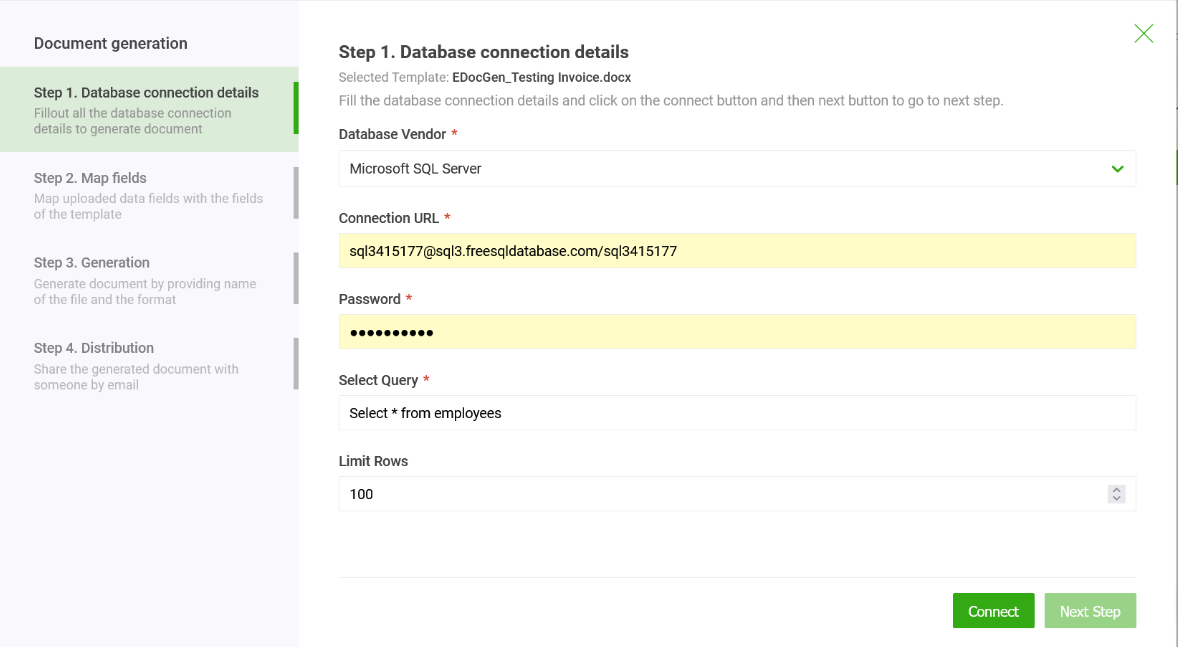
With your data architecture locked in, this is where the fun really starts—where data meets design. Forget basic mail-merge. We're talking about building genuinely intelligent documents that can think for themselves. The goal is to create dynamic PDF templates that twist, turn, and personalize their content based on the data they get from your database.
The process is surprisingly straightforward. You embed simple, readable tags directly into your template files, which can be standard Word documents or fillable PDFs you already use. This isn't a developer-only game. A business analyst at an insurance company, for example, could design a policy document that automatically pulls in or leaves out entire sections depending on the coverage type sitting in a database field.
This simple step transforms a static file into a responsive, intelligent asset. It's the secret to churning out highly customized documents at scale, which is the whole point of any serious database to pdf automation project.
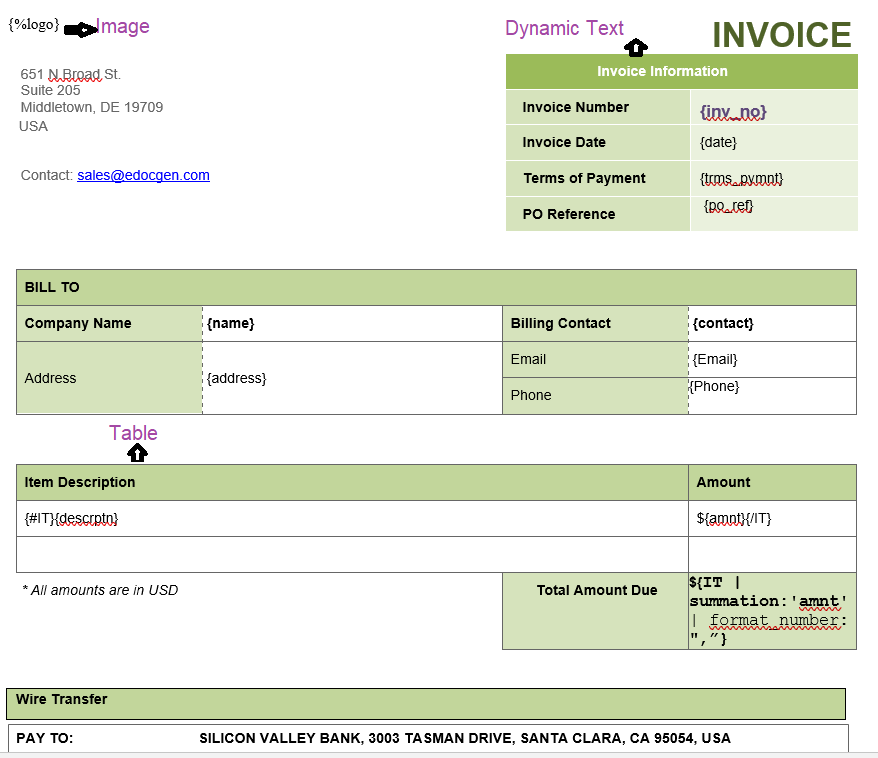
Think of conditional logic as the "if-this-then-that" brainpower inside your templates. It gives a document the ability to make decisions, instructing it to show, hide, or change content based on values coming from your data source.
This is a massive time-saver in the real world. Imagine a real estate firm that generates sales contracts for properties in different states. Every state has its own unique legal clauses that absolutely must be in the final document.
Instead of drowning in dozens of separate contract templates—they can build one master template.
This guarantees every single contract is 100% compliant and accurate without anyone having to manually pick the right version. The logic is baked right in, driven entirely by the database.
By embedding conditional logic directly into your templates, you eliminate the risk of human error and the operational drag of managing countless document variations. Your single source of truth—the database—dictates the final, compliant output every time.
This isn't just a convenience; it's a necessity. The PDF software market was valued at USD 4.8 billion and is growing fast, largely because 82% of businesses pick PDF as their primary format for documents generated from databases. Combine that with the 320% spike in e-signature demand since 2020, and the case for dynamically generated, ready-to-sign PDFs is crystal clear.
But what about data that isn’t a fixed size, like line items on an invoice or a list of dependents on an insurance policy? That's where looping comes in. Loops, often called "repeat sections," let your template dynamically create table rows or list items.
You just define a block in your template—like a single table row or a bullet point—and tell the engine to repeat it for every single item it finds in a specific data array.
Take an e-commerce order sitting in a SQL database. An order might have one item or fifty. A static template just can't handle that kind of unpredictability.
When the document gets generated, the engine cycles through the data created by nested queries, creating and populating a new row for each one. If the database record has five items, the PDF gets a five-row table. If it has twenty, it gets twenty rows. It is that simple. To get a closer look at the mechanics, check out our guide on how to https://www.edocgen.com/help/loops-lists-repeatsections in your templates.
And while you're building these intelligent templates, it's also a good time to think about accessibility. Using tools that help generate inclusive PDFs ensures the documents you produce are usable by everyone, regardless of ability.
Generating a single PDF from a database is one thing, but what happens when you need to reliably produce thousands—or even tens of thousands—on a tight schedule? That is when you cross the bridge from simple document creation into the world of high-volume batch processing, a completely different engineering challenge. For any business looking to automate critical workflows like monthly billing or end-of-quarter reporting, getting this right is non-negotiable.
Entering the query and connection details each time you generate documents can be time-consuming and repetitive. To simplify this process, the system provides automation features that help streamline these steps.
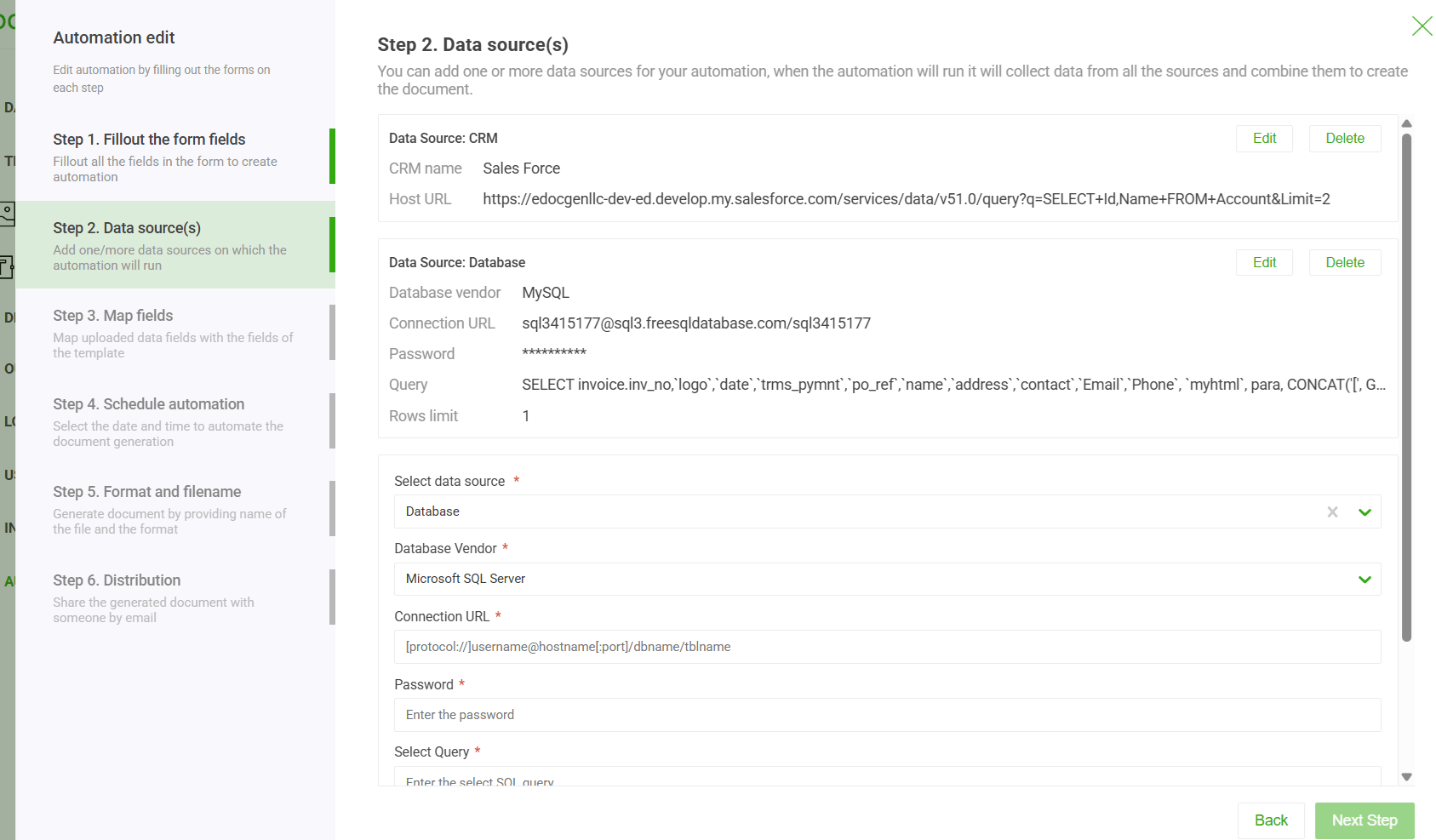
This method is perfect for situations where you don't need instant, real-time output but absolutely demand high throughput and accuracy. We've seen it used countless times for:
The beauty of this batch-oriented approach is that it gives you a clear, auditable trail. You have the input data file, the exact template that was used, and the resulting batch of PDFs, which makes verifying accuracy a breeze.
While manually kicking off a batch job is powerful, the real game-changer is scheduling. This is where you transform your database to pdf workflow from a reactive task into a proactive, "set it and forget it" process. By setting up a recurring schedule, you guarantee that critical documents get generated and distributed without anyone having to lift a finger.
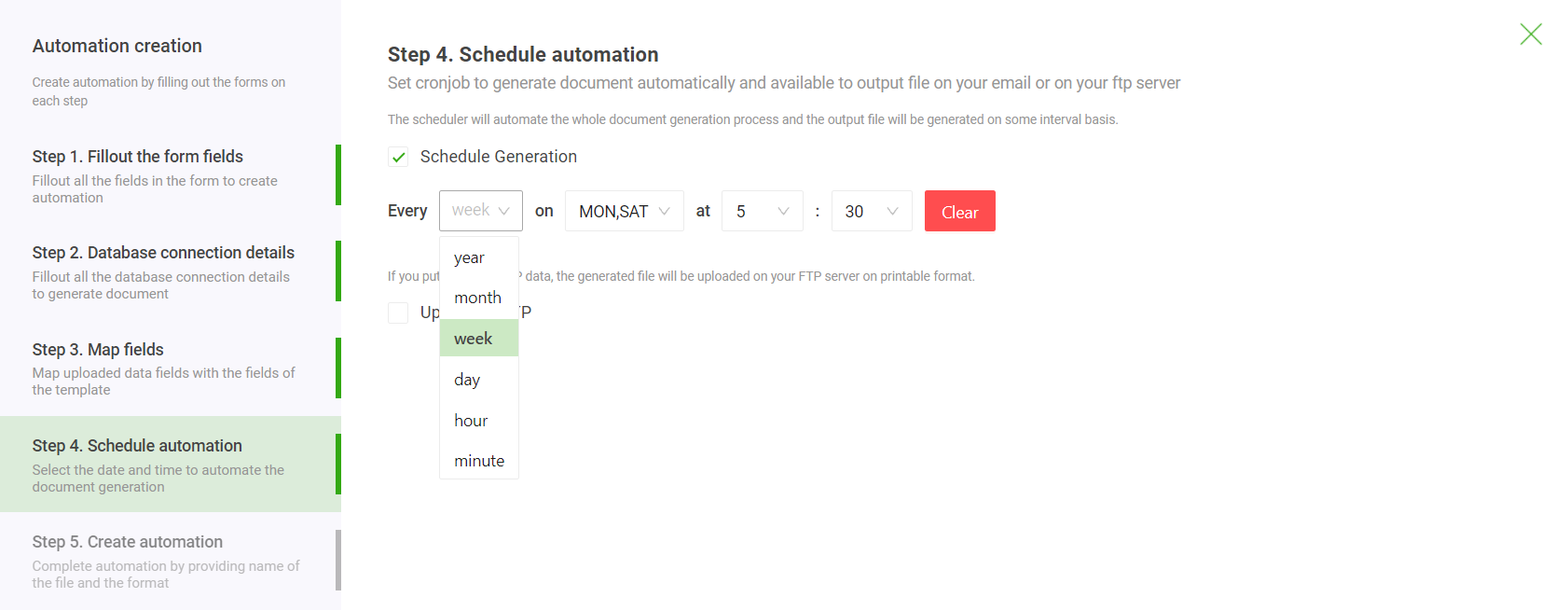
Scheduling is the final step in true automation. It allows a financial firm to automatically generate and email thousands of client portfolio statements every night at 2 AM, ensuring they are in clients' inboxes by morning, all without a single person needing to be involved.
Imagine the operational wins. No more forgotten tasks or last-minute scrambles to meet deadlines. No more relying on one person to remember to kick off a critical job. The system just handles it, reliably and on time.
When you start dealing with massive datasets—tens of thousands of records or more—performance becomes a real consideration. You need a bit of planning to avoid system timeouts and ensure every single document is generated flawlessly. For a deeper technical dive, our guide on high-volume document generation is a great resource.
Here are a few practical tips we've learned to keep large jobs running smoothly:
For developers, the API is where the real work happens. It is the bridge that connects your database to the PDF generator, powering real-time document creation and weaving it directly into your existing systems. Getting this connection right is absolutely critical for building a workflow that’s secure, fast, and won't fall over when you need it most.
Think of PDF generation as a service. The service handles the heavy lifting and sends back the finished PDF, either right away or with a link to the file.
One of the first big decisions you'll make is whether to use synchronous or asynchronous API calls. This choice has a direct impact on user experience and system performance, so it pays to know the difference.
A hybrid approach has often been implemented with excellent results. The application makes an asynchronous call, and we set up a webhook that pings a callback URL as soon as the document is ready. You get the best of both worlds: a snappy, responsive UI and efficient background processing for the heavy lifting.
Let's see what this looks like in the real world. Here’s a quick Python script that grabs customer data from a PostgreSQL database and hits an API to generate an invoice.
import requests import json import psycopg2
Connect to the PostgreSQL database
conn = psycopg2.connect(database="mydb", user="user", password="password", host="localhost", port="5432") cur = conn.cursor()
Fetch data for a specific invoice
cur.execute("SELECT customer_name, invoice_date, total_amount FROM invoices WHERE id = 123;") invoice_data = cur.fetchone()
Make the API call to the generation service
headers = { 'Authorization': 'Bearer YOUR_API_KEY', 'Content-Type': 'application/json' } response = requests.post(' https://app.edocgen.com/api/v1/document/generate/bulk', headers=headers, data=json.dumps(payload))
Save the generated PDF
if response.status_code == 200: with open('invoice_123.pdf', 'wb') as f: f.write(response.content) print("Invoice generated successfully.") else: print(f"Error: {response.status_code}")
conn.close()
This basic pattern is incredibly versatile. You could adapt it for a Salesforce Apex trigger that fires when an Opportunity is marked "Closed Won," automatically creating a sales contract and attaching it to the record. This kind of hands-off automation is exactly why API-driven document services are booming.
API best practices aren't just about making code work; they're about building a secure and scalable foundation. Proper API key management, robust error handling, and payload optimization are the pillars of a successful integration that won't fail under pressure.
To make sure your integration is bulletproof, you need to focus on a few key practices:
Leveraging a purpose-built document generator API gives you specialized tools designed for these exact workflows.
The PDF software market, currently valued at USD 1,851.2 million , is growing fast for a reason. Companies are leaning heavily on tools that can turn database content directly into compliant, professional PDFs. This is especially true in sectors like banking and insurance, where regulations demand secure, standardized documents.
North America is leading the charge with over 40% market share , growing at an impressive 13.8% CAGR . This growth is fueled by cloud adoption and the absolute necessity of connecting data silos like CRMs and databases. It is a trend that perfectly aligns with the rise of platforms that use APIs to automate PDF creation from sources like JSON, finally killing off the manual, error-prone work that bogs down so many IT teams. You can dive deeper into the market dynamics by reading the full PDF software market report.
This is probably the number one question we get, and for good reason. Real-world data is messy and almost never flat. You've got customers with multiple orders, and each of those orders has a bunch of line items. How do you get that into one clean document?
The trick is to think in layers. Your data should be structured as a nested JSON object, and your template needs to mirror that structure with nested loops. For example, you’d set up an outer loop to cycle through the main 'orders' array from your database. Then, inside that loop, you’d have a second, inner loop that iterates through the 'line_items' tied to that specific order.
This approach lets your template dynamically build tables or lists that can be any length. It’s how you ensure every single piece of data shows up correctly without having to hard-code a solution for every possible scenario.
Security is everything, especially when you’re plugging a core business database into an outside service. First things first: always use secure API endpoints ( HTTPS ) and strong authentication like API keys or OAuth. And it should go without saying, but never, ever hardcode credentials in your client-side code. That’s just asking for trouble.
Your document generation platform absolutely must support strong data encryption, both in transit (using protocols like TLS 1.2+ ) and at rest (with AES-256 encryption ). A secure connection is the bare minimum.
For companies in finance, healthcare, or any field with highly sensitive data, an on-premises deployment is often the best path forward. This keeps the entire workflow tucked safely behind your corporate firewall, giving you the ultimate control and peace of mind.
One last thing—make sure the platform has granular, role-based access controls. This lets you dictate exactly who can touch templates, connect to data sources, or run generation jobs, effectively minimizing your risk.
Of course. Any modern document generation platform worth its salt isn't a one-trick pony. The goal is to produce whatever output you need from a single, intelligent template and data source.
Once you’ve built your template with all the right tags and logic, you should be able to specify the output format with a simple API parameter.
This means you can easily:
This multi-format capability is a huge time-saver. You're not stuck building and maintaining three slightly different templates for each file type, which cuts down on a ton of administrative overhead.
If you're a global business, your documents need to speak your customers' language—literally and figuratively. Good news is, modern systems are built for this.
To handle different languages, you have a couple of options. You could maintain separate, translated templates for each language. Or, for a more streamlined approach, you can use a single master template with conditional logic that checks a 'language' field from your database and pulls in the right text blocks.
And for regional quirks like dates ( DD-MM-YYYY vs. MM-DD-YYYY ) and currencies ( € vs. $ ), the platform should have built-in formatting functions. You can apply these directly to your template tags, ensuring data that's stored in a standard format in your database gets rendered perfectly for the recipient’s locale.
Ready to stop wasting time on manual document creation? EDocGen empowers your team to automate the entire database to PDF workflow, from template design to high-volume generation. See how EDocGen can transform your processes today .