
In real estate, speed and accuracy are everything. An automated property report generator is a tool that pulls data from multiple sources to instantly create detailed analyses—think CMAs, portfolio summaries, and investment reports. This isn't just about moving away from spreadsheets; it's about being able to generate hundreds of custom reports on demand , giving your client service and accuracy a serious boost.
Let's be real: manual reporting is a huge time sink. It's slow, mind-numbingly tedious, and—worst of all—a breeding ground for human error. Those are hours you could be spending building relationships or closing deals, not stuck behind a screen copying and pasting data.
Moving to an automated system does more than just speed things up; it overhauls your entire workflow. Instead of your team getting bogged down by endless data entry, they’re freed up to focus on high-value activities that actually drive revenue. It's about making smarter, data-driven decisions, and making them faster than the competition.
The true power here is turning raw data into actionable intelligence. When you can instantly break down property values, market trends, and investment potential, you arm both your team and your clients with the insights needed to act with confidence.
This capability is so transformative that the market for these tools is exploding. Projections show that the real estate generator market is on track to hit a valuation of around USD 2.76 billion by 2026 , fueled by intense demand from brokers, investors, and developers.
Platforms like EDocGen are at the forefront, providing the framework to build these powerful, custom reporting systems.It's designed to make complex automation accessible to anyone, not just developers. This user-first approach empowers business users to create and manage their own report-generation workflows directly.

Let's be honest: any automated report generator is only as good as the data you feed it. Before you can hit a button and watch the magic happen, you have to get your data house in order. If the foundation is messy, the entire structure you build on top of it will be wobbly at best.
The goal here is to pull all your critical property information into a single, reliable source file. I recommend a CSV or Excel spreadsheet. This file becomes the "single source of truth" that a platform like EDocGen will use to bring your report templates to life.
To build reports that are actually useful, you'll likely need to pull information from several different places. Mastering data collection is a huge part of this, and there are plenty of effective strategies for scraping real estate listings to get what you need. Think of your final spreadsheet as the central hub for data that might currently be scattered across your CRM, MLS exports, and other systems.
You'll want to gather a few key categories of information:
The most common point of failure we see in automation projects is inconsistent data. Taking an extra hour to clean up your source file will genuinely save you days of headaches trying to figure out why your reports have errors or blank fields.
Getting your data hygiene right isn't just about avoiding mistakes; it's a strategic move. The demand for tech-driven real estate solutions is only growing, and that relies on having a solid data infrastructure.
Once you've collected your data, you need to be militant about consistency in your column headers. This is non-negotiable. An automation tool works by matching a header in your spreadsheet to a placeholder tag in your report template.
For example, if you use property address in your template, your spreadsheet column must be named exactly that. Don't switch between prop_addr, Address, or property location. The machine isn't smart enough to guess your intent. Pick one format and stick to it. This simple discipline is the bedrock of successful real estate document automatio and ensures your system works perfectly every single time.

Alright, with your data wrangled and ready to go, we've arrived at the fun part: designing the actual report. This is where you get to transform those neat rows and columns of data into a polished, professional document that will genuinely impress your clients. The goal here is to build a template in EDocGen that's as beautiful as it is functional.
A well-designed report is a direct reflection of your brand's quality. In an industry where over 72% of real estate firms are leaning into automation, a crisp, data-rich presentation is no longer a "nice-to-have"—it's a critical differentiator. A visually compelling report doesn't just present facts; it builds trust and influences decisions.
First thing's first: let's infuse your brand's identity into the template. This goes way beyond just dropping a logo in the header. We're aiming for a cohesive look that communicates professionalism from top to bottom.
Inside your EDocGen template (which can be a simple Word or PowerPoint file), you can quickly set up your core branding:
With the static elements locked in, it’s time to add the magic: dynamic placeholders. These are just simple tags that show EDocGen exactly where to plug in the data from your spreadsheet.
For instance, you'll pop tags like {{property_address}}, {{market_value}}, and {{annual_taxes}} right into your document. When the reports are generated, EDocGen swaps each tag with the correct data for every property, automatically.
This is where your property report generator starts to feel truly intelligent. You can go beyond just filling in blanks by using conditional logic to make your reports adapt based on the data itself. This feature alone can elevate your report from a basic data summary to a genuinely insightful analysis.
The real power of an automated system is its ability to build intelligence directly into the report. You can create rules that automatically highlight opportunities or flag concerns, guiding your client’s attention to what truly matters without you lifting a finger.
Let's say you want to call out high-performing investment properties. You can set up a rule that only shows a "Prime Investment Opportunity" badge if the calculated ROI is above a specific number, like 8% .
Here are a couple of practical ways you can use conditional logic:
Finally, no property report is truly complete without clear visuals. EDocGen lets you embed dynamic charts that pull data straight from your source file. Think bar charts for comparing property values, pie charts for breaking down expenses, or line graphs for showing market trends. Best of all, these charts update automatically for every single report, making complex information digestible for anyone at a quick glance.
Alright, you've got your clean data file and a sharp-looking, branded template. Now for the fun part: connecting the dots and firing up your report generator. This is where all the prep work clicks into place, and your static files become a dynamic, report-churning machine. It’s a surprisingly quick process that takes you from upload to a finished report in just a few minutes.
The main task here is called mapping . Inside EDocGen, you'll upload your data source—that CSV file we polished up earlier is a perfect example. The platform intelligently reads your column headers (like property_address, market_value, etc.) and asks you to match them with the placeholders you created in your template ({{property_address}}, {{market_value}}).
Think of it as simply telling the system, "Hey, put the data from this column right into this spot in the document."
Once everything is mapped, you can generate the documents either one at a time or in bulk.
Bulk Generation for Immediate Needs: This is your go-to when you need a big batch of reports, like, yesterday. Let's say you just listed a 150-unit apartment building and need individual fact sheets for an open house this weekend. You just upload your data, map the fields once, and click "Generate." EDocGen will crank out all 150 unique PDFs for you to download.
This infographic breaks down the entire flow, from raw data input all the way to the final, polished report.
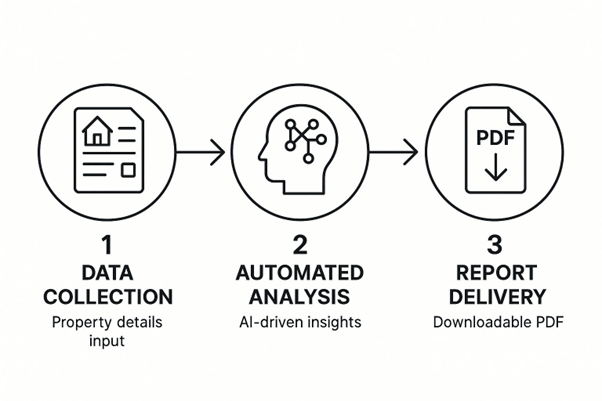
As you can see, the workflow is designed to be seamless. It takes those raw property details, runs them through the automation engine, and delivers a professional report every time.
Let’s dig into the power of that Google Sheet connection we mentioned. Imagine your team uses a shared sheet to log new property leads as they come in. By linking that live sheet to your EDocGen template, you've just built a completely hands-off automated property reports generator .
Every single time a team member adds a new property to that Google Sheet, it acts as a trigger. EDocGen instantly grabs the new data, populates your report template, and can even email the finished PDF directly to the agent assigned to that lead. No one has to click a button or upload a single file. The entire process hums along in the background, making sure your team has the reports they need, right when they need them.
This hands-off approach is the ultimate goal of automation. It removes the manual step of generating reports entirely, turning a recurring task into a seamless background process that supports your team in real-time.
This kind of slick integration is possible because modern document generation software is built specifically for this type of connectivity. It lets you go way beyond simple batch jobs and create true, event-driven workflows that save a massive amount of time and eliminate the risk of someone forgetting to create a critical report.

Once you’ve got the hang of the basics, it's time to take your automated property report generator from a handy tool to an absolute powerhouse for your business. Moving beyond simple batch generation is where the magic really happens, unlocking a new level of efficiency that seasoned pros rely on every single day.
One of the most impactful next steps is tapping into EDocGen 's API. This is what allows you to deeply connect the report generator with your existing real estate software or CRM. Instead of manually clicking "generate," you can set up triggers based on specific actions. Imagine a report instantly generating and landing in an agent's inbox the moment a lead’s status in your CRM changes to "Site Visit Scheduled." That's the kind of automation that closes deals.
A single property has multiple stories to tell, and who's listening determines which story you should share. A game-changing strategy we've seen work time and again is creating different template variations from a single data source. This lets you speak directly to the unique interests of each stakeholder without doing a lick of extra data entry.
The most effective reports aren’t one-size-fits-all. They are precisely tuned instruments that deliver the right information to the right person at the right time, maximizing impact and driving decisions.
Think about a common scenario: you've just listed a new multi-family property. From just one spreadsheet of data, you can produce three completely distinct reports.
The infrastructure supporting this kind of powerful real estate tech is booming. The global generator sales market—which powers the data centers essential for these cloud-based systems—was valued at over USD 66 billion in 2024. With a projected climb to USD 107 billion by 2034, it’s clear that robust, automated digital tools are the future.
Here's a simple breakdown of how you can structure these report variations. It’s a great starting point for thinking about your own templates.
|
Audience |
Key Content Focus |
Example EDocGen Feature |
|
Investors |
Financial metrics, ROI, cap rates, 5-year projections. |
Dynamic tables and complex calculations. |
|
Buyers |
Visuals, property features, neighborhood amenities. |
Image placeholders and branded design elements. |
|
Internal Team |
Key stats, showing status, agent assignment. |
Conditional logic to display internal-only notes. |
By using features like conditional logic and dynamic tables in EDocGen, you can create these customized views effortlessly from one master data file. It’s all about working smarter, not harder.
Lastly, as your reports get more detailed and valuable, security becomes absolutely critical. You're handling sensitive property financials and client data, and you have a responsibility to protect it.
Modern platforms like EDocGen build these protections right in. You should always use password protection for any report that contains financial information. It’s a simple step that adds a crucial layer of security.
Here’s another pro tip: send trackable links instead of email attachments. This gives you a massive advantage. You can see precisely when a client or investor has opened and viewed their personalized analysis, giving you the perfect opening for a perfectly timed follow-up call. It's a small detail that makes a big difference.
The first thing on everyone's mind is almost always data security. How safe is my sensitive property and client information when it's in a cloud-based tool? It's a fair question. Reputable platforms like EDocGen live and breathe security. They use industry-standard AES-256 encryption for your data, both when it's being sent and when it's just sitting on their servers. Plus, they're typically compliant with strict regulations like GDPR .
This level of control means you can rest easy knowing your data is locked down throughout the entire automation process.
A lot of people think they're stuck with CSV files. Not at all. While CSVs are a great and common way to start, a flexible property report generator can handle much more. You can use JSON, which is perfect for those API-driven workflows. If you're curious, there are some great primers on the different kinds of document automation to learn more about these connections .
Finally, the million-dollar question: "How technical do I need to be?" For basic batch generation—creating many reports at once from a spreadsheet—the learning curve is surprisingly gentle. If you can handle a spreadsheet and use a word processor, you've got the skills to design a template and map your data. The core features are made for business users, not developers.
While you might need a technical expert for those advanced API integrations, you can get a ton of value and save countless hours without ever writing a single line of code.
Ready to stop the manual grind and start creating stunning, professional property reports in minutes? With EDocGen , you can connect your data, design beautiful templates, and automate your entire workflow. Start your journey with EDocGen today!