
The impact of document automation extends beyond mere time savings. A study by IDC revealed that organizations implementing intelligent document processing solutions experienced a 41% reduction in document-related errors and a 36% increase in employee productivity.
This technology transforms the laborious task of document creation and management into a streamlined, efficient process, significantly impacting productivity and accuracy across industries.
Consider these questions:
The importance of document automation becomes even more clear given its wide-ranging applications. From legal contracts and financial reports to customer communications and HR documents, automation touches virtually every aspect of business operations. It's not merely about digitizing paper; it's about reimagining how information flows through an organization.
This comprehensive guide discussed document automation in detail, exploring its mechanisms, benefits, and implementation strategies.
So, let's jump right into it:-
Document automation refers to the use of software and technology to create, manage, and distribute documents with minimal human intervention. This process transforms traditional, manual document handling into an efficient, streamlined workflow, significantly reducing the time and resources required for document-related tasks.
At its core, document automation involves:
The scope of document automation extends far beyond simple mail merges or form filling. Modern document automation systems can handle complex documents and workflows, including:
Document automation transforms the way organizations create, manage, and distribute documents. By leveraging advanced technologies and streamlined workflows, document automation significantly reduces manual effort, minimizes errors, and enhances overall efficiency.
Here are the key stages of the document automation process, exploring how each step contributes to a more efficient document lifecycle.
The foundation of document automation lies in well-designed templates. These templates serve as the blueprint for all automated documents, incorporating placeholders for variable data and rules for document structure and formatting.
Template design is a critical phase that requires a deep understanding of both the document's purpose and the organization's branding and compliance requirements. Advanced template design tools allow for the creation of dynamic templates that can adapt to various scenarios without the need for multiple versions.
Key aspects of template design and creation include:
Once templates are in place, the next crucial step is integrating and managing the data that will populate these templates. This stage involves connecting the document automation system to various data sources within the organization and ensuring that the right data flows into the right places within the documents.
Effective data integration is essential for producing accurate, up-to-date documents. It often requires collaboration between IT teams and business users to ensure that data mappings are correct and that the system can handle various data formats and structures.
Key components of data integration and management include:
The document generation phase is where the magic happens - templates and data come together to create final documents. This process involves more than simply filling in blanks; it requires the application of complex business rules and logic to ensure that each document is tailored to its specific purpose and recipient.
Modern document generation engines can handle a wide range of document types and formats, from simple letters to complex contracts with multiple clauses and variations. The ability to generate documents in real-time, on-demand, or in batch processes provides flexibility to meet various business needs.
Key elements of the document generation process include:
Document automation doesn't exist in isolation; it's most effective when integrated into broader business workflows. This integration ensures that documents move seamlessly through various stages of review, approval, and execution, aligning with established business processes.
Workflow integration can significantly reduce bottlenecks in document-centric processes, providing visibility into document status and enabling quick action when needed. It also plays a crucial role in maintaining compliance by ensuring that proper procedures are followed for each document.
Key aspects of workflow integration include:
Once documents are generated and approved, they need to be distributed to the intended recipients and stored securely for future reference. Automated distribution ensures that documents reach the right people at the right time, while proper storage is crucial for compliance, auditing, and easy retrieval.
Modern document automation systems offer multiple distribution channels and integrate with various document management and storage solutions, providing flexibility and security in how documents are handled after generation.
Key components of distribution and storage include:
The final stage in the document automation process is ongoing analysis and optimization. By tracking document usage, performance metrics, and user interactions, organizations can continuously refine their document automation processes for maximum efficiency.
Analytics provide valuable insights into bottlenecks, usage patterns, and areas for improvement. This data-driven approach to optimization ensures that document automation continues to deliver value and adapt to changing business needs over time.
Key elements of analytics and optimization include:
Document automation relies on a suite of advanced technologies to streamline and enhance document-related processes. Understanding these core technologies is crucial for organizations looking to implement or optimize their document automation systems. Let's explore the key technologies that are driving innovation in this field:
Template engines are the backbone of document automation, enabling the creation of dynamic, reusable document templates.
Key features and benefits of modern template engines include:
Data integration technologies and APIs are crucial for connecting document automation systems with various data sources, ensuring that documents are populated with accurate, up-to-date information.
Key aspects of data integration and APIs in document automation include:
Workflow automation tools play a critical role in streamlining the entire document lifecycle, from creation to approval and distribution.
Key features of workflow automation in document automation include:
Cloud technology has revolutionized document automation by providing scalable, accessible, and cost-effective solutions.
Benefits of cloud-based document automation platforms include:
While still in its early stages of adoption in document automation, blockchain technology offers the potential for enhanced security, authenticity, and traceability of documents.
Potential applications of blockchain in document automation include:
The integration of these technologies in document automation systems offers powerful, flexible, and intelligent solutions that go far beyond simple template filling.
By creating, managing, and distributing documents automatically, businesses across various industries are realizing significant improvements in efficiency, accuracy, and overall productivity.
Here are some of these benefits to be precise:-
The implementation of document automation solutions can lead to a paradigm shift in how organizations handle their document-centric processes. One of the most immediate and impactful benefits is the dramatic increase in efficiency. Tasks that once took hours can now be completed in minutes, allowing employees to focus on more strategic, value-adding activities.
In industries where precision is paramount, such as healthcare and finance, document automation proves invaluable. By minimizing manual data entry and utilizing predefined templates, the likelihood of errors is substantially reduced. This improvement in accuracy not only enhances operational efficiency but also plays a crucial role in maintaining regulatory compliance.
The financial impact of document automation extends beyond mere efficiency gains. Organizations often report substantial cost savings due to reduced labor requirements, decreased error-related expenses, and lower overhead costs associated with document storage and retrieval.
In today's customer-centric business landscape, the ability to respond quickly and accurately to customer needs can be a significant differentiator. Document automation plays a vital role in enhancing customer experience by enabling faster turnaround times and more personalized service.
Beyond the immediate operational improvements, document automation offers several strategic advantages that position organizations for long-term success:
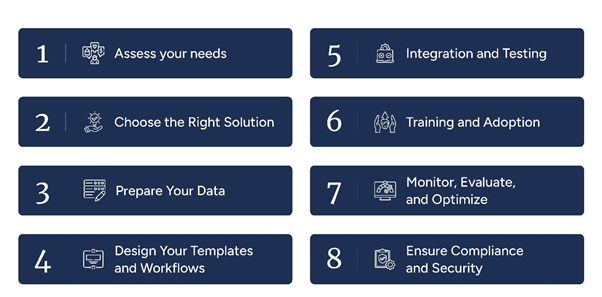
Implementing document automation can be a transformative process for organizations, but it requires careful planning and execution. This step-by-step guide outlines the key stages of implementing document automation, providing practical advice for a successful transition.
The first step in implementing document automation is to thoroughly assess your organization's needs and identify processes suitable for automation.
Selecting the appropriate document automation solution is crucial for success. Consider the following factors:
Data quality is paramount in document automation. Before implementation, focus on:
With your data prepared, the next step is to design the templates and workflows that will drive your automated processes:
Integrating the document automation system with your existing technology stack is a critical phase:
The success of your document automation implementation largely depends on user adoption:
Implementation is not the end of the journey. Continuous monitoring and optimization are key to long-term success:
Throughout the implementation process and beyond, maintaining compliance and security should be a top priority:
In the competitive landscape of document automation solutions, EDocGen stands out as a comprehensive, user-friendly, and powerful platform designed to meet the diverse needs of modern businesses. Let's explore the key features and advantages that make EDocGen an ideal choice for organizations seeking to optimize their document processes.
EDocGen offers robust document generation features that cater to a wide range of business needs:
EDocGen prioritizes user experience, making document automation accessible to users across the organization:
EDocGen's data integration capabilities ensure that your documents are always populated with accurate, up-to-date information:
EDocGen adapts to your document generation needs, whether you're a small business or a large enterprise:
EDocGen prioritizes the security of your sensitive data and helps maintain regulatory compliance:
EDocGen is designed to fit into your existing technology ecosystem:
EDocGen is committed to your success beyond just providing software:
By choosing EDocGen, you're not just getting a document automation tool; you're gaining a partner committed to transforming your document processes and driving your business forward.
The digital transformation journey is ever-evolving, and document automation plays a crucial role in this evolution. As you consider the next steps for your organization, reflect on the potential impact of document automation on your specific processes and workflows:-
EDocGen offers a powerful solution to these challenges, providing the tools and support needed to improve your document processes. Schedule a demo with us to see firsthand how EDocGen can transform your document processes and drive your business forward.
Document automation can be applied to a wide range of document types across various industries. Common examples include:
Essentially, any document that follows a consistent structure and incorporates variable data can be automated.
Security in document automation is paramount, especially when dealing with sensitive information. Reputable document automation solutions like EDocGen incorporate multiple layers of security:
Always ensure that your chosen solution complies with relevant industry standards and regulations.
Document automation enhances business efficiency in several ways:
These efficiencies often translate into cost savings, improved customer satisfaction, and better resource allocation.
The return on investment (ROI) for document automation can vary depending on the organization's size, the complexity of documents, and the scale of implementation. However, many businesses report significant returns:
While the initial investment may seem substantial, the long-term benefits often result in a positive ROI within the first year of implementation.
Document automation systems capture and store valuable data about document usage, processing times, and workflow patterns. This data can be analyzed to:
By providing these insights, document automation supports more informed, data-driven decision-making across the organization.
EDocGen is designed for seamless integration with a wide range of business systems:
While the complexity of integration can vary depending on your existing infrastructure, EDocGen's robust integration capabilities and support team ensure a smooth implementation process for most organizations.