
At its core, report automation is simply using software to do the heavy lifting of gathering, organizing, and presenting data. It takes what is often a slow, mistake-prone manual task and turns it into an efficient, reliable workflow that delivers insights on time, every time.
If you've ever spent a whole day lost in a spreadsheet jungle, you already know the pain of manual reporting. It’s a tedious cycle of copy-pasting from a dozen different sources, battling with formatting, and chasing down colleagues for the latest figures. Sound familiar?
This old-school approach turns your team into digital-era scribes, painstakingly transcribing data that's often stale by the time the report even lands in someone's inbox. The final document is just a static snapshot of a moment that’s already gone, offering very little value for making smart, forward-looking decisions.
To give you a clearer picture, let's break down the two worlds.
This table offers a quick comparison between the traditional manual reporting process and a modern automated workflow, highlighting the key differences in everything from efficiency and accuracy to strategic value.
|
Attribute |
Manual Reporting |
Automated Reporting |
|
Process |
Copy-paste from multiple sources, manual formatting |
Data automatically pulled, formatted, and compiled |
|
Speed |
Slow, often taking hours or days |
Fast, with reports generated in minutes or on a schedule |
|
Accuracy |
High risk of human error (typos, formula mistakes) |
High accuracy with consistent, rule-based processing |
|
Timeliness |
Delivers outdated, "snapshot-in-time" data |
Provides near real-time or up-to-the-minute insights |
|
Scalability |
Difficult to scale; more reports mean more manual work |
Easily scalable to handle growing data volumes |
|
Employee Focus |
Low-value, repetitive data entry |
High-value data analysis and strategic interpretation |
|
Decision-Making |
Reactive, based on past events |
Proactive, based on current and ongoing trends |
As you can see, the differences aren't just minor improvements—they represent a fundamental shift in how a business operates.
The problem with manual reporting runs much deeper than just wasted time. It introduces serious business risks and operational friction that can genuinely hold your company back. The process is fragile and a breeding ground for human error—a single misplaced decimal or a broken formula can lead to bad conclusions and expensive mistakes.
This reliance on manual work also creates a massive bottleneck. When your leaders need information now to respond to a market shift or an internal problem, they're stuck waiting. That delay means missed opportunities and forces the business into a reactive, rather than proactive, stance.
This is where report automation completely changes the game. It’s not about replacing people; it’s about empowering them by taking over the monotonous, rule-based tasks that drain their time and energy. Think of it as the ultimate assistant, working 24/7 to make sure data is always accurate, consistent, and ready for analysis.
This shift is quickly becoming standard practice. Globally, about 60% of companies have already woven some form of automation, including for reports, into their daily workflows. It's no wonder why: more than 90% of workers say automation makes them more productive, and businesses that invest in it see an average 22% cut in operating costs.
By embracing report automation, you unlock several key advantages:
In the end, report automation is more than a nice-to-have. It’s a competitive necessity that transforms reporting from a dreaded chore into a powerful tool that helps drive the business forward.
Let’s cut through the jargon and talk about what report automation actually means in the real world. Forget about needing a computer science degree or writing complex code. At its core, it’s like having a dedicated digital assistant who handles the most mind-numbing parts of your reporting workflow.
This isn't a sci-fi robot. It’s a smart system that connects directly to the business tools you already use every day—your CRM, accounting software, marketing platforms, you name it. You give it a set of instructions once, and it follows them perfectly, every single time. It logs in, grabs the specific data you need, and pulls it all together.
But that’s just the start. This is where things get interesting.
Once all the raw data is gathered, the system gets to work doing the things that take you or your team hours. In seconds, it can:
Finally, this digital assistant packages everything into a professional-looking report. It can populate a pre-made Word template, build a PowerPoint presentation, or update a live dashboard. The finished report is then sent directly to the right people, right on schedule, through email, Slack, or whatever channel you prefer.
The difference in time and effort is staggering. This visual paints a clear picture of the shift from a manual slog to an automated flow.
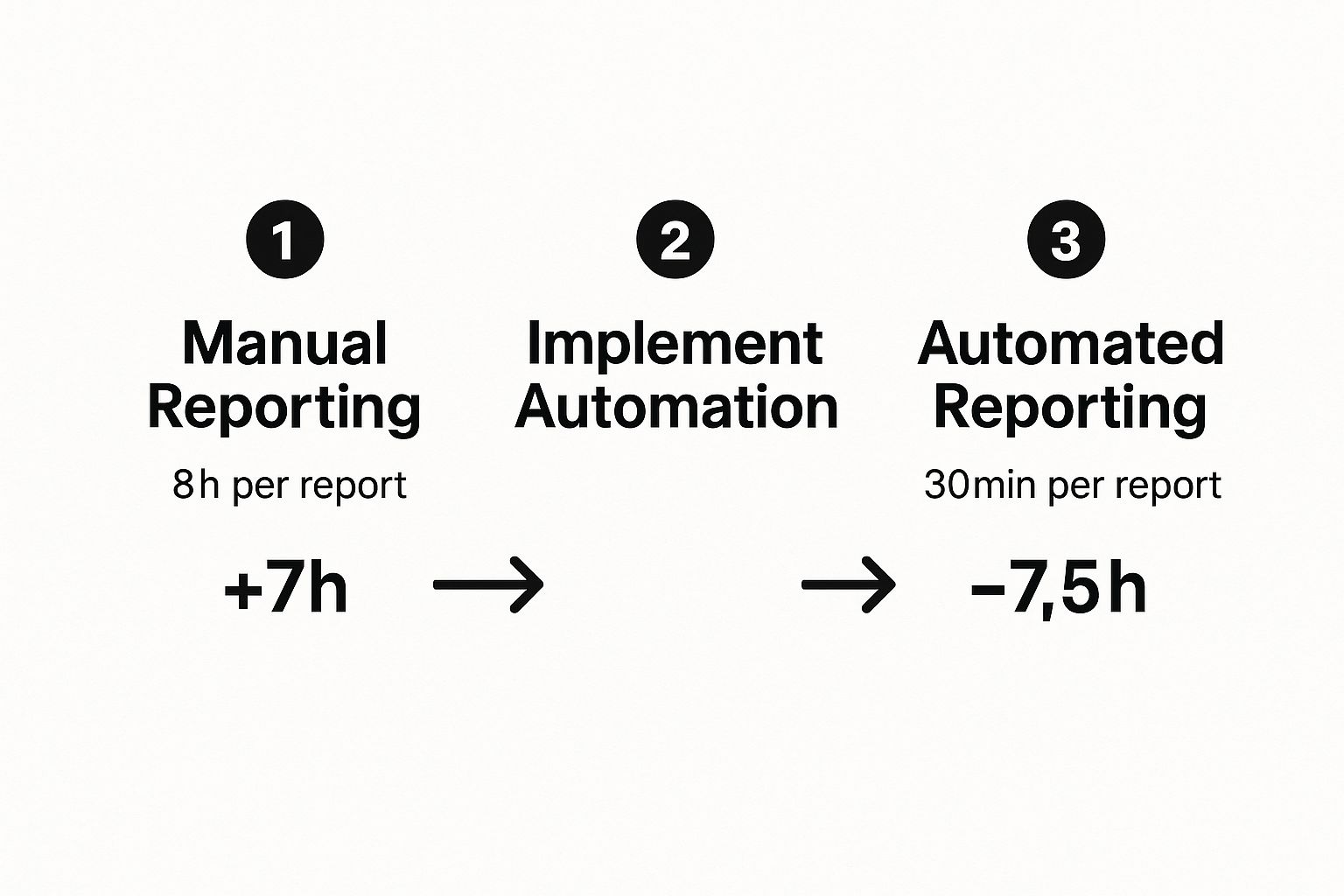
Think about that: what once took an entire workday can now be done in under an hour. That’s a massive amount of time freed up for work that actually matters.
At its heart, report automation is all about taking over repetitive, rules-based tasks. The simple test is this: if you can write down the step-by-step instructions for creating a report, you can automate it. This isn't about artificial intelligence making creative decisions; it's about flawlessly executing a predictable set of commands.
Let’s look at a sales manager who needs a weekly performance report.
When the manager gets to her desk, the report is waiting for her. Instead of spending her morning building it, she spends that time analyzing what it means, spotting trends, and coaching her reps.
This isn't just for data analysts or the finance team. Any department that regularly wrangles data into reports can see a huge benefit.
|
Department |
Common Automated Report |
Business Benefit |
|
Sales |
Weekly Pipeline & Performance |
More time for coaching and selling |
|
Marketing |
Monthly Campaign ROI |
Faster campaign optimization |
|
Finance |
Daily Cash Flow Statements |
Real-time financial visibility |
|
Operations |
Inventory & Logistics Updates |
Proactive supply chain management |
By offloading the mechanical task of putting reports together, companies empower their people to work at a higher level. The conversation shifts from, "How do I build this report?" to "What is this report telling us, and what should we do about it?" That's the real goal of effective report automation.

When people talk about report automation, the first thing that comes to mind is saving time. And sure, that’s a huge plus. But the real magic happens when you look beyond the clock and see how it completely rewires a business's operational DNA. Saving a few hours is just the start; the true value comes from the ripple effects on costs, decision-making, and your ability to grow.
By getting manual grunt work out of the way, you immediately cut down on operational costs. You’re no longer paying smart people to copy and paste data from one spreadsheet to another. Instead, their time is freed up for high-level analysis and strategy. It also virtually erases the costly mistakes that come with human error. We've all seen it happen—a single misplaced decimal in a financial report or a botched KPI in a marketing summary can lead to terrible investments and misguided strategies.
This isn't happening in a vacuum. Report automation is a massive piece of the global industrial automation market, an industry valued at roughly USD 169.82 billion that's projected to explode to USD 443.54 billion by 2035. This growth is all about boosting efficiency and consistency, and automation is the engine helping businesses finally get a handle on the overwhelming amount of data they produce.
Maybe the biggest change you'll see is the move from being reactive to proactive. Manual reporting is like driving while only looking in the rearview mirror—by the time you spot a problem, it’s already in the past. Automated, real-time data gives you a live dashboard of the road ahead, letting you anticipate bumps and opportunities before you get to them.
Think about it in real-world terms:
In every case, automation delivers the intel needed to make smart choices before a small snag becomes a five-alarm fire. That ability to act on fresh data is a serious competitive advantage.
When your data is consistently reliable and always on hand, allocating resources stops being a guessing game and starts becoming a science. You get a crystal-clear picture of which marketing channels are actually delivering ROI, which products are driving profits, and where operational bottlenecks are slowing you down. This clarity lets you put your time, money, and people where they'll make the biggest impact.
This clarity naturally extends to team performance. With automated reports, performance metrics are transparent, objective, and consistent for everyone. From the front lines to the C-suite, the whole company works from the same set of facts, creating a culture of accountability and data-driven growth. This is just one piece of a much larger digital transformation; for a related deep dive, check out our guide to automated document generation for enterprises.
Finally, report automation is absolutely essential for sustainable growth. As your business gets bigger, the amount of data it generates grows exponentially. Trying to keep up with manual reporting becomes an impossible task. You’re left with two bad choices: hire more people for low-value data entry, or watch your reporting process crumble under the weight.
Automation breaks that cycle. An automated system doesn't care if it's processing data for ten clients or ten thousand. It just works, delivering the same speed and accuracy every time. This lets your operations expand without burying your team or compromising the quality of your insights. It's the engine that powers smart, efficient growth.
Diving into the world of report automation can feel like a maze. Dozens of platforms all claim to be the magic bullet for your data headaches. So, how do you cut through the marketing jargon and find a tool that actually helps your team instead of adding another layer of complexity?
The key is to focus on a handful of non-negotiable features. Think of this as your essential checklist. The right platform isn’t just a glorified scheduler; it becomes a core part of your business operations. Let’s break down what separates a basic tool from a genuine business asset.
To make this crystal clear, here’s a breakdown of the core features you should be looking for, what they do, and why they matter for your business.
|
Feature |
Description |
Business Impact |
|
Data Source Connectors |
The ability to seamlessly pull data from various systems like CRMs, databases, and financial software using pre-built integrations or a robust API. |
Eliminates data silos and manual data entry, providing a single source of truth for all reporting and saving countless hours. |
|
Flexible Scheduling |
Allows you to schedule report generation and delivery based on specific times (hourly, daily, weekly) or events (e.g., a sale closing). |
Ensures stakeholders receive timely information exactly when it's most relevant, improving decision-making speed and relevance. |
|
Multi-Channel Distribution |
The capability to send completed reports through various channels, such as email, Slack, Microsoft Teams, or to a cloud storage folder. |
Delivers insights directly into your team's existing workflows, increasing visibility and ensuring reports are actually read and used. |
|
No-Code Interface |
An intuitive, user-friendly dashboard with drag-and-drop functionality that allows non-technical users to build and customize reports. |
Empowers business users to create their own reports without depending on IT, fostering data self-sufficiency and faster insights. |
|
Customizable Templates |
The power to create and save branded report templates that can be reused for different datasets or time periods. |
Maintains brand consistency across all communications and drastically cuts down the time needed to create new, professional-looking reports. |
These features work together to create a system that not only automates tasks but also makes your entire organization more data-driven and efficient.
Let's be blunt: a report automation tool is worthless if it can't talk to your data. The most critical feature, by far, is how well the platform connects to the systems you already use every day. It should act like a universal adapter, plugging into your business's core applications without needing a massive IT project to get it working.
You should be looking for a wide range of pre-built connectors for the big players:
Beyond the standard connectors, a truly powerful platform offers a solid API. This gives you the freedom to build custom integrations with proprietary software or less common tools, making sure no data source is left behind. Understanding the different reporting automation tools and their specific integration capabilities is a crucial first step in choosing the right solution.
This is where the "automation" part truly comes to life. A great tool lets you graduate from the tedious cycle of manually running and emailing reports to a "set it and forget it" workflow. You need the ability to define exactly when reports are created and who gets them, automatically.
But modern platforms go way beyond a simple daily email. Look for more advanced controls:
This feature single-handedly smashes information bottlenecks. It ensures the right people get the right data at the right time, without ever having to ask for it.
Your data experts shouldn't need a background in software development to build a report. A clean, user-friendly, drag-and-drop interface is absolutely essential for team-wide adoption. This feature empowers the people who know the data best—your marketing managers, sales leads, and financial analysts—to create and tweak their own reports without waiting on a developer.
This functionality is a huge part of the larger shift toward no-code platforms that put real power back into the hands of business users. By removing the technical hurdles, you dramatically speed up how quickly your team can get the insights they need. If you're interested in this concept, refer to our blog SSRS alternatives that explains how no-code principles can be applied to save significant time and resources. This approach makes your reporting agile enough to keep up with the fast-paced needs of your business.
Going from a cool idea on a whiteboard to a real, working automated process can feel daunting. But a successful report automation rollout isn't about flipping a giant switch overnight. The smartest way to do it is in phases. Start small, nail a pilot project that proves the value, and then use that success to expand across the company. This roadmap breaks it all down into simple, manageable steps.
The journey starts with strategy, not software. Before you even glance at a tool, you need to find the perfect candidate for your first automation project. The whole point is to score a quick, obvious win for the business.
The sweet spot for your first project is a report that’s high-effort but also high-value. You're looking for something that’s repetitive, sucks up a ton of time, is prone to copy-paste errors, and is still critical for making daily decisions. Just think about the reports your team absolutely dreads putting together every week or month.
Here’s what to look for to find your ideal first target:
A weekly sales performance summary or a monthly marketing campaign ROI report are often perfect starting points. They tick all these boxes, and any improvements you make will get noticed immediately by the people who matter.
Once you know what you're automating, it's time to pick your tool. The market is crowded, but don’t get distracted by shiny objects. You need to find a tool that fits your specific data sources, your team's skills (or lack thereof), and your budget.
When you're comparing options, here’s what really matters:
Alright, time to build. Using the tool you selected, you'll start by mapping out the digital steps to create your report. This means setting up data connections, defining the logic for calculations, and designing the final report template. This is where you ensure your new automated report is trustworthy.
Think of it as creating a digital blueprint of the old manual grind. As you get into the weeds of building, you might have a lightbulb moment and realize that a broader <strong></strong> strategy could solve a lot of other problems across the business, too.
After your workflow is built, testing is everything. Don't skip this. Run the automated report and put it side-by-side with one you made the old way. Check every number, every chart, every single detail to confirm it's 100% accurate. This is how you build trust in the new process.
With a tested and trusted workflow, you're ready to go live with your pilot. Roll out the new automated report to its audience, but make sure you communicate what’s new. Explain the benefits, like getting more accurate data, faster.
But your job isn't done at launch. You have to actively ask for feedback from the people using the report. Ask them straight up: Is this giving you the insights you need? Is the format easy to read? This feedback is pure gold for making tweaks and proving the real-world value of report automation.
This first win becomes your internal success story. It’s the proof you need to get buy-in to scale these efforts to other teams and show everyone the undeniable ROI of getting the robots to do the boring work.

To really get why report automation is such a game-changer today, it helps to look back at the folks who embraced it first—not because it was trendy, but because they had to. Long before marketers and ops teams were talking about it, the finance and accounting worlds were drowning in data. For them, one tiny mistake could snowball into a massive problem.
Automation wasn't a nice-to-have; it was a lifeline. Imagine manually creating monthly financial statements, painstakingly building audit trails, or reconciling endless accounts. These tasks weren't just slow—they were loaded with risk. A single typo could spark a compliance fire or completely derail financial forecasts.
This high-stakes pressure cooker was the perfect environment to prove what automation could do.
The story of how the finance world adopted automation is a powerful one. Back in the 2010s, technology started systematically taking over the most complex and error-prone accounting tasks. What was once a high-risk, manual slog became a set of reliable, automated workflows that delivered accuracy and transparency nobody thought possible. As experts have noted, this shift gave professionals the power to handle huge amounts of data with incredible precision, turning report automation into a cornerstone of modern auditing. You can dive deeper into this historical shift in accounting practices.
This early history is crucial because it shows that automation isn’t some fleeting trend. It's a battle-tested strategy that has been sharpened for decades in one of the most demanding corners of the business world.
The journey finance took gives us a clear blueprint. Their experience taught some universal lessons that any team can apply.
Here’s what we learned from their story:
Looking at this long history of success, it's clear that report automation is a sound strategy. The groundwork has been laid, the tech is proven, and the benefits are undeniable. The lessons from these original pioneers show that any team—from sales to HR—can take the same approach and turn their own reporting from a source of friction into a true strategic asset.
As teams start exploring report automation, a few key questions always pop up. Let's tackle them head-on, clearing up any confusion so you can move forward with confidence.
This is usually the first question on everyone's mind, but the cost is far more flexible than you might think. While massive, enterprise-level platforms can come with a hefty price tag, there are plenty of scalable and affordable tools designed specifically for small to medium-sized businesses.
The better way to look at it is through the lens of return on investment (ROI). Think about how many hours your team sinks into manual reporting every single week. Automating just one or two critical reports can often pay for the software subscription in a matter of months by freeing up hundreds of valuable employee hours.
Absolutely not. The goal of report automation isn't to replace people—it's to elevate their work. It takes over the mind-numbing, repetitive tasks like data pulls and formatting, which, let's be honest, aren't the best use of anyone's talent.
This shift frees your team from being data "assemblers" so they can become data "analysts." They get to spend their brainpower on things that actually matter and require human intelligence:
At the end of the day, it makes their jobs more strategic, more engaging, and a lot less monotonous.
Data security is non-negotiable, and any reputable automation platform is built with this as a top priority. The leading tools on the market offer robust security features to protect your sensitive information, often making your data more secure than it was before.
When evaluating a tool, look for these essentials:
By choosing a trusted provider, you can be confident that your automated reporting process is just as secure—if not more so—than manual methods that often rely on emailing unsecured spreadsheets back and forth.
Ready to eliminate manual reporting and empower your team with real-time insights? EDocGen offers a powerful, no-code platform that lets you automate the creation of any business report from your existing data sources.