
Picture this: you have two options. You can either spend hours manually typing up hundreds of personalized letters, or you can send a perfectly tailored email campaign to everyone on your list with a single click.
That simple choice gets right to the heart of CRM document automation . It's the technology that elevates your CRM from a simple customer database into a powerhouse for creating accurate, professional documents in an instant.
At its core, CRM document automation is all about connecting the valuable customer data you already have in your CRM directly to your document templates. Your CRM is the command center for all your critical client information—names, addresses, deal sizes, purchase histories, you name it.
Instead of having an employee copy and paste all that data into a contract or proposal, automation does the heavy lifting. The tech creates a bridge between your data and your documents. You design a template—say, for a sales quote—with special placeholders. The system then pulls the right info from a customer's profile and instantly fills in those blanks, generating a complete, personalized document in seconds.
When your CRM acts as the "single source of truth," every document you generate isn't just fast—it's consistently accurate and on-brand. This builds a foundation of trust with every single customer interaction.
This fundamental shift is why we're seeing such a boom in this space. The global Salesforce CRM document generation software market, for example, was valued at around USD 1.1 billion recently and is on track to hit approximately USD 2.81 billion by 2033 . That kind of growth shows just how seriously businesses are taking the need to cut down on manual work and eliminate errors.
The applications are everywhere and they make a real difference. Today's CRM document automation is often supercharged with newer tech, including innovations in Generative AI in customer experience, which takes personalization to a whole new level.
This is especially critical in industries drowning in paperwork. For instance, the way insurance document generation has been automated is a perfect example of how it boosts both efficiency and compliance in a highly regulated field.
Ultimately, it’s about freeing your team to focus on what they were hired to do: building relationships and growing the business.
So, how does all this CRM document automation magic actually happen?
Think of it like a souped-up mail merge, but for your entire business. Instead of just pulling a name and address into a generic letter, this system acts as a conductor, orchestrating a perfect flow of information from your core business systems into polished, ready-to-go documents.
It all boils down to three core parts working together. Each one has a specific, vital job to do in turning raw data into a valuable business asset—all without anyone lifting a finger.
The goal is an efficient, error-free process, which is often visualized right on a modern CRM dashboard.
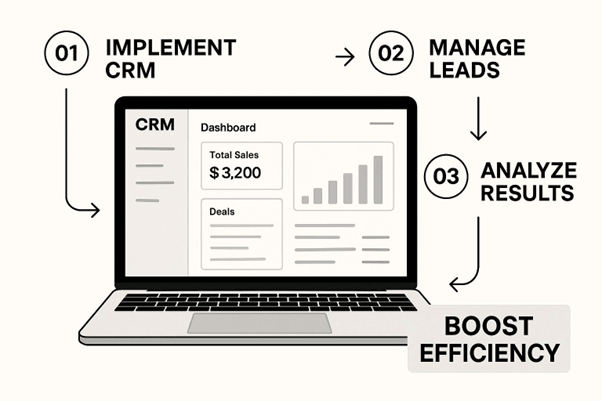
This kind of clean interface is exactly what empowers users—connecting data directly to document creation and boosting efficiency across the board.
The real power of this process comes from the teamwork between your data, your templates, and the engine that brings them together. Let's pull back the curtain on each piece.
It's this seamless blend of data and templates that makes the system so powerful. A sales rep can go from a handshake deal to a sent contract in just a few minutes because the system handles every tedious detail automatically.
The one thing you have to remember is this: an automated system is only as good as the data you feed it. Keeping your CRM data clean, organized, and accurate isn't just a good idea for document automation—it's an absolute must.
Ultimately, this whole setup gets rid of the soul-crushing task of manually finding, copying, and pasting information. By automating this workflow, businesses don't just claw back countless hours. They also slash the risk of human error that can jeopardize contracts, botch quotes, and erode client trust. The result is a faster, more accurate, and far more professional operation from end to end.
Let's be honest, talking about CRM document automation isn't just a fancy way to say you're saving a few minutes on paperwork. The real story is about how this one change can create a positive ripple effect across your entire business, turning administrative efficiency into real, measurable value.
The first and most obvious win is cutting down on costly human mistakes. We've all seen it happen—a misplaced decimal on a quote or a tiny typo in a contract can snowball into lost revenue, legal headaches, and a serious dent in client trust. By pulling information directly from your CRM, you ensure every single document is populated with the right data, every single time. This keeps your branding tight and your compliance on point.
One of the biggest payoffs is a much faster sales cycle. It's a game-changer. Picture your sales rep finishing a great call. Instead of getting bogged down for the next hour manually creating a contract, they can generate and fire off a personalized, accurate agreement with a single click. That kind of speed is a serious competitive advantage, letting your team close deals while others are still sifting through templates.
This responsiveness also makes for a far better customer experience. When clients get professional, error-free documents just moments after a conversation, it builds immediate confidence and loyalty. These small, efficient interactions create a smooth, impressive journey that makes your business look sharp and dependable.
Bringing document generation inside your CRM also seriously beefs up security. Using role-based permissions, you get to decide exactly who can create or even look at sensitive documents like financial reports or contracts. This prevents unauthorized edits and guarantees that only the latest, approved templates are being used, which goes a long way in managing compliance risks.
This shift toward automation isn't happening in a vacuum; it's part of a massive industry trend. The global document automation software market was valued at USD 2.3 billion in 2023 and is on track to hit USD 5.7 billion by 2032 . These findings on the document automation market highlight a huge push across industries for better accuracy and speed. This explosive growth proves that businesses everywhere are realizing the value of turning routine paperwork into a streamlined, strategic asset.
Theory is great, but the real magic of CRM document automation happens when you see it solve actual problems for different teams. This isn't a niche tool for one department; it’s a versatile powerhouse that can streamline work across your entire organization.
Let's step away from the abstract and look at some tangible examples of how this technology completely changes the day-to-day grind.
Picture this: a sales rep just wrapped up a fantastic product demo. The prospect is eager to move forward but needs a formal proposal and a non-disclosure agreement (NDA) right away.
This is a perfect example of how Salesforce document generation can directly speed up the time to revenue.
Now, think about a customer service agent handling a tricky support case. An on-site technician is needed, which means a work order has to be created with zero errors to guarantee a first-time fix.
The automation system can pull case details, the customer's service history, and specific equipment information directly into a standardized work order.
This kind of centralized data view is what makes automation so powerful. The agent generates a flawless work order and even a personalized follow-up summary for the customer, ensuring a smooth, professional service experience from start to finish.
By connecting CRM data directly to service documents, you eliminate the communication gaps and manual errors that lead to customer frustration and repeat service calls.
When it comes to invoicing and financial compliance, there’s no room for error. Imagine a finance team responsible for sending hundreds of monthly invoices, each one unique based on different client contracts and usage levels. The risk of a typo or miscalculation during manual entry is massive.
With an automated system, the moment a deal is marked "Closed-Won" in the CRM, an invoice is automatically created with the right line items, payment terms, and due dates. Tools designed for automating CRM data entry are key here, populating customer-facing documents instantly. The system can even be set up to send automated payment reminders, slashing the time spent on manual follow-ups and boosting cash flow.
This kind of efficiency explains the market's explosive growth, particularly among smaller companies. In fact, small and medium-sized businesses (SMBs) account for 60-70% of the market share for these tools, drawn to affordable, cloud-based solutions that deliver a serious competitive edge.
The market for CRM document automation is crowded, but don't let that fool you into thinking this has to be a complicated decision. If you know what to look for, you can easily cut through the noise and find a tool that actually fits how your business operates.
The single most important factor is deep CRM integration . The tool has to connect seamlessly with your specific CRM, whether that's Salesforce, HubSpot, or something else. A shallow link that only grabs a name and email won't cut it. You need something that can dig into custom objects and fields to build truly personalized documents.
Beyond that initial connection, you need to think about who will actually be using this tool every day. Your sales reps, account managers, and operations team need a system they can actually use without calling IT for help. A clunky, code-heavy platform will just end up collecting digital dust.
This is why you should prioritize a tool with an intuitive, no-code template builder . A simple drag-and-drop interface empowers your non-technical staff to create and tweak their own templates. That self-service ability is a game-changer for speed and long-term adoption.
A great automation tool empowers your team to solve their own document challenges without waiting on technical help. The goal is to make creating a complex contract as easy as filling out a simple form.
Another non-negotiable feature is conditional logic . Business documents are rarely one-size-fits-all. A good tool must handle "if-then" rules effortlessly. For example, you might need it to automatically insert a specific legal clause only when a deal value tops $50,000 , or add a different service tier description based on the customer's region. Without this, you're back to manual edits.
To make a smart, confident choice, it helps to evaluate your options systematically. Think of it as a scorecard for picking the right partner for your business. The table below breaks down the must-have features, what to look for in each, and why it's so critical for success.
Feature Checklist for Automation Tools
A guide to help evaluate and compare different CRM document automation solutions based on essential features.
|
Feature |
What to Look For |
Why It Matters |
|
CRM Integration |
A native, deep connection to your specific CRM, including access to custom fields and objects. |
Ensures all the data you need is pulled automatically, eliminating manual work and frustrating workarounds. |
|
Template Builder |
An intuitive, no-code drag-and-drop interface designed for non-technical users. |
Empowers business teams to create and manage their own templates, which boosts speed and user adoption. |
|
Output Formats |
Support for essential business formats like PDF, Word (DOCX), and even Excel for reports. |
Gives you the flexibility to generate the right document type for any situation, from contracts to invoices. |
|
Conditional Logic |
The ability to create rules that show, hide, or change content based on your CRM data. |
Handles all the complex variations in your documents automatically, which dramatically reduces errors and saves time. |
|
Security & Compliance |
Look for features like AES-256 encryption, granular user permissions, and clear audit trails. |
Protects sensitive customer and company data, ensuring you stay compliant with standards like GDPR or SOC 2. |
Using this checklist will give you a clear framework for comparing different platforms. It moves the conversation from vague marketing promises to concrete capabilities, ensuring the tool you pick will truly meet your team's needs from day one.
You'd be surprised. Modern CRM document automation tools are built for the people who actually use them—sales ops, admins, and marketers—not developers.
Most of these platforms have intuitive drag-and-drop template builders and simple, guided setups. The goal is to empower your team to create and manage the documents they need without ever having to touch a line of code.
Yes, and you absolutely should. The last thing you want is to reinvent the wheel. Leading automation tools are designed to work with what you already have.
You can typically upload your existing Microsoft Word or Google Docs templates right into the platform. From there, it's just a matter of adding the tool's special placeholders (often called "merge fields") that connect to your CRM data. This way, you keep your branding and formatting intact.
Security is the bedrock of any trustworthy CRM document automation platform. Always look for tools that offer robust encryption, fine-grained user permissions, and clear audit trails to keep your sensitive information locked down.
It has to be. Any vendor worth their salt puts security front and center. Think multi-layered encryption for your data, whether it's sitting on a server or being sent in an email.
They also provide critical features like user-based permissions, which let you control who can generate or even see certain documents. When paired with secure e-signature integrations, the process is often more secure than manual methods. You can learn more about general document automation security practices to see how your chosen vendor stacks up.
Ready to stop wrestling with manual documents and speed up your workflows? EDocGen offers a powerful, secure platform that clicks right into the systems you already use.